| Windows 7: Installers use wrong drive/partition, fix? |
11 Feb 2009
|
#1 | | |
Installers use wrong drive/partition, fix? Okay, I'm dual booting Windows 7 right now, as drive G: (Vista is C: ).
My problem is that installers like to use C: rather than G:, is there a setting somewhere where I can make my absolute main drive G:, rather than C:?
Some installers correctly use G:, while others (NSIS based, some others) use C: -- perhaps it's an installer issue, I don't know.
-- ALSO --
When I try to install Microsoft software, the installer extracts temporary files.. okay, but it extracts them to my external drive, and often they are not removed. How can I stop that from happening? | My System Specs |
| OS Windows 7 x64 CPU AMD Phenom X4 9850 Black Edition @ 2.65GHz Motherboard NVIDIA nForce 720 Memory 8 GB Graphics Card NVIDIA 9800 GT 512MB Sound Card Creative XTreme-Gamer Monitor(s) Displays 22" ViewSonic Screen Resolution 1680x1050 Keyboard Razer Lycosa (Mirror) Mouse Razer DeathAdder PSU 500 watt Hard Drives 750 GB
500 GB Internet Speed 1.5Mbps Other Info 5.1 surround sound |
11 Feb 2009
|
#2 | | Vista Ult 64bit - Windows 7 Ult 7264 64bit Frozen North |
Yah...tell me about this one Jason..
I've had the same issue numerous times, an I even got one large Company to change the way their s'ware installs (Roxio) and I'm currently pestering Nero to make a change to theirs too. Theirs stole every single media extension and every "possible" extension, I had found all my .dat files were changed to open with Nero Showtime...apparently one company makes a media file with .dat ext and so Nero thought it should be stolen too.
(Everyone with Nero, PLEASE write and complain about file extension theft!)
I used to have to unplug other drives while installing a second XP install as it Always saw another drive first (other than the one I was installing onto), decided the first partition on it should be the C: drive, and always installed the hidden boot files onto that partition. Many times it was my Music part or my Movies part, and until I started unplugging other drives it never installed them onto the actual partition I was installing onto.
I have yet to find or figure out, other than decompiling the installer and trying to rebuild it...a way to stop this behavior.
Other than contacting the company who makes the s'ware and complaining that this is Unwanted behaviour, I can't really see anything else. More of us need to do this when we run across unwanted installer behaviours so we can change the way they do this (Everyone Contact Nero Please  ) | My System Specs | | System Manufacturer/Model Number Personal Build OS Vista Ult 64bit - Windows 7 Ult 7264 64bit CPU Intel Core 2 Duo E6750 Motherboard Asus Commando Memory 4 G's Crucial Ballistix Tracer Graphics Card BFG Nvidia 8800 GTS 340 Sound Card Creative Sound Blaster X-FI Platinum FATAL1TY Monitor(s) Displays 2-22" HP W2207 LCD Screen Resolution 1920 x 1080 Keyboard Logitech MX 5500 Mouse Logitech MX Revolution PSU Enermax Noise Taker II 600W Case NZXT Lexa Classic (dual doored & windowed) Cooling Zalman 9700 CPU cooler - 4 x 120mm, 1 x 90mm fans Hard Drives 3 x 500G WD Caviar SATA II Internet Speed Blazing... |
11 Feb 2009
|
#3 | | Windows 7 Ultimate Vista Ultimate x64 QLD, Cairns |
Hi Jason, I have installed windows 7 a dozen times in dual boots and tipple boots and every time I have always done an install from boot screen and I have always had C: assigned when seen from inside that OS, so I have no Idea why you would see yours as G: when you are in Windows 7.
I also have all my temporary install files saved to the external disc but I have only seen empty folders remain on the odd occasion which were easily deleted, but to be honest I would rather have them there than on my Primary partition because they are easier to spot for deletion. | My System Specs | | System Manufacturer/Model Number Home Brew OS Windows 7 Ultimate Vista Ultimate x64 CPU Core 2 Duo E8500 3.16Ghz @ 3.8Ghz Motherboard eVGA 750i FTW Memory 2x2Gigs Patriot PC2-6400 LL Graphics Card Inno3D GeForce GTX260 216 SP Monitor(s) Displays ASUS VW222U 22" 2ms Response time Screen Resolution 1680x1050 Keyboard Logitech G15 Gaming Keyboard Mouse Logitech G9 Gaming Mouse PSU HYTEC 600W & Thermaltake 650W Toughpower Power Exp Case Thermaltake Armor LCS (Liquid Cooling System) Cooling Liquid Cooling System Hard Drives SATA 150GB
SATA II 250GB
USB IDE 750GB Ext. |
11 Feb 2009
|
#4 | | |

Quote: Originally Posted by Mr GRiM Hi Jason, I have installed windows 7 a dozen times in dual boots and tipple boots and every time I have always done an install from boot screen and I have always had C: assigned when seen from inside that OS, so I have no Idea why you would see yours as G: when you are in Windows 7.
I also have all my temporary install files saved to the external disc but I have only seen empty folders remain on the odd occasion which were easily deleted, but to be honest I would rather have them there than on my Primary partition because they are easier to spot for deletion.
Depends on how you have your HD setup Grim, if on a seperate physical drive, then yes like you said, but if you have say a 250 split up in 4 ways, this would be how he has G: (depending on setup and cd/dvd drives as well)... I actually installed 7 on the laptop an extended partition D:. Somehow it flipped drive letters after install making 7 C: and XP D:, go figure right.... But when booting up to XP, it shows D: for Windows 7.... dont really know, as i havent gotten on there much lately after the install and setup... but no problems with the weirdness thats going on affecting a boot problem or such. History tells me different tho  .
As for your issue jason... i actually think there is a reg workaround, but i'm not your guy... this is 7 also, and may NOT be a reg for it.... not sure what the problem could be as every installer i have gotten that i can recall, has given the custom install option. Always a good habit to use instead of "typical", "express", "compact". This way you know what and where you are installing something, not too mention any addons for any program setup. | My System Specs | | System Manufacturer/Model Number CUSTOM OS XP/win7 x86 build 7127 CPU Athlon64 X2 DUAL 4200+ 2.21ghz Motherboard ASUS K8 PRO SLI Memory 2GB Dual Chan DDR2 Corsair Graphics Card Nvidia 6800GT Sound Card nvidia Monitor(s) Displays 19' LCD Screen Resolution 1280x1024 Keyboard MS wireless Mouse MS Wireless PSU coolermaster 450 Case SUPERFLOWER Cooling 1 HDD bay fan, 5x80mm Case Fans, AEROGATE II Fan/Temp Hard Drives WD 250, 2x500, 2x1TB IDE/USB
WD 250 SATA (system)
SEAGATE 120 Sata Internet Speed fassssssssst |
11 Feb 2009
|
#5 | | |
Hi Jason,
If you are comfortable editing the registry ( always make a back up first )
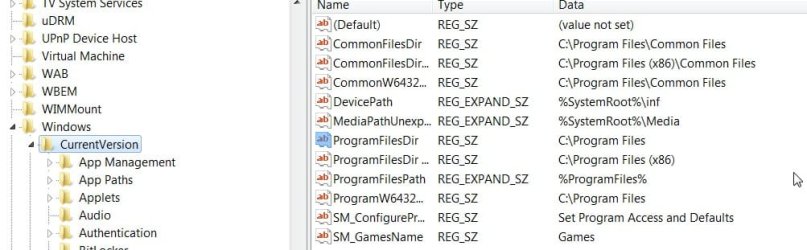
Go to HKEY_LOCAL_MACHINE\SOFTWARE\Microsoft\Windows\CurrentVersion
Click Current version in the left pane. In the right pane , rt click ProgramFilesDir and Modify to any value you want, eg G:\Program Files.
Do the same for the one underneath for x86.
You can find it easily - open regedit, click Edit>Find, copy and paste ProgramFilesDir and click Find Next - will take you straight there.
Hope it helps
SIW2 | My System Specs | | OS Vista x64 / 7 X64 CPU E8400 Motherboard ASRock 1333 GLAN R2.0 Memory 2x1 gb 800mhz Graphics Card 9500gt 1gb Case Coolermaster Cooling Winpower 500w Hard Drives Maxtor 160gb-2mb cache |
11 Feb 2009
|
#6 | | |
@SIW2
That's all configured to how it should be (it's all set to G:\). I guess it's just the installers fault for assuming I'm on C: when I'm not. @Chappy/Digger
Yeah, I always have to use custom to define the path.. or else it could be placed on my Vista partition @Grim
So you had Vista AND Windows 7 on a drive, identified by the OS, labeled as C:? That sounds wrong, unless they are on different disks, which mine are not. I have a 500 GB HDD split up two ways, two 200GB partitions (one for Windows 7 and Vista). Each partition is labeled as a drive when you boot up, and mine just happened to have the drive letter G:, because Vista is on C:.. | My System Specs | | OS Windows 7 x64 CPU AMD Phenom X4 9850 Black Edition @ 2.65GHz Motherboard NVIDIA nForce 720 Memory 8 GB Graphics Card NVIDIA 9800 GT 512MB Sound Card Creative XTreme-Gamer Monitor(s) Displays 22" ViewSonic Screen Resolution 1680x1050 Keyboard Razer Lycosa (Mirror) Mouse Razer DeathAdder PSU 500 watt Hard Drives 750 GB
500 GB Internet Speed 1.5Mbps Other Info 5.1 surround sound |
12 Feb 2009
|
#7 | | |
Hi Jason,
Usually when you boot into either Vista or 7, whichever one you are booted into will take the letter C.
If you installed 7 from within windows, i.e. while booted into Vista, C was not available at that time , so 7 will assign itself another letter.
Hope it helps
SIW2 | My System Specs | | OS Vista x64 / 7 X64 CPU E8400 Motherboard ASRock 1333 GLAN R2.0 Memory 2x1 gb 800mhz Graphics Card 9500gt 1gb Case Coolermaster Cooling Winpower 500w Hard Drives Maxtor 160gb-2mb cache |
12 Feb 2009
|
#8 | | |
I assumed that
I just mounted the image with Daemon, and continued from there. I just don't happen to have any blank DVD disks laying around.
Thanks for your help.. this issue seems unsolvable as it's really the installers fault, I guess | My System Specs | | OS Windows 7 x64 CPU AMD Phenom X4 9850 Black Edition @ 2.65GHz Motherboard NVIDIA nForce 720 Memory 8 GB Graphics Card NVIDIA 9800 GT 512MB Sound Card Creative XTreme-Gamer Monitor(s) Displays 22" ViewSonic Screen Resolution 1680x1050 Keyboard Razer Lycosa (Mirror) Mouse Razer DeathAdder PSU 500 watt Hard Drives 750 GB
500 GB Internet Speed 1.5Mbps Other Info 5.1 surround sound |
12 Feb 2009
|
#9 | | |
Hi Jason,
That's the answer - if you mounted it with Daemon, then you were booted into Vista at the time.
7 saw all the letters being used by the "live" Vista install , and took the next letter for itself - G.
Normally if you install 7 by booting the dvd, it doesn't see any letters being used (as there is no "live" installation) - it gives itself the letter C ( in other words, C is the default ).
Then when you boot Vista,it calls itself C.
When you boot 7, that calls itself C.
That is what the installers expect.
The solution is to boot into 7 and go into Disk Management.
Give Vista a different drive letter ( anything except C , V will do ).
Give 7 the drive letter C. Restart.
Now when you boot 7 it calls itself C and the installers will install on the drive currently called C, which is 7 drive.
Then when you boot Vista, it calls itself C and anything you install on Vista will go on the drive currently called C, which is the Vista drive.
Hope it helps
SIW2 | My System Specs | | OS Vista x64 / 7 X64 CPU E8400 Motherboard ASRock 1333 GLAN R2.0 Memory 2x1 gb 800mhz Graphics Card 9500gt 1gb Case Coolermaster Cooling Winpower 500w Hard Drives Maxtor 160gb-2mb cache Installers use wrong drive/partition, fix? problems? All times are GMT -5. The time now is 01:51 PM. | |