
| Windows 7: Admin apps in std accts AT LOGON (TS doesn't work) |
14 Nov 2009
|
#1 | | Windows 7 Home Premium x64 SP1 São Paulo, Brazil |
Admin apps in std accts AT LOGON (TS doesn't work) I have a couple of low-level apps that should be started on logon, stay on the system tray, and require admin privileges. The most important of them is NextSensor: my processor tends to overheat, especially in summer (which is now starting here in the Southern Hemisphere and is predicted to be hotter than usual this year), and NextSensor throttles it down to safety when CPU temperature approaches dangerous levels. Actually, NextSensor is the main reason why I'm running 32-bit Windows 7: it won't run on 64-bit because it needs to run its own system drivers for that, and it doesn't have a 64-bit version yet.
Just putting a shortcut to NextSensor in the Startup folder will cause annoying UAC prompts every time I logon to a standard account. Using Task Scheduler works great if I logon to an admin account, but no setting I have tried will make it just quietly start and go to the system tray in a standard account:
- Setting it to run as an admin user in Task Scheduler (either as an admin account or the Administrators group) also forces me to check Run only when this user is logged on, otherwise it won't ever appear on the tray (Windows disables user interaction when this option is unchecked). Predictably (duh!), this causes the task not to run if I just log on to a standard account, even if I configure the task to run specifically at that account's logon. The "At logon of any user" trigger is ignored - it will only run when I logon to an admin account. It is also not there as a background process: I checked it in Task Manager ( "Show processes from all users").
- Setting NextSensor to run as the standard user itself at that account's logon and checking "Run with the highest privileges" will make it run, but only after an annoying UAC prompt at logon, which I want to avoid. Of course, this is the same result I get just placing an ordinary shortcut to NextSensor at the Startup folder, which is much simpler and less resource-intensive.
- I also tried the Task Scheduler shortcut method described in a tutorial here, placing the shortcut to the task at Startup. A DOS window appears at logon for a brief fraction of a second, not long enough for me to read anything in it (if there is even anything to be read there), but the task won't be started. Again, it doesn't appear in Task Manager and is not in the background either - it's really not running.
Without the safeguard of NextSensor, I am avoiding doing any CPU-intensive task for now, until I solve this problem. Any suggestions? Thanks. | My System Specs |
| System Manufacturer/Model Number self-built OS Windows 7 Home Premium x64 SP1 CPU AMD Phenom II X6 1090T @stock speed (3.2 GHz) Motherboard MSI 890GXM-G65 Memory 16 GB DDR3-1866 (4 x 4 GB Corsair Vengeance) Graphics Card Sapphire Radeon HD6850 Sound Card on-board Realtek ALC889 Monitor(s) Displays LG IPS236V, 23" IPS LED + Samsung T200M, 20" LCD Screen Resolution 1920 x 1080 (LG), 1680 x 1050 (Samsung) Keyboard Microsoft Wireless Desktop 3000 Mouse Microsoft Wireless Desktop 3000 with BlueTrack PSU XFX 750W Black Edition Case Cooler Master CM 690 Cooling several fans, Akasa Nero 2 for CPU Hard Drives OCZ Vertex 3 SSD, 120 GB; Western Digital Caviar Black WD-1002FAEX (1 TB, SATA III, 7200 rpm); Seagate ST31000528AS (1 TB, SATA II, 7200 rpm) Internet Speed 6 Mbps cable (nominal, of course usually less...) |
14 Nov 2009
|
#2 | | W7x64 Pro, SuSe 12.1/** W7 x64 Pro, XP MCE Indian Territory |
See if this will help" Mike Lin's Home Page
Right click on a blank area below any items listed that you want the app to run on and select "add". | My System Specs | | System Manufacturer/Model Number DIY OS W7x64 Pro, SuSe 12.1/** W7 x64 Pro, XP MCE CPU Phenom II 1090T w/Noctua NH-D14 /**4400+ X2 w/CM Hyper TX 3 Motherboard ASRock 890FX Deluxe 4/**A8N-SLI Memory 2 x 2GB Patriot PGS34g1600LLKA/**4x1GB Corsair VS Graphics Card EVGA GTX460 SC/**EVGA 8800GTS Sound Card Asus Xonar D2X/**Xonar D1 Monitor(s) Displays Acer X233H, Dell E152FPc /**LG M237-WD Screen Resolution 1920x1080 & 1024x768/**1980x1080 Keyboard Logitech Media USB/**Saitek Eclipse Mouse Cordless Trackman Wheel/**Ditto PSU CM RS600 w/ APC BX1000G/**Antec 500 TP w/ APC BX1000 Case HAF922/**Antec 1040IIB Cooling 3x200mm, 1x140 and 1x120mm/**5x80mm fans Hard Drives WDC 2TB, 1.5TB, 1TB, 500GB,Seagate 500GB , Maxtor 80GB /**500GB Seagate & WDC 1TB Black Internet Speed 3.3Mbps Other Info SB 560 5.1 w/ Sennheiser RS140/**Creative T20 speakers, Dvico FusionHDTV7 Gold RT, Cisco E3000, HP 5510V AIO, Linksys E3000, Belkin F5U237 hub and **F5D8055 adapter
(** = 2nd rig) |
14 Nov 2009
|
#3 | | Windows 7 Home Premium x64 SP1 São Paulo, Brazil |

Quote: Originally Posted by seekermeister See if this will help" Mike Lin's Home Page
Right click on a blank area below any items listed that you want the app to run on and select "add".
Sorry, but all that Mike Lin's software does is create a Control Panel applet that makes it easier to manage startup applications from the usual sources (Registry Run keys and Start Menu Startup folders) - nothing that can't be accomplished in other ways. It does nothing about permissions and privileges.
In fact, the applet is dated from 2003, predates Vista and the UAC concept by several years, and was made for "all [then] modern versions of Windows through Windows XP." Sorry, but it doesn't help me with my problem.
NextSensor is important to protect my "hothead" CPU, so for now I'm resigned to a UAC prompt at every logon  , but I'd really like to get rid of it.
So, please keep this topic open, and I'm eager to hear any further suggestions of fixes or workarounds.
Oh, before you ask, I did try a hardware solution for my CPU overheating problem, installing a more powerful cooler: a big expensive Zalman with a copper heatsink and a huge fan, with the contact base smeared with Arctic Silver 5 in the recommended amount. It didn't improve things and the cooler soon failed (though I have to praise the efficacy of its big copper heatsink, because it took me some time to find out that the fan wasn't running and the processor still worked!). I went back to AMD's stock cooler, which didn't make things better but didn't make them worse either.
Last edited by goyta; 14 Nov 2009 at 04:58 PM..
Reason: Remembered to mention a hardware solution attempt
| My System Specs | | System Manufacturer/Model Number self-built OS Windows 7 Home Premium x64 SP1 CPU AMD Phenom II X6 1090T @stock speed (3.2 GHz) Motherboard MSI 890GXM-G65 Memory 16 GB DDR3-1866 (4 x 4 GB Corsair Vengeance) Graphics Card Sapphire Radeon HD6850 Sound Card on-board Realtek ALC889 Monitor(s) Displays LG IPS236V, 23" IPS LED + Samsung T200M, 20" LCD Screen Resolution 1920 x 1080 (LG), 1680 x 1050 (Samsung) Keyboard Microsoft Wireless Desktop 3000 Mouse Microsoft Wireless Desktop 3000 with BlueTrack PSU XFX 750W Black Edition Case Cooler Master CM 690 Cooling several fans, Akasa Nero 2 for CPU Hard Drives OCZ Vertex 3 SSD, 120 GB; Western Digital Caviar Black WD-1002FAEX (1 TB, SATA III, 7200 rpm); Seagate ST31000528AS (1 TB, SATA II, 7200 rpm) Internet Speed 6 Mbps cable (nominal, of course usually less...) |
14 Nov 2009
|
#4 | | |
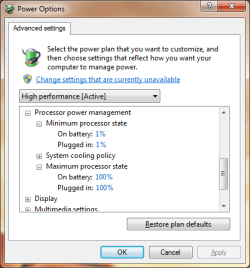
I'm not too sure about your processor...but Windows already automatically throttles the processor down using the built in power management features of the processor. By opening Power Options and getting into the advance options you can set the minimum level. AMD also has it software for that called Cool'n'Quiet. AMD Cool'n'Quiet Technology | My System Specs | | Computer type PC/Desktop System Manufacturer/Model Number Alienware Aurora ALX R4 OS Windows 7 x64 (SP1) CPU Intel Core i7-3930K (3.2GHz, Turbo 4GHz) Motherboard Alienware Aurora-R4 x79 Memory 4x Samsung 4GB PC3-12800 DDR3 (16GB 1600MHz) Graphics Card Nvidia Geforce GTX 690 (Stock) Sound Card RealTek Integrated Audio Monitor(s) Displays Dell UltraSharp U3011 Screen Resolution 2560x1600 PSU 875W Some Dell PSU <.< Hard Drives Samsung P830 256 GB, WD Raptor 150GB, 2x 1TB HDDs Other Info Dell Inspiron Mini 10v (Intel Atom N270 1.6 GHz; 1GB; Windows 7 Ultimate) |
14 Nov 2009
|
#5 | | Windows 7 Home Premium x64 SP1 São Paulo, Brazil |
We are talking about different things (and digressing) 
Quote: Originally Posted by logicearth I'm not too sure about your processor...but Windows already automatically throttles the processor down using the built in power management features of the processor. By opening Power Options and getting into the advance options you can set the minimum level. AMD also has it software for that called Cool'n'Quiet. AMD Cool'n'Quiet Technology Logicearth, we are talking about different things. Yes, AMD has Cool'n'Quiet, and both Vista and Windows 7 have native drivers for it. But what Cool'n'Quiet does is throttle down the processor at times of low demand. There won't be any noticeable difference in your user experience if you're just quietly typing a text in Word and the processor runs at 1 GHz instead of 3 GHz. So, the CnQ driver throttles the processor down to that speed, in order to save power, make it cooler and, depending on your hardware, allow the CPU cooling fan to run slower and less noisy (hence the name).
If the current tasks demand more processing power and speed, however, the driver will automatically respond by speeding up the CPU, either stepwise or straight to full power. Such cycles can be alternated in milliseconds, both up and down.
By contrast, what NextSensor does is constantly monitor the CPU temperature, and if necessary override CnQ and force the processor to momentarily slow down at times of high demand, whenever it gets too hot and perilously approaches its maximum operating temperature, above which it may be physically and permanently damaged.
I was unlucky to get a processor that tends to overheat (the model is not to blame, individual units of any processor model may behave like that, for largely imponderable reasons and minute manufacturing differences). It may easily reach AMD's specified limit for an Athlon 64 (about 71°C/160°F) when running CPU-intensive tasks: performing a video conversion, encrypting a large file, testing a compressed archive, or even with occasional bursts of higher activity from Windows' own tasks. And living in a subtropical area where air conditioning is mostly unaffordable to an average Joe like me doesn't help, so I'm always fighting CPU overheating here.
Anyway, we're digressing from the main subject and problem, which is how to auto-start a program that needs administrative privileges when logging on to a standard account, without getting an annoying UAC prompt every time. (Remember that NextSensor is just the most critical of such applications in my case, but there would be a separate UAC prompt for each of them.)
Thanks a lot, however, for the effort, including the screen capture. That didn't go unnoticed! :-) | My System Specs | | System Manufacturer/Model Number self-built OS Windows 7 Home Premium x64 SP1 CPU AMD Phenom II X6 1090T @stock speed (3.2 GHz) Motherboard MSI 890GXM-G65 Memory 16 GB DDR3-1866 (4 x 4 GB Corsair Vengeance) Graphics Card Sapphire Radeon HD6850 Sound Card on-board Realtek ALC889 Monitor(s) Displays LG IPS236V, 23" IPS LED + Samsung T200M, 20" LCD Screen Resolution 1920 x 1080 (LG), 1680 x 1050 (Samsung) Keyboard Microsoft Wireless Desktop 3000 Mouse Microsoft Wireless Desktop 3000 with BlueTrack PSU XFX 750W Black Edition Case Cooler Master CM 690 Cooling several fans, Akasa Nero 2 for CPU Hard Drives OCZ Vertex 3 SSD, 120 GB; Western Digital Caviar Black WD-1002FAEX (1 TB, SATA III, 7200 rpm); Seagate ST31000528AS (1 TB, SATA II, 7200 rpm) Internet Speed 6 Mbps cable (nominal, of course usually less...) |
14 Nov 2009
|
#6 | | |
I guess it is only Intel processors that do it then. When mine gets close to overheating there is a forced throttling down using the same power management features. | My System Specs | | Computer type PC/Desktop System Manufacturer/Model Number Alienware Aurora ALX R4 OS Windows 7 x64 (SP1) CPU Intel Core i7-3930K (3.2GHz, Turbo 4GHz) Motherboard Alienware Aurora-R4 x79 Memory 4x Samsung 4GB PC3-12800 DDR3 (16GB 1600MHz) Graphics Card Nvidia Geforce GTX 690 (Stock) Sound Card RealTek Integrated Audio Monitor(s) Displays Dell UltraSharp U3011 Screen Resolution 2560x1600 PSU 875W Some Dell PSU <.< Hard Drives Samsung P830 256 GB, WD Raptor 150GB, 2x 1TB HDDs Other Info Dell Inspiron Mini 10v (Intel Atom N270 1.6 GHz; 1GB; Windows 7 Ultimate) Admin apps in std accts AT LOGON (TS doesn't work) problems? All times are GMT -5. The time now is 09:39 PM. | |