Windows 7 Forums Search
Welcome to Windows 7 Forums. Our forum is dedicated to helping you find solutions with any problems, errors or issues you are experiencing with Windows 7. The Windows 7 forum also covers news and updates and has an extensive Windows 7 tutorial section that covers a wide range of tips and tricks.


Windows 7 - Protected system fonts

 
11-18-2009   #1


Protected system fonts

When i upgraded to Windows 7 I found that the Chinese etc. system fonts are still protected system fonts.
I assume that they are still part of the Windows 7 OS and not a hang over from Vista. They stiill can't be removed.
I know that Batang etc do no harm. But they annoyed me when I was using Vista and after the upgrade they are still there to annoy me.
It's not just that I'm being a bit precious about them
I fight to resist loading every font under the sun onto my system. I easily could, I love fonts.
But if I can't have every font I want I really object to having to carry ones that I will never need or want.

Why do Microsoft make them unremovable?
OK, in some parts of the world they need these.
But surely Microsoft, in their wisdom(?) could have been a bit more flexible.

My System SpecsSystem Spec
11-18-2009   #2


Windows 7 Ultimate x64 SP1


Hello Terry,

Have you already tried deleting them using the method below?

Fonts - Delete
My System SpecsSystem Spec
11-19-2009   #3


Yes

"the Chinese etc. system fonts are still protected system fonts."
My System SpecsSystem Spec
.


11-19-2009   #4


Windows 7 Ultimate x64


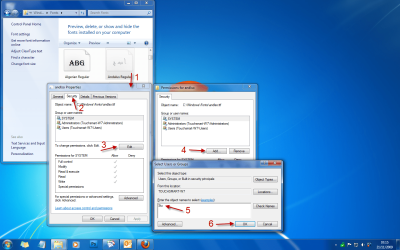
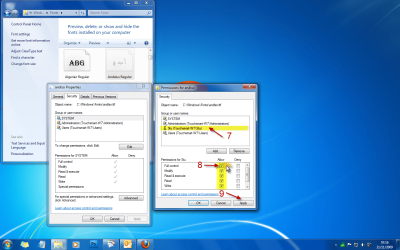
OK, i just changed the ACL. Added my username and gave full permissions, changed the owner to me (instead of trusted installer) and tried to delete, i didn't get the system protected message this time but was told that the fonts are in use and cannot be deleted????
I'll keep trying for a solution.

EDIT: The changes in the ACL worked. Which font in particular where you trying to delete?
My System SpecsSystem Spec
11-20-2009   #5


Anthing in non-latin script, like chinese or similar, that to my eyes appears as a collection of squiggles.
These are language or region specific and I'll never need them.
My System SpecsSystem Spec
11-21-2009   #6


Windows 7 Ultimate x64


Quote   Quote: Originally Posted by rsvr85 View Post
OK, i just changed the ACL. Added my username and gave full permissions, changed the owner to me (instead of trusted installer) and tried to delete, i didn't get the system protected message this time but was told that the fonts are in use and cannot be deleted????
I'll keep trying for a solution.

EDIT: The changes in the ACL worked. Which font in particular where you trying to delete?
You may have to do this with each of the fonts you want deleting.

Take Ownership of file - Vista Forums

Protected system fonts-1.png

Protected system fonts-2.png

Protected system fonts-3.png

Last edited by Brink; 11-21-2009 at 11:48 AM.. Reason: added link
My System SpecsSystem Spec
12-12-2009   #7


Win 7 32 Pro SP1


To get rid of protected system fonts:

(0) Create a System Restore Point first

(1) Copy C:\Windows\Fonts folder to Desktop, make Read Only
(2) Restart using Ubuntu 9.04 DVD to run from disc without changing your computer
(3) Use Ubuntu to delete fonts you don't want
(4) remove Ubuntu disc, restart Windows 7

You are the owner of any fonts you reinstall from your Desktop copy

This may also work with BartPE or Seagate Disk Wizard

Last edited by agbneill; 12-12-2009 at 03:08 PM..
My System SpecsSystem Spec
12-13-2009   #8


That's a good idea.
I'll make a list of them first,though. Better to delete 1 too few than 1 too many.
My System SpecsSystem Spec
12-16-2009   #9


Win 7 32 Pro SP1


Removing unwanted fonts via Ubuntu disk:

In retrospect, maybe not such a good idea.

I lost the pointer icon on the Start Menu and checkboxes and radio buttons in some apps. Not sure which font they came from.

You cannot reinstall fonts removed this way because Win thinks they're still there.

Fonts are listed in HKLM\SOFTWARE\Microsoft\Windows NT\Current Version\Fonts (maybe somewhere else as well). I'm not sure of the wisdom of removing them here.
My System SpecsSystem Spec
01-03-2010   #10


Windows 7


In deleting Fonts in Windows 7 one-by-one, as above, I note that they are currently owned by 'TrustedInstaller'. Is there any way to - I don't know, log on or something - as 'TrustedInstaller' so the fonts can be deleted en masse?
My System SpecsSystem Spec
Reply

 Protected system fonts problems?


Thread Tools


Similar Threads for: Protected system fonts
Thread Forum
Solved Changing system fonts Customization
Illustrator CS4 and Protected System Fonts Software
Solved Microsoft Updates Core System Fonts To Fix Blurred Fonts Issues Browsers & Mail
Changing System Fonts win 7? Customization
System Fonts are borked. halp =( General Discussion


All times are GMT -5. The time now is 03:09 AM.


Windows 7 Forums is an independent web site and has not been authorized,
sponsored, or otherwise approved by Microsoft Corporation.
"Windows 7" and related materials are trademarks of Microsoft Corp.
© Designer Media Ltd
  

1 2 3 4 5 6 7 8 9 10 11 12 13 14 15 16 17 18 19 20 21 22 23 24 25 26 27 28 29 30