Hi everybody.
Quick question.
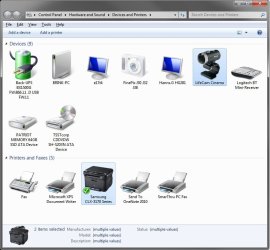
Are the icons in the Devices and Printers window (Device Stage) replaced immediately upon any system update, or do they just show up and get replaced at random whenever Win7 feels like doing it?
I recently did a fresh install of Win7 on two different machines (Ultimate x64 on one machine and Enterprise x64 on another) and the devices listed show the stock icons even though the drivers for those peripheral units are installed... All "Update" settings are set to recommended and automatic on both machines.
Weird thing is before I re-installed Ultimate on the first machine, the true icons showed up in Devices and Printers for my monitor, keyboard (MS keyboard), Canon scanner, Brother printer... I didn't quite pay attention how/when that happened, but I was pleasantly surprised with the extra access I had by just clicking that life-like icon.
Now, since the re-install, all I get are the stock icons.
Funny thing is when I hit "Properties", say - for the keyboard, which is a Microsoft 3000 kbd, the info simply reads: "Unknown Manufacturer", "HID keyboard Device". The MS drivers are installed though. :shock:
Same thing for my monitors (Dell 2209WA). Windows downloaded the drivers, but the properties info shows the monitor as "uknown manufacturer". How weird is that?
Something I'm missing???? Or is this Device Stage fubared somehow?
Cheers
Steve
Quick question.
Are the icons in the Devices and Printers window (Device Stage) replaced immediately upon any system update, or do they just show up and get replaced at random whenever Win7 feels like doing it?
I recently did a fresh install of Win7 on two different machines (Ultimate x64 on one machine and Enterprise x64 on another) and the devices listed show the stock icons even though the drivers for those peripheral units are installed... All "Update" settings are set to recommended and automatic on both machines.
Weird thing is before I re-installed Ultimate on the first machine, the true icons showed up in Devices and Printers for my monitor, keyboard (MS keyboard), Canon scanner, Brother printer... I didn't quite pay attention how/when that happened, but I was pleasantly surprised with the extra access I had by just clicking that life-like icon.
Now, since the re-install, all I get are the stock icons.
Funny thing is when I hit "Properties", say - for the keyboard, which is a Microsoft 3000 kbd, the info simply reads: "Unknown Manufacturer", "HID keyboard Device". The MS drivers are installed though. :shock:
Same thing for my monitors (Dell 2209WA). Windows downloaded the drivers, but the properties info shows the monitor as "uknown manufacturer". How weird is that?
Something I'm missing???? Or is this Device Stage fubared somehow?
Cheers
Steve
My Computer
At a glance
- Computer Manufacturer/Model Number
- Main machine custom-built
- OS
- Windows 7 Ultimate x64
- CPU
- Intel C2D [email protected]
- Motherboard
- Asus P5Q-E
- Memory
- OCZ Platinum 4x2GB 1066Mhz
- Graphics Card(s)
- nVidia EN8900GT UL 512MB
- Sound Card
- Creative SB x-FI Fatal1ty
- Monitor(s) Displays
- 2x Dell 22" 2209WA
- Screen Resolution
- 1680x1050
- Hard Drives
- 1x1TB Seagate 7200.12
1x640GB WD Black
1x320GB Seagate 7200.10
- PSU
- Antec TruePower 650W
- Case
- Antec SOHO Performance II
- Cooling
- Zalman CPU; 5x80mm case
- Keyboard
- MS Digital Media 3000
- Mouse
- Logitech G5
- Internet Speed
- 10Mb/s down - 1.1Mb/s up