
 |
Welcome to Windows 7 Forums. Our forum is dedicated to helping you find solutions with any problems, errors or issues you are experiencing with Windows 7. The Windows 7 forum also covers news and updates and has an extensive Windows 7 tutorial section that covers a wide range of tips and tricks.
Windows 7 - Search in hidden folders? |
11-21-2009
|
#1 | | |
Search in hidden folders? Is there a way to disable searching in hidden folders?
I have some non-hidden files in hidden folders on my HDD (so I can access the files by typing the right path in address bar, without changing any visibility settings), and I don't want any of these files to be shown in search results at all.
Last edited by Rathori; 11-21-2009 at 02:21 PM..
Reason: Missed a word
| My System Specs | | OS Windows 7 Ultimate x64 CPU Core 2 Quad Q6600 Motherboard ASRock P43DE Memory 8GB DDR2-800 GEIL Black Dragon Graphics Card GeForce 8800GTX Monitor(s) Displays LG L226WTQ 22" 16:10 Screen Resolution 1680x1050 Keyboard Logitech G15 (Blue) Mouse Microsoft SideWinder PSU Gigabyte ODIN GT 800W Cooling Zalman CNPS9500 CU Hard Drives Seagate Barracudas ST31000333AS, ST31000340AS, ST3320620AS, ST3500320NS. Internet Speed ADSL 6144/768 kbit/s Other Info Nothing is overclocked, I'm tired of figuring out whether it's a poorly written software or overclocking that causes problems. |
11-21-2009
|
#2 | | Windows 7 Ultimate x64 SP1 |
Hello Rathori,
You should be able to remove these hidden folder locations from the index to not have them in the search results anymore. The tutorial below can help show you how to if needed. Index Locations - Add or Remove
Hope this helps,
Shawn | My System Specs | | System Manufacturer/Model Number Self built custom OS Windows 7 Ultimate x64 SP1 CPU Intel i7-980X 3.3 Ghz (3.48 Ghz OC'd) Motherboard ASUS P6X58D Premium Memory 12 GB (2GBx6) DDR3 PC3-16000 2000 MHz Kingston HyperX Graphics Card Sapphire HD5870 Eyefinity 6 2GB Sound Card Realtek HD Audio ALC889 Integrated Chip Monitor(s) Displays 3x 27" Asus VE278Q Screen Resolution 1920x1080 Keyboard Logitech Cordless Desktop MX 5500 Revolution Mouse Logitech Cordless Desktop MX 5500 Revolution PSU OCZ Series Gold OCZZ1000M 1000W Case Corsair Obsidian 800D Cooling Thermalright Ultra 120 Extreme Copper CPU heat sink w/120 MM Hard Drives 160GB OCZ RevoDrive X2
** 2 x 1TB Samsung HDD HD154UI SATA Internet Speed 50 Mb/s Download and 2 Mb/s Upload Other Info Microsoft LifeCam Cinema
** Lite-On iHBS212 12x BD Writer
** Samsung CLX-3175FW Printer
** Netgear WNDR3800 Router
** Motorola SBG6580 Cable Modem
** 2x APC Back-UPS XS 1500 |
11-21-2009
|
#3 | | |
None of these folders are indexed, and I have also tried unchecking "Allow files on this drive to have contents indexed in addition to file properties" in drive properties. Both hidden folder and files they contain still show up in search results.
Is there a way to disable searching in non-indexed locations? | My System Specs | | OS Windows 7 Ultimate x64 CPU Core 2 Quad Q6600 Motherboard ASRock P43DE Memory 8GB DDR2-800 GEIL Black Dragon Graphics Card GeForce 8800GTX Monitor(s) Displays LG L226WTQ 22" 16:10 Screen Resolution 1680x1050 Keyboard Logitech G15 (Blue) Mouse Microsoft SideWinder PSU Gigabyte ODIN GT 800W Cooling Zalman CNPS9500 CU Hard Drives Seagate Barracudas ST31000333AS, ST31000340AS, ST3320620AS, ST3500320NS. Internet Speed ADSL 6144/768 kbit/s Other Info Nothing is overclocked, I'm tired of figuring out whether it's a poorly written software or overclocking that causes problems. |
11-21-2009
|
#4 | | |
Are hidden files visible? | My System Specs | | System Manufacturer/Model Number Dell Inspiron e1705 OS Windows 7 (7600) x86 CPU Intel Core 2 Duo T7200 (2 GHz) Motherboard Unknown Dell MB Memory 2 GB Graphics Card ATI Mobility Radeon x1400 (128 MB Dedicated) Sound Card SigmaTel HD Audio; Turtle Beach Audio Advantage SRM Monitor(s) Displays Laptop 17" Screen Resolution 1920x1200 Other Info Dell Inspiron Mini 10v (Intel Atom N270 1.6 GHz; 1GB; Windows 7 Ultimate) |
11-21-2009
|
#5 | | |
The files are visible and are not hidden. The folder that contains those files is hidden and is not visible. I have visibility settings set to "Don't show hidden files and folders". The hidden folders don't show up in search results, but their contents do. | My System Specs | | OS Windows 7 Ultimate x64 CPU Core 2 Quad Q6600 Motherboard ASRock P43DE Memory 8GB DDR2-800 GEIL Black Dragon Graphics Card GeForce 8800GTX Monitor(s) Displays LG L226WTQ 22" 16:10 Screen Resolution 1680x1050 Keyboard Logitech G15 (Blue) Mouse Microsoft SideWinder PSU Gigabyte ODIN GT 800W Cooling Zalman CNPS9500 CU Hard Drives Seagate Barracudas ST31000333AS, ST31000340AS, ST3320620AS, ST3500320NS. Internet Speed ADSL 6144/768 kbit/s Other Info Nothing is overclocked, I'm tired of figuring out whether it's a poorly written software or overclocking that causes problems. |
11-21-2009
|
#6 | | Windows 7 Ultimate x64 SP1 |
Rathori,
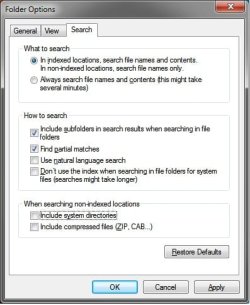
Double check to see if having your Search Options set like below may help. | My System Specs | | System Manufacturer/Model Number Self built custom OS Windows 7 Ultimate x64 SP1 CPU Intel i7-980X 3.3 Ghz (3.48 Ghz OC'd) Motherboard ASUS P6X58D Premium Memory 12 GB (2GBx6) DDR3 PC3-16000 2000 MHz Kingston HyperX Graphics Card Sapphire HD5870 Eyefinity 6 2GB Sound Card Realtek HD Audio ALC889 Integrated Chip Monitor(s) Displays 3x 27" Asus VE278Q Screen Resolution 1920x1080 Keyboard Logitech Cordless Desktop MX 5500 Revolution Mouse Logitech Cordless Desktop MX 5500 Revolution PSU OCZ Series Gold OCZZ1000M 1000W Case Corsair Obsidian 800D Cooling Thermalright Ultra 120 Extreme Copper CPU heat sink w/120 MM Hard Drives 160GB OCZ RevoDrive X2
** 2 x 1TB Samsung HDD HD154UI SATA Internet Speed 50 Mb/s Download and 2 Mb/s Upload Other Info Microsoft LifeCam Cinema
** Lite-On iHBS212 12x BD Writer
** Samsung CLX-3175FW Printer
** Netgear WNDR3800 Router
** Motorola SBG6580 Cable Modem
** 2x APC Back-UPS XS 1500 |
11-22-2009
|
#7 | | |
I have set search options like that, it doesn't help - the files keep keep showing up in search results. | My System Specs | | OS Windows 7 Ultimate x64 CPU Core 2 Quad Q6600 Motherboard ASRock P43DE Memory 8GB DDR2-800 GEIL Black Dragon Graphics Card GeForce 8800GTX Monitor(s) Displays LG L226WTQ 22" 16:10 Screen Resolution 1680x1050 Keyboard Logitech G15 (Blue) Mouse Microsoft SideWinder PSU Gigabyte ODIN GT 800W Cooling Zalman CNPS9500 CU Hard Drives Seagate Barracudas ST31000333AS, ST31000340AS, ST3320620AS, ST3500320NS. Internet Speed ADSL 6144/768 kbit/s Other Info Nothing is overclocked, I'm tired of figuring out whether it's a poorly written software or overclocking that causes problems. |
11-22-2009
|
#8 | | Windows 7 Ultimate x64 SP1 |
Strange. Are you sure that you have the hidden system files set like this below in Folder Options? 
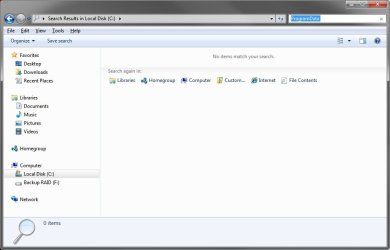
With these settings and the ones above for Search Options, this is the search results I get for the hidden "ProgramData" system folder. 
If they still show up, then as a test, you might create a new administrator account to see if the search results are the way you wanted them instead. | My System Specs | | System Manufacturer/Model Number Self built custom OS Windows 7 Ultimate x64 SP1 CPU Intel i7-980X 3.3 Ghz (3.48 Ghz OC'd) Motherboard ASUS P6X58D Premium Memory 12 GB (2GBx6) DDR3 PC3-16000 2000 MHz Kingston HyperX Graphics Card Sapphire HD5870 Eyefinity 6 2GB Sound Card Realtek HD Audio ALC889 Integrated Chip Monitor(s) Displays 3x 27" Asus VE278Q Screen Resolution 1920x1080 Keyboard Logitech Cordless Desktop MX 5500 Revolution Mouse Logitech Cordless Desktop MX 5500 Revolution PSU OCZ Series Gold OCZZ1000M 1000W Case Corsair Obsidian 800D Cooling Thermalright Ultra 120 Extreme Copper CPU heat sink w/120 MM Hard Drives 160GB OCZ RevoDrive X2
** 2 x 1TB Samsung HDD HD154UI SATA Internet Speed 50 Mb/s Download and 2 Mb/s Upload Other Info Microsoft LifeCam Cinema
** Lite-On iHBS212 12x BD Writer
** Samsung CLX-3175FW Printer
** Netgear WNDR3800 Router
** Motorola SBG6580 Cable Modem
** 2x APC Back-UPS XS 1500 |
11-22-2009
|
#9 | | |
Yes, that's the way I have my folder options set.
Hidden folders and files don't show up as search results, but non-hidden files which are located in hidden folders do, and I want them to not be shown. | My System Specs | | OS Windows 7 Ultimate x64 CPU Core 2 Quad Q6600 Motherboard ASRock P43DE Memory 8GB DDR2-800 GEIL Black Dragon Graphics Card GeForce 8800GTX Monitor(s) Displays LG L226WTQ 22" 16:10 Screen Resolution 1680x1050 Keyboard Logitech G15 (Blue) Mouse Microsoft SideWinder PSU Gigabyte ODIN GT 800W Cooling Zalman CNPS9500 CU Hard Drives Seagate Barracudas ST31000333AS, ST31000340AS, ST3320620AS, ST3500320NS. Internet Speed ADSL 6144/768 kbit/s Other Info Nothing is overclocked, I'm tired of figuring out whether it's a poorly written software or overclocking that causes problems. |
11-22-2009
|
#10 | | Windows 7 Ultimate x64 SP1 |
Do you happen to have store and display recently opened items enabled in the start menu? If so, disable it and see if you continue to have hidden items show up. | My System Specs | | System Manufacturer/Model Number Dell XPS 15 L502x OS Windows 7 Ultimate x64 SP1 CPU Core i7-2670QM Memory 8GB DDR3 PC3-10600 Graphics Card Intel HD Graphics 3000 + GeForce GT 540M Screen Resolution 1920x1080 Hard Drives 1TB 5400RPM Seagate Search in hidden folders? problems? All times are GMT -5. The time now is 03:12 AM. |  |