Windows 7 Forums


Windows 7: "Sytem Repair Disk" Can't Load - Error 4001100200001012

27 Nov 2009  
terryoregon

Windows 7 Home Premium 64-bit (pre-installed by Dell)
10 posts
Portland, Oregon
 
 
"Sytem Repair Disk" Can't Load - Error 4001100200001012

Went into the Windows 7 control panel to make a 'system repair disk' (boot disk), just in case I ever needed it. Making the disk went OK, with Windows 7 telling me it had successfully finished, and to label the CD.

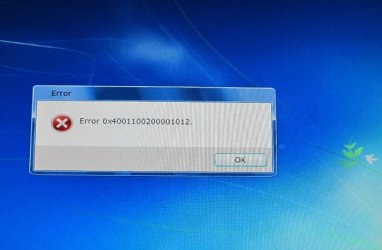
I then put the boot CD into my DVD drive to make sure it worked OK. Computer boots from the CD and Windows 7 says it has started loading files. Then the pretty blue background screen started (just like the one in the F8 repair console), and then there was a long pause and then I get the error code shown on the photo below. Clicking OK reboots the computer, and no repair options ever load.

I made two separate boot disks to rule out a bad CD, but still get the same error #


This is a brand new Dell computer, both DVD drives work fine, and burn CDs without problems.
Attached Thumbnails
"Sytem Repair Disk" Can't Load - Error 4001100200001012-error.jpg  
My System SpecsSystem Spec

27 Nov 2009  
terryoregon

Windows 7 Home Premium 64-bit (pre-installed by Dell)
10 posts
Portland, Oregon


Update:

In looking at what came with my computer, I do in fact have a "Reinstallation DVD" for Windows 7. It boots OK into the repair console. So, the problem in making my own boot disk is a moot point for now - other then the desire to understand that error code.
My System SpecsSystem Spec
27 Nov 2009  
Jacee

Windows 7 Ultimate 32bit SP1
7,141 posts


This is what I found... hope it makes sense to you:
Windows 7 repair disk error code 0x4001100200001012
My System SpecsSystem Spec
.


27 Nov 2009  
terryoregon

Windows 7 Home Premium 64-bit (pre-installed by Dell)
10 posts
Portland, Oregon


Quote:
This is what I found... hope it makes sense to you:
Windows 7 repair disk error code 0x4001100200001012
Thanks, that's certainly identical to my problem. However, their possible solutions didn't resolve anything. I don't see an obvious way to slow down the burn process when Windows 7 is controlling the DVD drive - there is no option to change that. The only way I know to change burn speed is with the third party software that works with the drive (like Roxio Media Creator that came preinstalled). I have a hard time believing this is an issue with the CD/DVD itself. I have dual drives and I've tried burning the boot CD with both using Verbatim CDs, which never give me problems. Both CDs show the files OK when viewing them in explorer. I also tried burning a Verbatim DVD+R, same issue.

I then tried running their recommended "sfc /scannow" command, and it said it repaired some files but couldn't repair other files. I checked the "CBS.log" it generated, but there's a LOT of info in there - not much that means anything to me.
Anyways, as long as I have the "Reinstallation DVD", I'm OK. Don't want to spend to much time on it.
My System SpecsSystem Spec
27 Nov 2009  
Frostmourne

Windows 7 Ultimate x86-64
2,716 posts


Upload the .log file and then use Imgburn to burn the disc at the lowest speed. Also, if you allowed the creation of the 100mb partition, it contains the info for system restore and bitlocker.

www.imgburn.com/
My System SpecsSystem Spec
01 Oct 2010  
thehappyman

Win 7 Ultimate x64
268 posts
Central Florida


All this stuff about slowing down your Disc Burner in order to make a "Recovery Disc"
is a bunch of nonsense as are the various post on the internet that suggest you need to run SFC to find corrupt system files before burning your recovery disc. Where do people get this stuff ?????

THE PROBLEM IS the "System Recovery Partition" thats on your hard drive - Almost all Dell Computers have this partition - Alienware computers have it too now (wonder why - ha ha ??)

Well, the solution is simple - Just download an .ISO "image file" of the Windows 7 Repair Disk and burn it to a CD - it works just fine !!!!!!

You can download a 32 or 64 bit ISO image fom this site for free depending on which one you need.

Create a Windows 7 System Repair Disc — MAXIMUMpcguides – Windows 7 tips, tricks, help, and how-to guides

Cheers
TheHappyman
My System SpecsSystem Spec
01 Oct 2010  
brianzion

Operating System : Windows 7 Home Premium Edition 6.01.7600 SP1 (x64)
3,643 posts
MILTON KEYNES


Quote   Quote: Originally Posted by thehappyman View Post
All this stuff about slowing down your Disc Burner in order to make a "Recovery Disc"
is a bunch of nonsense as are the various post on the internet that suggest you need to run SFC to find corrupt system files before burning your recovery disc. Where do people get this stuff ?????

THE PROBLEM IS the "System Recovery Partition" thats on your hard drive - Almost all Dell Computers have this partition - Alienware computers have it too now (wonder why - ha ha ??)

Well, the solution is simple - Just download an .ISO "image file" of the Windows 7 Repair Disk and burn it to a CD - it works just fine !!!!!!

Create a Windows 7 System Repair Disc — MAXIMUMpcguides – Windows 7 tips, tricks, help, and how-to guides

Cheers
TheHappyman


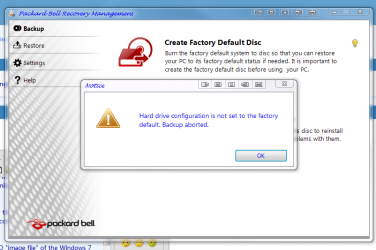
thats a great link thanks for sharing i cant make a packard bell recovery system disc when it went in for repair then came back the first thing i went to do was make the system disc using packard bells software but it just gave me the pop up here that i have posted.
Attached Thumbnails
"Sytem Repair Disk" Can't Load - Error 4001100200001012-factory-defult-disc.png  
My System SpecsSystem Spec
01 Oct 2010  
gregrocker

Win7 x 6 PC's
36,538 posts
California, Florida, Boston


It gets posted several times most days here: System Repair Disc - Create
My System SpecsSystem Spec
15 Aug 2011  
JOJOBUTCHER

windows7 home premium 64bit
1 posts
 
 
Many Thanks Happyman

Quote   Quote: Originally Posted by thehappyman View Post
All this stuff about slowing down your Disc Burner in order to make a "Recovery Disc"
is a bunch of nonsense as are the various post on the internet that suggest you need to run SFC to find corrupt system files before burning your recovery disc. Where do people get this stuff ?????

THE PROBLEM IS the "System Recovery Partition" thats on your hard drive - Almost all Dell Computers have this partition - Alienware computers have it too now (wonder why - ha ha ??)

Well, the solution is simple - Just download an .ISO "image file" of the Windows 7 Repair Disk and burn it to a CD - it works just fine !!!!!!

You can download a 32 or 64 bit ISO image fom this site for free depending on which one you need.

Create a Windows 7 System Repair Disc — MAXIMUMpcguides – Windows 7 tips, tricks, help, and how-to guides

Cheers
TheHappyman
Thanks Happyman I wasted several discs trying to create the recovery disc on my dell
computer Windows7 64bit. The answer to your quote "where do they get this stuff from" is the so called experts at Dell & Microsoft. Anyway your suggestion worked for me great support.:
My System SpecsSystem Spec
Reply

 "Sytem Repair Disk" Can't Load - Error 4001100200001012 problems?


Thread Tools


Similar help and support threads for: "Sytem Repair Disk" Can't Load - Error 4001100200001012
Thread Forum
Receive "Server Not Found" error when trying to load websites. Network & Sharing
"Page Failed to Load" error attempting to change my Win7-64bit display BSOD Help and Support
Setup is starting services "loop" No Repair or installation Disk Installation & Setup
"BOOTMGR is missing" Need Help With Repair On The Windows 7 Disk Backup and Restore
Solved Receiving a "FIXMAPI 1.0 MAPI Repair Tool has stopped working" error Browsers & Mail


All times are GMT -5. The time now is 05:19 PM.


Windows 7 Forums is an independent web site and has not been authorized,
sponsored, or otherwise approved by Microsoft Corporation.
"Windows 7" and related materials are trademarks of Microsoft Corp.
© Designer Media Ltd