

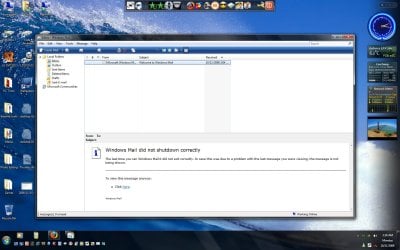
Some people Running the Windows 7 Pre Beta 6801 have been asking about Windows Mail in Windows seven and where they can find it.
The strange thing is it is there but it's hidden and doesn't do anything when you click on it, although you will see it in task manager, so if you do want Windows Mail this is what you have to do.
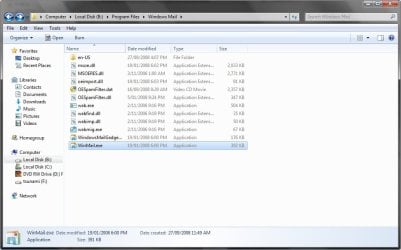
First go to folder options and deselect hide protected operating system files and do not show hidden files, you will now be able to see the Windows Mail executable file which was previously hidden.
Next go to your programs folder and Windows Mail folder and take Ownership of all the files in there, you will need to do this one file at a time and Don't Forget to Give Yourself FULL CONTROL of each file.
Just in case there is another fix for this in the Future you may want to make a copy of this folder and keep it somewhere
Once you have taken ownership and given yourself full control copy all your files from Vista's Windows Mail folder and paste and replace ALL of the files in Windows 7 Mail folder.
That's it and DON'T try to click on the Original Hidden WinMail.exe file, if you do you will not be able to replace it, as it will run and you wont see anything but you will still need to kill the process in task manager.
Good Luck and don't forget do give me some Rep, Thanks!!
The strange thing is it is there but it's hidden and doesn't do anything when you click on it, although you will see it in task manager, so if you do want Windows Mail this is what you have to do.
First go to folder options and deselect hide protected operating system files and do not show hidden files, you will now be able to see the Windows Mail executable file which was previously hidden.
Next go to your programs folder and Windows Mail folder and take Ownership of all the files in there, you will need to do this one file at a time and Don't Forget to Give Yourself FULL CONTROL of each file.
Just in case there is another fix for this in the Future you may want to make a copy of this folder and keep it somewhere
Once you have taken ownership and given yourself full control copy all your files from Vista's Windows Mail folder and paste and replace ALL of the files in Windows 7 Mail folder.
That's it and DON'T try to click on the Original Hidden WinMail.exe file, if you do you will not be able to replace it, as it will run and you wont see anything but you will still need to kill the process in task manager.
Good Luck and don't forget do give me some Rep, Thanks!!
Attachments

Last edited:
My Computer
At a glance
Windows 7 Ultimate Vista Ultimate x64Core 2 Duo E8500 3.16Ghz @ 3.8Ghz2x2Gigs Patriot PC2-6400 LLInno3D GeForce GTX260 216 SP
- Computer Manufacturer/Model Number
- Home Brew
- OS
- Windows 7 Ultimate Vista Ultimate x64
- CPU
- Core 2 Duo E8500 3.16Ghz @ 3.8Ghz
- Motherboard
- eVGA 750i FTW
- Memory
- 2x2Gigs Patriot PC2-6400 LL
- Graphics Card(s)
- Inno3D GeForce GTX260 216 SP
- Monitor(s) Displays
- ASUS VW222U 22" 2ms Response time
- Screen Resolution
- 1680x1050
- Hard Drives
- SATA 150GB
SATA II 250GB
USB IDE 750GB Ext.
- PSU
- HYTEC 600W & Thermaltake 650W Toughpower Power Exp
- Case
- Thermaltake Armor LCS (Liquid Cooling System)
- Cooling
- Liquid Cooling System
- Keyboard
- Logitech G15 Gaming Keyboard
- Mouse
- Logitech G9 Gaming Mouse


 .
.

