Windows 7 Forums Search
Welcome to Windows 7 Forums. Our forum is dedicated to helping you find solutions with any problems, errors or issues you are experiencing with Windows 7. The Windows 7 forum also covers news and updates and has an extensive Windows 7 tutorial section that covers a wide range of tips and tricks.


Windows 7 - Right Click Menu Resembles XP?

 
12-02-2009   #1


Windows 7


Right Click Menu Resembles XP?

A few weeks ago, my computer crashed for reasons that I'm still unsure of, and I had to reinstall using a USB key. (See this topic if you want to read about that in detail.)

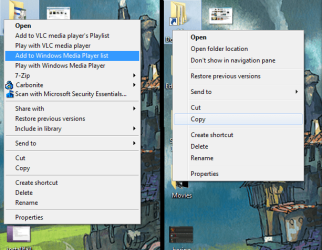
After the reinstall, it's mostly been working, but it's been treating my right-click menus very oddly. They look normal inside of programs and on the "My Documents" and "Recycle Bin" desktop icons, but all the folders and documents that don't come built into the OS have flat menus that turn blue as you mouse over them, exactly like in XP and earlier systems. Any idea how I can remedy this?

Attached Thumbnails
Right Click Menu Resembles XP?-menus.png  
My System SpecsSystem Spec
12-02-2009   #2


7600.20510 x86


It's caused by some 3rd party software you installed.
My System SpecsSystem Spec
12-03-2009   #3


Win 7 64, OSX Snow Leopard


Most probably, its caused by that Carbonite Context menu, from a google search, i think its an online backup app, so get the latest version (Windows 7 supporting version, if there is one) from their website and reinstall that app.

And also update VLC, 7Zip to there latest version.

Last edited by Rishone; 12-03-2009 at 01:05 AM.. Reason: Typo
My System SpecsSystem Spec
.


12-03-2009   #4


Windows 7


I downloaded the latest 7Zip, and I already have the latest version of VLC, but I can't find any way to update Carbonite on their webpage.
My System SpecsSystem Spec
12-03-2009   #5


Windows 7 Pro & Vista Home Premium


Give this app a try:

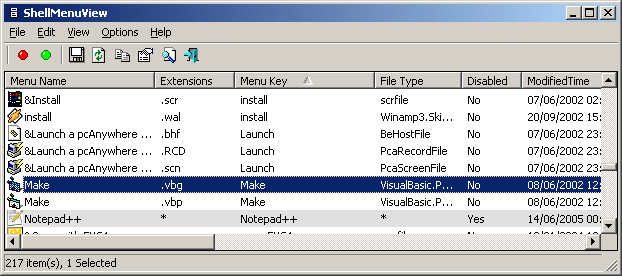
ShellMenuView v1.12

Description

ShellMenuView is a small utility that display the list of static menu items that appeared in the context menu when you right-click a file/folder on Windows Explorer, and allows you to easily disable unwanted menu items.

System Requirements

ShellMenuView works properly on Windows 2000 and Windows XP. You can also use ShellMenuView on Windows 98 for viewing the menu items list, but the disable/enable feature won't work on this version of Windows. (The disabling feature is achieved by adding 'LegacyDisable' key to the desired menu item in the Registry, and this Registry key is not supported by Windows 98)

Search for other utilities in NirSoft


Or Autoruns:
Autoruns for Windows v9.57
My System SpecsSystem Spec
12-03-2009   #6


Windows 7


That says 2000 and XP. Does it work on 7?
My System SpecsSystem Spec
12-03-2009   #7


Windows 7 Pro & Vista Home Premium


Yes, sure does.
My System SpecsSystem Spec
12-03-2009   #8


Windows 7


Okay, by deleting the Carbonite registry value in HKEY_CLASSES_ROOT\*\shellex\ContextMenuHandlers, I've got pictures and program context menus looking normal, but when I click on a folder it still looks bad and shows the Carbonite option. How can I fix the folders?
My System SpecsSystem Spec
12-03-2009   #9


Windows 7 Pro & Vista Home Premium


You need to do a search in the registry and remove all instances of Carbonite
My System SpecsSystem Spec
12-03-2009   #10


Windows 7


All instances? Wouldn't that uninstall it?
My System SpecsSystem Spec
Reply

 Right Click Menu Resembles XP? problems?


Thread Tools


Similar Threads for: Right Click Menu Resembles XP?
Thread Forum
Left click brings up right click context menu on desktop General Discussion
Context Menu - Right Click vs Shift Right Click Tutorials
Solved Unable to remove MagicISO context menu from right click menu in Win 7 Customization
Right-Click Extender a Right-Click Menu addon app Customization
Taskbar menu right click instead of shift+right click? Customization


All times are GMT -5. The time now is 03:19 AM.


Windows 7 Forums is an independent web site and has not been authorized,
sponsored, or otherwise approved by Microsoft Corporation.
"Windows 7" and related materials are trademarks of Microsoft Corp.
© Designer Media Ltd
  

1 2 3 4 5 6 7 8 9 10 11 12 13 14 15 16 17 18 19 20 21 22 23 24 25 26 27 28 29 30