Windows 7 Forums


Windows 7: Windows 7 left click battery tray icon

04 Dec 2009  
beinghuman

Windows 7 Home Premium 32-bit
9 posts
 
 
Windows 7 left click battery tray icon

Hello,


I'm having issues with the left click of the battery tray icon. When I click on it nothing shows up. In Vista, it would show up a tiny little window similar to the network sys tray icon. The battery window would allow you to switch power profiles. However, there is nothing that shows up when I left click or left double click on the battery tray icon. This has been a problem ever since the upgrade to windows 7.


Here is a screencap of the icon I am referring to (it's the battery on the left):


Thanks in advance for the help.
My System SpecsSystem Spec

04 Dec 2009  
Brink

64-bit Windows 7 Ultimate SP1 & Windows 8 Enterprise
47,740 posts
Texas


Hello BeingHuman, and welcome to Seven Forums.

You should be able to also right click on it and click on Power Options to select a new power profile as well for now, but you might see if restarting the computer may be able to restore the left click function.

Hope this helps,
Shawn
My System SpecsSystem Spec
04 Dec 2009  
zone23

Windows 7 X64
173 posts


Right clicking the power icon on my laptop gives me 4 options:

Adjust Sceen Brightness
Power Options
Windows Mobility Center
Turn System Icons on or OFF

7 no longer has the options you are looking for (Max. Battery drain for little performance increase). Power Options gives you two options:

Balanced
Power Saver

Have no fear if you PC needs the extra CPU it will ramp it up on its own.
My System SpecsSystem Spec
.


05 Dec 2009  
beinghuman

Windows 7 Home Premium 32-bit
9 posts


Quote   Quote: Originally Posted by zone23 View Post
Right clicking the power icon on my laptop gives me 4 options:

Adjust Sceen Brightness
Power Options
Windows Mobility Center
Turn System Icons on or OFF

7 no longer has the options you are looking for (Max. Battery drain for little performance increase). Power Options gives you two options:

Balanced
Power Saver

Have no fear if you PC needs the extra CPU it will ramp it up on its own.

What about left clicking the power icon? Or double left clicking? That's the option I'm talking about that seems to be missing.
My System SpecsSystem Spec
05 Dec 2009  
beinghuman

Windows 7 Home Premium 32-bit
9 posts


Quote   Quote: Originally Posted by Brink View Post
Hello BeingHuman, and welcome to Seven Forums.

You should be able to also right click on it and click on Power Options to select a new power profile as well for now, but you might see if restarting the computer may be able to restore the left click function.

Hope this helps,
Shawn

No, restarting does not help at all.
My System SpecsSystem Spec
05 Dec 2009  
zone23

Windows 7 X64
173 posts


Quote   Quote: Originally Posted by beinghuman View Post
Quote   Quote: Originally Posted by zone23 View Post
Right clicking the power icon on my laptop gives me 4 options:

Adjust Sceen Brightness
Power Options
Windows Mobility Center
Turn System Icons on or OFF

7 no longer has the options you are looking for (Max. Battery drain for little performance increase). Power Options gives you two options:

Balanced
Power Saver

Have no fear if you PC needs the extra CPU it will ramp it up on its own.

What about left clicking the power icon? Or double left clicking? That's the option I'm talking about that seems to be missing.
My bad left click is what I meant and ya the options your looking for have been removed. So when you left click you should see:

Adjust Sceen Brightness
Power Options
Windows Mobility Center
Turn System Icons on or OFF

no Max. performance you dont have any options at all?
My System SpecsSystem Spec
05 Dec 2009  
Brink

64-bit Windows 7 Ultimate SP1 & Windows 8 Enterprise
47,740 posts
Texas


Zone,

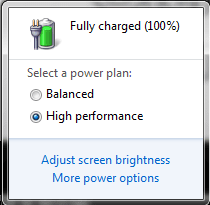
When I left click on the laptop, I still get the two Power Plan options for a quick change and the Power Options link.
My System SpecsSystem Spec
05 Dec 2009  
Kari

Windows 7 x64 Ultimate
12,755 posts
A Finnish immigrant in Leipzig, Germany


Quote   Quote: Originally Posted by zone23 View Post
... Power Options gives you two options:

Balanced
Power Saver
...
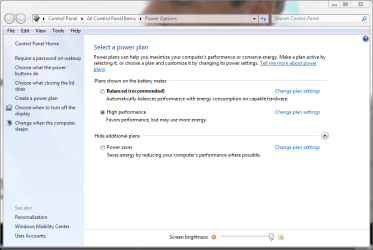
There are three power options as seen here:

Windows 7 left click battery tray icon-power_options2.png

Left clicking the power icon lets you choose between balanced and High Performance or Power Saver plans (depending on which one of these two has been last used). Balanced is always shown. You also get links to adjust screen brightness and power plan options.

Name:  power_options.PNG
Views: 2056
Size:  12.9 KB

Kari
My System SpecsSystem Spec
06 Dec 2009  
beinghuman

Windows 7 Home Premium 32-bit
9 posts


Quote   Quote: Originally Posted by Kari View Post
Quote   Quote: Originally Posted by zone23 View Post
... Power Options gives you two options:

Balanced
Power Saver
...
There are three power options as seen here:

Attachment 40585

Left clicking the power icon lets you choose between balanced and High Performance or Power Saver plans (depending on which one of these two has been last used). Balanced is always shown. You also get links to adjust screen brightness and power plan options.

Attachment 40584

Kari

Attachment 40584

This is what doesn't appear when I left click or left double click the power icon. Nothing at all appears.

I have an asus laptop. So I installed power4gear hybrid. This is not the problem however because when I uninstalled it the left click window still didn't appear. This all happened after I upgraded to windows 7 home premium 32-bit from windows vista home premium 32-bit

Thanks.
My System SpecsSystem Spec
06 Dec 2009  
beinghuman

Windows 7 Home Premium 32-bit
9 posts


Quote   Quote: Originally Posted by zone23 View Post
Quote   Quote: Originally Posted by beinghuman View Post
Quote   Quote: Originally Posted by zone23 View Post
Right clicking the power icon on my laptop gives me 4 options:

Adjust Sceen Brightness
Power Options
Windows Mobility Center
Turn System Icons on or OFF

7 no longer has the options you are looking for (Max. Battery drain for little performance increase). Power Options gives you two options:

Balanced
Power Saver

Have no fear if you PC needs the extra CPU it will ramp it up on its own.

What about left clicking the power icon? Or double left clicking? That's the option I'm talking about that seems to be missing.
My bad left click is what I meant and ya the options your looking for have been removed. So when you left click you should see:

Adjust Sceen Brightness
Power Options
Windows Mobility Center
Turn System Icons on or OFF

no Max. performance you dont have any options at all?

I have all the options and then some (custom plans). I just can't get that window to appear on left click or left double click.

Am I really not expressing this well enough, it seems simple enough to me.


Maybe I should say on primary click rather than left click because some may be left-handed and it may be right click for them.
My System SpecsSystem Spec
Reply

 Windows 7 left click battery tray icon problems?


Thread Tools


Similar help and support threads for: Windows 7 left click battery tray icon
Thread Forum
Changing from double left click to open files to a single left click Installation & Setup
How to restore missing tray icon? Windows 7 Tray Icons Changer Software
Left and right click on Safely Remove icon doesnt work Hardware & Devices
Windows Tray Icons Creator:Create Tray Icons With Mouse Click Action Software
Taskbar Icon Behavior On Left Click General Discussion


All times are GMT -5. The time now is 01:50 AM.


Windows 7 Forums is an independent web site and has not been authorized,
sponsored, or otherwise approved by Microsoft Corporation.
"Windows 7" and related materials are trademarks of Microsoft Corp.
© Designer Media Ltd