|
Welcome to Windows 7 Forums. Our forum is dedicated to helping you find solutions with any problems, errors or issues you are experiencing with Windows 7. The Windows 7 forum also covers news and updates and has an extensive Windows 7 tutorial section that covers a wide range of tips and tricks.
Windows 7 - Why is the text on my Passport showing blue? |
12-05-2009
|
#1 | | |
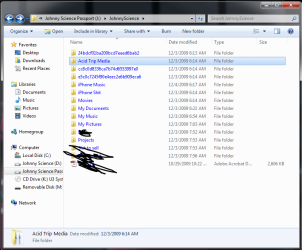
Why is the text on my Passport showing blue? I think this just started happening, but why is the text to all of my files on my passport showing up as blue instead of the normal black?
| My System Specs | | System Manufacturer/Model Number Built it myself OS Windows 7 64 & Ubuntu 64 CPU Intel Quad Core Q6600 2.40GHz Motherboard Asus Memory 8g Graphics Card Nvidia 9600 GT & 9800 GT Sound Card Turtle Beach 5.1 Monitor(s) Displays Three 19" Dell's & one 46" Samsung 750 |
12-05-2009
|
#2 | | |
File or folder name written in blue normally means the item or the drive is compressed or encrypted.
Kari | My System Specs | | System Manufacturer/Model Number HP ENVY 17-1150eg OS Windows 7 x64 Ultimate CPU 1.6 GHz Intel Core i7-720QM Processor Memory 6 GB Graphics Card ATI Mobility Radeon HD 5850 Graphics Sound Card Beats sound system with integrated subwoofer Monitor(s) Displays 17" laptop display, 22" LCD and 32" Full HD TV through HDMI Screen Resolution 1600*900, 1680*1050 and 1920*1080 Keyboard Logitech diNovo Media Desktop Laser (bluetooth) Mouse Logitech MX1000 Laser (Bluetooth) Hard Drives Internal: 2 x 500 GB SATA Hard Disk Drive 7200 rpm
External: 2TB for backups, 3TB USB3 network drive for media Internet Speed 50/10 Mbps VDSL Other Info Windows 7 Ultimate Retail Full in English, additional Guest-user accounts in Finnish, German and Swedish (Working languages English & Swedish, Family language German, my own language, mother tongue, Finnish. I really need Ultimate to get to use Language Packs!) |
12-05-2009
|
#3 | | |

Quote: Originally Posted by Kari File or folder name written in blue normally means the item or the drive is compressed or encrypted.
Kari probably encrypted I guess?
But I dont think I set a password?
How can I see if there is a password set for it & if not, create one? | My System Specs | | System Manufacturer/Model Number Built it myself OS Windows 7 64 & Ubuntu 64 CPU Intel Quad Core Q6600 2.40GHz Motherboard Asus Memory 8g Graphics Card Nvidia 9600 GT & 9800 GT Sound Card Turtle Beach 5.1 Monitor(s) Displays Three 19" Dell's & one 46" Samsung 750 |
12-05-2009
|
#4 | | |
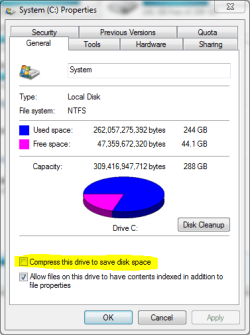
Check first if Passport is compressed. Right click the drive in Computer window, is the the Compress this drive to save disk space checked?
If it's compressed (Bitlocker etc.) and you don't have the password you are screwed (pardon my French)
Kari | My System Specs | | System Manufacturer/Model Number HP ENVY 17-1150eg OS Windows 7 x64 Ultimate CPU 1.6 GHz Intel Core i7-720QM Processor Memory 6 GB Graphics Card ATI Mobility Radeon HD 5850 Graphics Sound Card Beats sound system with integrated subwoofer Monitor(s) Displays 17" laptop display, 22" LCD and 32" Full HD TV through HDMI Screen Resolution 1600*900, 1680*1050 and 1920*1080 Keyboard Logitech diNovo Media Desktop Laser (bluetooth) Mouse Logitech MX1000 Laser (Bluetooth) Hard Drives Internal: 2 x 500 GB SATA Hard Disk Drive 7200 rpm
External: 2TB for backups, 3TB USB3 network drive for media Internet Speed 50/10 Mbps VDSL Other Info Windows 7 Ultimate Retail Full in English, additional Guest-user accounts in Finnish, German and Swedish (Working languages English & Swedish, Family language German, my own language, mother tongue, Finnish. I really need Ultimate to get to use Language Packs!) |
12-05-2009
|
#5 | | |
yeah it is clicked & is on.
Its a 500g HDD I'm only using like 13g right now.
There is no reason to allow compression is there?
I want to be able to just plug the drive in & double click like normal...
Now that I've unchecked it, how do I add password encryption?
I'm using 2nd copy to back up my media & Acronis for OS iso if it makes a difference. | My System Specs | | System Manufacturer/Model Number Built it myself OS Windows 7 64 & Ubuntu 64 CPU Intel Quad Core Q6600 2.40GHz Motherboard Asus Memory 8g Graphics Card Nvidia 9600 GT & 9800 GT Sound Card Turtle Beach 5.1 Monitor(s) Displays Three 19" Dell's & one 46" Samsung 750 |
12-05-2009
|
#6 | | |
Just uncheck the compression. Should be fine then.
Kari | My System Specs | | System Manufacturer/Model Number HP ENVY 17-1150eg OS Windows 7 x64 Ultimate CPU 1.6 GHz Intel Core i7-720QM Processor Memory 6 GB Graphics Card ATI Mobility Radeon HD 5850 Graphics Sound Card Beats sound system with integrated subwoofer Monitor(s) Displays 17" laptop display, 22" LCD and 32" Full HD TV through HDMI Screen Resolution 1600*900, 1680*1050 and 1920*1080 Keyboard Logitech diNovo Media Desktop Laser (bluetooth) Mouse Logitech MX1000 Laser (Bluetooth) Hard Drives Internal: 2 x 500 GB SATA Hard Disk Drive 7200 rpm
External: 2TB for backups, 3TB USB3 network drive for media Internet Speed 50/10 Mbps VDSL Other Info Windows 7 Ultimate Retail Full in English, additional Guest-user accounts in Finnish, German and Swedish (Working languages English & Swedish, Family language German, my own language, mother tongue, Finnish. I really need Ultimate to get to use Language Packs!) |
12-05-2009
|
#7 | | |
Now that I've unchecked it, how do I add password encryption?
I'm using 2nd copy to back up my media & Acronis for OS iso if it makes a difference. | My System Specs | | System Manufacturer/Model Number Built it myself OS Windows 7 64 & Ubuntu 64 CPU Intel Quad Core Q6600 2.40GHz Motherboard Asus Memory 8g Graphics Card Nvidia 9600 GT & 9800 GT Sound Card Turtle Beach 5.1 Monitor(s) Displays Three 19" Dell's & one 46" Samsung 750 |
12-05-2009
|
#8 | | |

Quote: Originally Posted by JohnnyScience Now that I've unchecked it, how do I add password encryption?
I'm using 2nd copy to back up my media & Acronis for OS iso if it makes a difference. If you are using Seven Ultimate, you could use Bitlocker. Right click the drive in Computer window, choose Turn on Bitlocker.
Be sure to print the encryption key sheet!
Kari | My System Specs | | System Manufacturer/Model Number HP ENVY 17-1150eg OS Windows 7 x64 Ultimate CPU 1.6 GHz Intel Core i7-720QM Processor Memory 6 GB Graphics Card ATI Mobility Radeon HD 5850 Graphics Sound Card Beats sound system with integrated subwoofer Monitor(s) Displays 17" laptop display, 22" LCD and 32" Full HD TV through HDMI Screen Resolution 1600*900, 1680*1050 and 1920*1080 Keyboard Logitech diNovo Media Desktop Laser (bluetooth) Mouse Logitech MX1000 Laser (Bluetooth) Hard Drives Internal: 2 x 500 GB SATA Hard Disk Drive 7200 rpm
External: 2TB for backups, 3TB USB3 network drive for media Internet Speed 50/10 Mbps VDSL Other Info Windows 7 Ultimate Retail Full in English, additional Guest-user accounts in Finnish, German and Swedish (Working languages English & Swedish, Family language German, my own language, mother tongue, Finnish. I really need Ultimate to get to use Language Packs!) |
12-05-2009
|
#9 | | |
Before using Bitlocker-to-go on the drive, take off all the data and backup it up!
If things go wrong.... | My System Specs | | System Manufacturer/Model Number Dell Inspiron e1705 OS Windows 7 (7600) x86 CPU Intel Core 2 Duo T7200 (2 GHz) Motherboard Unknown Dell MB Memory 2 GB Graphics Card ATI Mobility Radeon x1400 (128 MB Dedicated) Sound Card SigmaTel HD Audio; Turtle Beach Audio Advantage SRM Monitor(s) Displays Laptop 17" Screen Resolution 1920x1200 Other Info Dell Inspiron Mini 10v (Intel Atom N270 1.6 GHz; 1GB; Windows 7 Ultimate) |
12-06-2009
|
#10 | | |

Quote: Originally Posted by logicearth Before using Bitlocker-to-go on the drive, take off all the data and backup it up!
If things go wrong.... +1
Backup is always important. Especially so before making some major adjustments or changes like encrypting a whole drive.
Kari | My System Specs | | System Manufacturer/Model Number HP ENVY 17-1150eg OS Windows 7 x64 Ultimate CPU 1.6 GHz Intel Core i7-720QM Processor Memory 6 GB Graphics Card ATI Mobility Radeon HD 5850 Graphics Sound Card Beats sound system with integrated subwoofer Monitor(s) Displays 17" laptop display, 22" LCD and 32" Full HD TV through HDMI Screen Resolution 1600*900, 1680*1050 and 1920*1080 Keyboard Logitech diNovo Media Desktop Laser (bluetooth) Mouse Logitech MX1000 Laser (Bluetooth) Hard Drives Internal: 2 x 500 GB SATA Hard Disk Drive 7200 rpm
External: 2TB for backups, 3TB USB3 network drive for media Internet Speed 50/10 Mbps VDSL Other Info Windows 7 Ultimate Retail Full in English, additional Guest-user accounts in Finnish, German and Swedish (Working languages English & Swedish, Family language German, my own language, mother tongue, Finnish. I really need Ultimate to get to use Language Packs!) Why is the text on my Passport showing blue? problems? All times are GMT -5. The time now is 03:22 AM. |  |