| Windows 7: W7(Pro) will not load passed opening screen |
09 Dec 2009
|
#1 | | |
W7(Pro) will not load passed opening screen Help please - first post
M/c starts with a nice blue screen with left and right icons and mouse cursor all operatig .It will go no further.
when this first occured it went into Repair mode twice - said it could not fix and pointed to System32 Drivers\WDF01000.sys.Subsequent use of Repair now shows no
errors.
Booting to Repair from my installation Disk reports eveything as OK.Moved to Restore point - section shows only one point of todays date -which apparantly was made before an automatic update - ran OK.
I have run SFC\scannow but cannot interpret it. - sent to rapiddatashare -lost the ref No. for the moment.
Is this the correct forum? Any help would be appreciated
Naunton | My System Specs |
| System Manufacturer/Model Number own OS windows 7 professional CPU intel 6600 Motherboard asus P5w dh deluxe Memory 2gb Graphics Card geforce 8800 Sound Card m/b Monitor(s) Displays Hyundai 241d PSU ? Case thermotek Cooling basic Hard Drives 2 x 150 Raptors |
09 Dec 2009
|
#2 | | W7x64 Pro, SuSe 12.1/** W7 x64 Pro, XP MCE Indian Territory |
Can you boot in Safe Mode? | My System Specs | | System Manufacturer/Model Number DIY OS W7x64 Pro, SuSe 12.1/** W7 x64 Pro, XP MCE CPU Phenom II 1090T w/Noctua NH-D14 /**4400+ X2 w/CM Hyper TX 3 Motherboard ASRock 890FX Deluxe 4/**A8N-SLI Memory 2 x 2GB Patriot PGS34g1600LLKA/**4x1GB Corsair VS Graphics Card EVGA GTX460 SC/**EVGA 8800GTS Sound Card Asus Xonar D2X/**Xonar D1 Monitor(s) Displays Acer X233H, Dell E152FPc /**LG M237-WD Screen Resolution 1920x1080 & 1024x768/**1980x1080 Keyboard Logitech Media USB/**Saitek Eclipse Mouse Cordless Trackman Wheel/**Ditto PSU CM RS600 w/ APC BX1000G/**Antec 500 TP w/ APC BX1000 Case HAF922/**Antec 1040IIB Cooling 3x200mm, 1x140 and 1x120mm/**5x80mm fans Hard Drives WDC 2TB, 1.5TB, 1TB, 500GB,Seagate 500GB , Maxtor 80GB /**500GB Seagate & WDC 1TB Black Internet Speed 3.3Mbps Other Info SB 560 5.1 w/ Sennheiser RS140/**Creative T20 speakers, Dvico FusionHDTV7 Gold RT, Cisco E3000, HP 5510V AIO, Linksys E3000, Belkin F5U237 hub and **F5D8055 adapter
(** = 2nd rig) |
10 Dec 2009
|
#3 | | |
yes
I can load Safe Mode
I forgot to mention that I dual Boot with XP
Also I notice that the Repair screens refer to Drive E: whereas my Layout is :-
2 150 Raptors as an Array
A -Floppy
B -none
C -Windows XP
D - DVD
E -External Backup
G -Windows 7
f - Stick _ Readyboost
I - Stick -EXternal apps etc
Thanks | My System Specs | | System Manufacturer/Model Number own OS windows 7 professional CPU intel 6600 Motherboard asus P5w dh deluxe Memory 2gb Graphics Card geforce 8800 Sound Card m/b Monitor(s) Displays Hyundai 241d PSU ? Case thermotek Cooling basic Hard Drives 2 x 150 Raptors |
10 Dec 2009
|
#4 | | W7x64 Pro, SuSe 12.1/** W7 x64 Pro, XP MCE Indian Territory |
Hmm, I don't know why you would get a partial boot if going to the wrong drive, but have you checked your boot priority in the BIOS? Is it possible that you didn't install Windows 7 where you intended to? Personally, I prefer to install an OS on a drive with no other OS on it, and with all other harddrives disconnected during the installation, then use either the F8 BBS Popup Menu or the BIOS Boot Priority to choose the OS to boot from.
If it really is installed on G:, it sounds as though that something went wrong in your boot manager, but if that is the case, you will need to wait for someone else to chime in, because I'm not sharp enough on that aspect yet.
EDIT: Thinking further about it, I'm sure that you didn't disconnect the other drives, otherwise Windows 7 would be on C:, just as XP is. Windows seven wouldn't have a different drive letter, unless booted into XP.
EDIT 2: It just sank in that you only essentially have one harddrive...the array. If that is the case, where does the external drive fall into place? | My System Specs | | System Manufacturer/Model Number DIY OS W7x64 Pro, SuSe 12.1/** W7 x64 Pro, XP MCE CPU Phenom II 1090T w/Noctua NH-D14 /**4400+ X2 w/CM Hyper TX 3 Motherboard ASRock 890FX Deluxe 4/**A8N-SLI Memory 2 x 2GB Patriot PGS34g1600LLKA/**4x1GB Corsair VS Graphics Card EVGA GTX460 SC/**EVGA 8800GTS Sound Card Asus Xonar D2X/**Xonar D1 Monitor(s) Displays Acer X233H, Dell E152FPc /**LG M237-WD Screen Resolution 1920x1080 & 1024x768/**1980x1080 Keyboard Logitech Media USB/**Saitek Eclipse Mouse Cordless Trackman Wheel/**Ditto PSU CM RS600 w/ APC BX1000G/**Antec 500 TP w/ APC BX1000 Case HAF922/**Antec 1040IIB Cooling 3x200mm, 1x140 and 1x120mm/**5x80mm fans Hard Drives WDC 2TB, 1.5TB, 1TB, 500GB,Seagate 500GB , Maxtor 80GB /**500GB Seagate & WDC 1TB Black Internet Speed 3.3Mbps Other Info SB 560 5.1 w/ Sennheiser RS140/**Creative T20 speakers, Dvico FusionHDTV7 Gold RT, Cisco E3000, HP 5510V AIO, Linksys E3000, Belkin F5U237 hub and **F5D8055 adapter
(** = 2nd rig) |
10 Dec 2009
|
#5 | | Win7 x 6 PC's California, Florida, Boston |
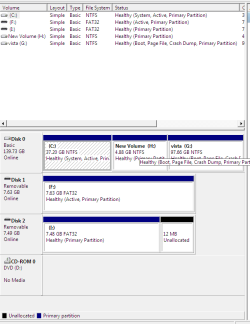
Can you take a screenshot of your full Disk Management drive map? Use SNipping tool in Start menu and attach using paper clip in reply box.
Most likely one of your other drives is derailing the boot. The RAID is a major complication to fixing it.
If the RAID were not there, you could unplug all drives except Windows 7 and XP, boot into Windows 7 DVD Repair console, select Startup Repair from the list and run repeatedly til it starts. Windows 7 Startup Repair automates all repair commands but may need to run several times to fix multiple issues.
You could then run a Repair Install from the Windows 7 desktop to reconfigure the boot correctly.
Once we see the Disk Management screenshot we can say for sure.
Last edited by gregrocker; 10 Dec 2009 at 04:50 AM..
| My System Specs | | |
10 Dec 2009
|
#6 | | |
Thanks folk
Seekermeister
You are correct I have only one drive with the two raptors acting as one.
The external drive E: is a one TB seagate not very kind !
I have removed this drive.
Gregroker
I am attaching the Disk Management Report you will see every things look OK
So far Windows 7 has run Repair twice - I have run once from Startup and once from installation Disk
the last one said every thing was fine | My System Specs | | System Manufacturer/Model Number own OS windows 7 professional CPU intel 6600 Motherboard asus P5w dh deluxe Memory 2gb Graphics Card geforce 8800 Sound Card m/b Monitor(s) Displays Hyundai 241d PSU ? Case thermotek Cooling basic Hard Drives 2 x 150 Raptors W7(Pro) will not load passed opening screen problems? All times are GMT -5. The time now is 05:23 PM. | |