| | Welcome to Windows 7 Forums. Our forum is dedicated to helping you find solutions with any problems, errors or issues you are experiencing with Windows 7. The Windows 7 forum also covers news and updates and has an extensive Windows 7 tutorial section that covers a wide range of tips and tricks. | Windows 7 - How do I open the cookies folder?
|
12-09-2009
|
#1 | | |
How do I open the cookies folder? Ran a scan and it shows 29 tracking cookies by name. But I can't open users\bob\cookies, or anything else related to cookies. In other versions, I could manually delete them, although they were in a different folder. "Search" does nothing.
| My System Specs | | System Manufacturer/Model Number Asus G50 and Toshiba L505 OS Win 7 - 64 Pro CPU 2.28 Motherboard ?- asus laptop Memory 4 gb Graphics Card ? laptop Sound Card ? laptop Monitor(s) Displays dual display, laptop and 24" Samsung PSU laptop Case laptop Cooling laptop Hard Drives two 250gb drives in laptop and one 250 Esata |
12-09-2009
|
#2 | | |
The cookies folder is really here: C:\Users\[username]\AppData\Roaming\Microsoft\Windows\Cookies | My System Specs | | System Manufacturer/Model Number Dell Inspiron e1705 OS Windows 7 (7600) x86 CPU Intel Core 2 Duo T7200 (2 GHz) Motherboard Unknown Dell MB Memory 2 GB Graphics Card ATI Mobility Radeon x1400 (128 MB Dedicated) Sound Card SigmaTel HD Audio; Turtle Beach Audio Advantage SRM Monitor(s) Displays Laptop 17" Screen Resolution 1920x1200 Other Info Dell Inspiron Mini 10v (Intel Atom N270 1.6 GHz; 1GB; Windows 7 Ultimate) |
12-09-2009
|
#3 | | Vista and Windows7, sometimes Ubuntu and Fedora |
Type shell:cookies into start/search and hit Enter. That will give you the "normal" cookies. Tracking cookies hide in various places. Best is to run SuperAntiSpyware to flush them out. | My System Specs | | System Manufacturer/Model Number HP, Dell, Gateway - 2 laptops and 2 desktops OS Vista and Windows7, sometimes Ubuntu and Fedora CPU from 1.6GHz Duo to 2.5GHz Quad Monitor(s) Displays 2x HP w2207 Keyboard with trackball - no mices Mouse terrible devices, who wants them Hard Drives 5x HDD, 2x SSD, 6x Externals Internet Speed DSL 6000 |
12-09-2009
|
#4 | | |

Quote: Originally Posted by logicearth The cookies folder is really here: C:\Users\[username]\AppData\Roaming\Microsoft\Windows\Cookies Thanks! Good lord, could they have buried them any deeper?
Why can't I put a block on these? The same ones come up on all my computers [visit the same sites, I guess] but those are XP and easy to find. Can't super duper Norton's Security Suite "see" these and "block" them? I have to run other s/w to spot them. | My System Specs | | System Manufacturer/Model Number Asus G50 and Toshiba L505 OS Win 7 - 64 Pro CPU 2.28 Motherboard ?- asus laptop Memory 4 gb Graphics Card ? laptop Sound Card ? laptop Monitor(s) Displays dual display, laptop and 24" Samsung PSU laptop Case laptop Cooling laptop Hard Drives two 250gb drives in laptop and one 250 Esata |
12-09-2009
|
#5 | | |
I tell Internet Explorer and other browsers to not allow third-party cookies. For IE, go to Internet Options > Privacy, there should be an Advance button there. I put third-party cookies as block, if you want you can make first-party prompt but don't block. Next you can block individual sites from setting cookies by use the Sites button. | My System Specs | | System Manufacturer/Model Number Dell Inspiron e1705 OS Windows 7 (7600) x86 CPU Intel Core 2 Duo T7200 (2 GHz) Motherboard Unknown Dell MB Memory 2 GB Graphics Card ATI Mobility Radeon x1400 (128 MB Dedicated) Sound Card SigmaTel HD Audio; Turtle Beach Audio Advantage SRM Monitor(s) Displays Laptop 17" Screen Resolution 1920x1200 Other Info Dell Inspiron Mini 10v (Intel Atom N270 1.6 GHz; 1GB; Windows 7 Ultimate) |
12-09-2009
|
#6 | | Windows 7 Pro & Vista Home Premium |
Download SurF File Manager
It will get into all those "hidden" areas that MS doesn't want you to access. | My System Specs | | System Manufacturer/Model Number Cheap $399.00 E-Machine OS Windows 7 Pro & Vista Home Premium CPU Athlon 64 3800+ (Orleans) 2.40GHz Motherboard Winfast Memory 2GB DDR2 RAM DIMM Graphics Card NVIDIA GeForce 8500 GT 512 MB memory HDMI out Sound Card creative X-Fi Exteme 7..1 channel Monitor(s) Displays Acer V223W 22" widescreen DVI Screen Resolution 1680x1050 Keyboard Dell Mouse Sony Vaio PSU OCZ 550 watt Case Gateway Cooling 2 fans Hard Drives WDC WD5 500GB
WDC WD25 250GB Internet Speed 18MB/s down - .72MB /s up |
12-10-2009
|
#7 | | |

Quote: Originally Posted by logicearth I tell Internet Explorer and other browsers to not allow third-party cookies. For IE, go to Internet Options > Privacy, there should be an Advance button there. I put third-party cookies as block, if you want you can make first-party prompt but don't block. Next you can block individual sites from setting cookies by use the Sites button. I have them set to "not allow" third party cookies, but it does not seem to stop them.
Further, I have tried that first party prompt, but it never tells you the name of the cookie. It just says it wants to set one, and there are times I want it, like my bank, favorite online stores, forums, etc.
Very annoying | My System Specs | | System Manufacturer/Model Number Asus G50 and Toshiba L505 OS Win 7 - 64 Pro CPU 2.28 Motherboard ?- asus laptop Memory 4 gb Graphics Card ? laptop Sound Card ? laptop Monitor(s) Displays dual display, laptop and 24" Samsung PSU laptop Case laptop Cooling laptop Hard Drives two 250gb drives in laptop and one 250 Esata |
12-10-2009
|
#8 | | Vista and Windows7, sometimes Ubuntu and Fedora |
The tracking cookies sneek in regardless what you do - unless you stay off the web. Run SAS from time to time to flush them out. They are pretty harmless anyhow. The other cookies in the cookie folder you can edit from time to time - what's the big deal? Can't have your cake and eat it. | My System Specs | | System Manufacturer/Model Number HP, Dell, Gateway - 2 laptops and 2 desktops OS Vista and Windows7, sometimes Ubuntu and Fedora CPU from 1.6GHz Duo to 2.5GHz Quad Monitor(s) Displays 2x HP w2207 Keyboard with trackball - no mices Mouse terrible devices, who wants them Hard Drives 5x HDD, 2x SSD, 6x Externals Internet Speed DSL 6000 |
12-10-2009
|
#9 | | Windows 7 Ultimate x64 SP1 |

Quote: Originally Posted by reghakr Download SurF File Manager
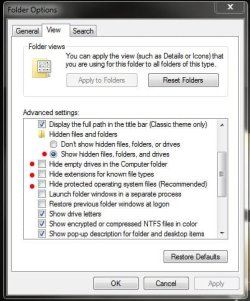
It will get into all those "hidden" areas that MS doesn't want you to access. Or you could just go into "Control Panel", "Folder Options", click "View" tab and check/un-tick these boxes...
That's the first thing I do when I set up windows | My System Specs | | System Manufacturer/Model Number Built by me OS Windows 7 Ultimate x64 SP1 CPU Intel Core i7-950 (3.06GHz) OC to 3.8GHz Motherboard Gigabyte GA-X58A-UD5 rev 1, F6 Bios Memory Corsair Dominator -TR3X6G1600C8D (6GB - 3X2GB) Graphics Card AMD Radeon HD6950 2gig (Sapphire) Sound Card X-Fi Titanium Fatality Pro Monitor(s) Displays HP ZR22w 22" LCD Monitor Screen Resolution 1920 x 1080 Keyboard Logitech Wireless Wave Mouse Logitech Performance MX PSU Antec Signature - SG-850 Case Cooler Master HAF X Cooling Noctua NH-C12P SE14 Hard Drives Primary - OCZ Vertex 2 SSD (120GB). Storage - One 1TB WD Caviar Black, One 750 WD Caviar Black. Internet Speed High Speed Cable Other Info Memory Timings - 1600MHz @ 8-8-8-20-1T @ 1.640 volts |
12-10-2009
|
#10 | | Windows 7 Ultimate x64 SP1 |

Quote: Originally Posted by robertpri Why can't I put a block on these? .......... Robert,
You could set Internet Explorer to block all cookies, then allow cookies per website instead. The tutorial below can show you more on this to help. It's the same in Windows 7 as Vista. Cookies - Vista Forums
Hope this helps,
Shawn | My System Specs | | System Manufacturer/Model Number Self built custom OS Windows 7 Ultimate x64 SP1 CPU Intel i7-980X 3.3 Ghz (3.48 Ghz OC'd) Motherboard ASUS P6X58D Premium Memory 12 GB (2GBx6) DDR3 PC3-16000 2000 MHz Kingston HyperX Graphics Card Sapphire HD5870 Eyefinity 6 2GB Sound Card Realtek HD Audio ALC889 Integrated Chip Monitor(s) Displays 3x 27" Asus VE278Q Screen Resolution 1920x1080 Keyboard Logitech Cordless Desktop MX 5500 Revolution Mouse Logitech Cordless Desktop MX 5500 Revolution PSU OCZ Series Gold OCZZ1000M 1000W Case Corsair Obsidian 800D Cooling Thermalright Ultra 120 Extreme Copper CPU heat sink w/120 MM Hard Drives 160GB OCZ RevoDrive X2
** 2 x 1TB Samsung HDD HD154UI SATA Internet Speed 50 Mb/s Download and 2 Mb/s Upload Other Info Microsoft LifeCam Cinema
** Lite-On iHBS212 12x BD Writer
** Samsung CLX-3175FW Printer
** Netgear WNDR3800 Router
** Motorola SBG6580 Cable Modem
** 2x APC Back-UPS XS 1500 How do I open the cookies folder? problems? All times are GMT -5. The time now is 04:27 AM. |  |