| Windows 7: Windows 7 conflicts with Vista |
12 Nov 2008
|
#21 | | Windows 8 Pro Standish, Lancashire, England |
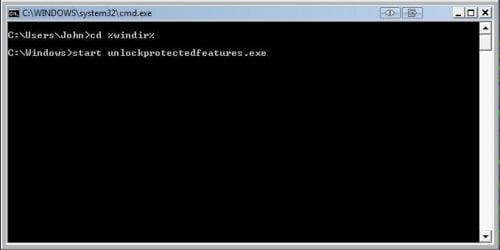
If you press the windows key + R and get the run box up, type cmd for the command prompt.
then enter each of the following lines
cd %windir%
start unlockProtectedFeatures.exe
If the protected feature box starts, try turning it off | My System Specs |
| Computer type PC/Desktop System Manufacturer/Model Number doofenshmirtz evil incorporated OS Windows 8 Pro CPU Intel Core i7-3970X Extreme Edition Motherboard ASRock X79 EXTREME11 Memory 32GB (8x4GB) Corsair DDR3 Dominator Platinum Graphics Card 2x 3GB EVGA GTX 660 Ti Superclocked+ Sound Card Creative Monitor(s) Displays 3 x27" Dell & 2 x 23" Dell Screen Resolution 3 @ 2560x1440 & 2 @ 1920x1080 Keyboard Microsoft Ergononic 7000 Mouse Logitech Performance MX PSU 1500W ThermalTake Toughpower Case Thermaltake Level 10 GT Cooling Antec Kúhler H2O 620 CPU Watercooler Hard Drives 240GB Intel 520 Series, 2.5" SSD, SATA III
Intel X25-M SSD - 160GB Internet Speed 34 Mb/s ADSL2+ (Bonded) Antivirus Windows Defender, Malwarebytes Pro Browser Firefox Other Info WinTV NovaTD
HP CP1515n Color Laser
Sony BD-5300S-0B Blu-ray Writer
Microsoft LifeCam Cinema
APC 750i Smart UPS |
12 Nov 2008
|
#22 | | |
i can get the cmd promt up but it states it cant find ''unlockprotectedfeatures.exe'' 
is there any other commands that might clear the mistake..?? | My System Specs | | System Manufacturer/Model Number myself OS SEVEN x64 CPU Q9450 @ 3.6GHZ 1.34v Motherboard ASUS P5K PREMIUM P35 Memory 8GB 1066 buffalo firestix @ 1152mhz CL5 Graphics Card Sapphire HD 5970 + GTX260 (physX) Sound Card Creative X-FI Xtreme Gamer Monitor(s) Displays SAMSUNG 20'' & SAMSUNG 23'' (dual screens) Screen Resolution 2048x1152 & 1680x1050 Keyboard LOGITECH E110 Mouse logitech NX5 PSU XCILIO 850w (78A) Case CM590 1x 120x38mm & 2x92x38mm / 4x 120x25mm Cooling AC7 PRO @ 92x38mm blower, Lamptron military bus bay controll Hard Drives 1x seagate 160gb IDE & 1x seagate 160gb SATA Internet Speed 2MB Other Info its a continual ''work in progress''.... |
12 Nov 2008
|
#23 | | Windows 8 Pro Standish, Lancashire, England |
Was the command run in the windows dir?
i.e. c:\windows\
Also if you can see your Windows 7 drive from vista check that unlockProtectedFeatures.exe is still in the Windows 7 windows directory | My System Specs | | Computer type PC/Desktop System Manufacturer/Model Number doofenshmirtz evil incorporated OS Windows 8 Pro CPU Intel Core i7-3970X Extreme Edition Motherboard ASRock X79 EXTREME11 Memory 32GB (8x4GB) Corsair DDR3 Dominator Platinum Graphics Card 2x 3GB EVGA GTX 660 Ti Superclocked+ Sound Card Creative Monitor(s) Displays 3 x27" Dell & 2 x 23" Dell Screen Resolution 3 @ 2560x1440 & 2 @ 1920x1080 Keyboard Microsoft Ergononic 7000 Mouse Logitech Performance MX PSU 1500W ThermalTake Toughpower Case Thermaltake Level 10 GT Cooling Antec Kúhler H2O 620 CPU Watercooler Hard Drives 240GB Intel 520 Series, 2.5" SSD, SATA III
Intel X25-M SSD - 160GB Internet Speed 34 Mb/s ADSL2+ (Bonded) Antivirus Windows Defender, Malwarebytes Pro Browser Firefox Other Info WinTV NovaTD
HP CP1515n Color Laser
Sony BD-5300S-0B Blu-ray Writer
Microsoft LifeCam Cinema
APC 750i Smart UPS |
12 Nov 2008
|
#24 | | |

Quote: Originally Posted by z3r010 Was the command run in the windows dir?
i.e. c:\windows\
Also if you can see your Windows 7 drive from vista check that .exe is still in the Windows 7 windows directory this is how i ran the commands....
>cd %windir%
>start unlockprotectedfeatures.exe
is this correct..?
i cannot find ''unlockprotectedfeatures'' in the Windows 7 windows directory..while browsing through vista ??
& i cant get in to roll it back, can i start the ''system restore'' with a command.??
sorry to be a droning NUB ... | My System Specs | | System Manufacturer/Model Number myself OS SEVEN x64 CPU Q9450 @ 3.6GHZ 1.34v Motherboard ASUS P5K PREMIUM P35 Memory 8GB 1066 buffalo firestix @ 1152mhz CL5 Graphics Card Sapphire HD 5970 + GTX260 (physX) Sound Card Creative X-FI Xtreme Gamer Monitor(s) Displays SAMSUNG 20'' & SAMSUNG 23'' (dual screens) Screen Resolution 2048x1152 & 1680x1050 Keyboard LOGITECH E110 Mouse logitech NX5 PSU XCILIO 850w (78A) Case CM590 1x 120x38mm & 2x92x38mm / 4x 120x25mm Cooling AC7 PRO @ 92x38mm blower, Lamptron military bus bay controll Hard Drives 1x seagate 160gb IDE & 1x seagate 160gb SATA Internet Speed 2MB Other Info its a continual ''work in progress''.... |
12 Nov 2008
|
#25 | | Windows 8 Pro Standish, Lancashire, England |
While in Vista download unlockprotectedfeatures.exe from shawns tutorial and copy it into your Windows 7 windows directory
when you run the commands from 7 it should look something like this | My System Specs | | Computer type PC/Desktop System Manufacturer/Model Number doofenshmirtz evil incorporated OS Windows 8 Pro CPU Intel Core i7-3970X Extreme Edition Motherboard ASRock X79 EXTREME11 Memory 32GB (8x4GB) Corsair DDR3 Dominator Platinum Graphics Card 2x 3GB EVGA GTX 660 Ti Superclocked+ Sound Card Creative Monitor(s) Displays 3 x27" Dell & 2 x 23" Dell Screen Resolution 3 @ 2560x1440 & 2 @ 1920x1080 Keyboard Microsoft Ergononic 7000 Mouse Logitech Performance MX PSU 1500W ThermalTake Toughpower Case Thermaltake Level 10 GT Cooling Antec Kúhler H2O 620 CPU Watercooler Hard Drives 240GB Intel 520 Series, 2.5" SSD, SATA III
Intel X25-M SSD - 160GB Internet Speed 34 Mb/s ADSL2+ (Bonded) Antivirus Windows Defender, Malwarebytes Pro Browser Firefox Other Info WinTV NovaTD
HP CP1515n Color Laser
Sony BD-5300S-0B Blu-ray Writer
Microsoft LifeCam Cinema
APC 750i Smart UPS |
12 Nov 2008
|
#26 | | |
unfortunately that didn't worked john....
but im sending this from Windows 7 now, i can open any programs straight from the task manager, so there must be a way to re enable the desktop....
i tried sys restore & that wont work, seeing as i can access anything on here surly there is a way to switch the desktop back on either through an app or command... 
its perfectly configured except for the desktop. | My System Specs | | System Manufacturer/Model Number myself OS SEVEN x64 CPU Q9450 @ 3.6GHZ 1.34v Motherboard ASUS P5K PREMIUM P35 Memory 8GB 1066 buffalo firestix @ 1152mhz CL5 Graphics Card Sapphire HD 5970 + GTX260 (physX) Sound Card Creative X-FI Xtreme Gamer Monitor(s) Displays SAMSUNG 20'' & SAMSUNG 23'' (dual screens) Screen Resolution 2048x1152 & 1680x1050 Keyboard LOGITECH E110 Mouse logitech NX5 PSU XCILIO 850w (78A) Case CM590 1x 120x38mm & 2x92x38mm / 4x 120x25mm Cooling AC7 PRO @ 92x38mm blower, Lamptron military bus bay controll Hard Drives 1x seagate 160gb IDE & 1x seagate 160gb SATA Internet Speed 2MB Other Info its a continual ''work in progress''.... |
12 Nov 2008
|
#27 | | Windows 8 Pro Standish, Lancashire, England |
try
cd %windir%
explorer.exe | My System Specs | | Computer type PC/Desktop System Manufacturer/Model Number doofenshmirtz evil incorporated OS Windows 8 Pro CPU Intel Core i7-3970X Extreme Edition Motherboard ASRock X79 EXTREME11 Memory 32GB (8x4GB) Corsair DDR3 Dominator Platinum Graphics Card 2x 3GB EVGA GTX 660 Ti Superclocked+ Sound Card Creative Monitor(s) Displays 3 x27" Dell & 2 x 23" Dell Screen Resolution 3 @ 2560x1440 & 2 @ 1920x1080 Keyboard Microsoft Ergononic 7000 Mouse Logitech Performance MX PSU 1500W ThermalTake Toughpower Case Thermaltake Level 10 GT Cooling Antec Kúhler H2O 620 CPU Watercooler Hard Drives 240GB Intel 520 Series, 2.5" SSD, SATA III
Intel X25-M SSD - 160GB Internet Speed 34 Mb/s ADSL2+ (Bonded) Antivirus Windows Defender, Malwarebytes Pro Browser Firefox Other Info WinTV NovaTD
HP CP1515n Color Laser
Sony BD-5300S-0B Blu-ray Writer
Microsoft LifeCam Cinema
APC 750i Smart UPS |
12 Nov 2008
|
#28 | | |
i see the problem i have.....i cannot select ''run as admin'' on the CMD prompt in the task manager
i think im just gonna format the 2nd HDD tonight & run a fresh installation (& steer well clear of this fancy taskbar), i have learn t quite a bit from my mistakes this time around  & i don't have those crappy modem drivers holding me up, & now i can configure the router from memory
.... its all good fun.
cheers for all your help john, i will be back on Windows 7 by tomorrow night so its not that bad ....a new install is no biggie to repeat | My System Specs | | System Manufacturer/Model Number myself OS SEVEN x64 CPU Q9450 @ 3.6GHZ 1.34v Motherboard ASUS P5K PREMIUM P35 Memory 8GB 1066 buffalo firestix @ 1152mhz CL5 Graphics Card Sapphire HD 5970 + GTX260 (physX) Sound Card Creative X-FI Xtreme Gamer Monitor(s) Displays SAMSUNG 20'' & SAMSUNG 23'' (dual screens) Screen Resolution 2048x1152 & 1680x1050 Keyboard LOGITECH E110 Mouse logitech NX5 PSU XCILIO 850w (78A) Case CM590 1x 120x38mm & 2x92x38mm / 4x 120x25mm Cooling AC7 PRO @ 92x38mm blower, Lamptron military bus bay controll Hard Drives 1x seagate 160gb IDE & 1x seagate 160gb SATA Internet Speed 2MB Other Info its a continual ''work in progress''.... |
12 Nov 2008
|
#29 | | W 7 64-bit Ultimate The Lowcountry |
Hello SK.
I had trouble with a a WU update today myself', it froze and I had to do a hard shutdown to clear it. I'm having no problem with the taskbar though; everything is running fine otherwise.
Sorry to hear you're having troubles.
Later  Ted | My System Specs | | System Manufacturer/Model Number * BFK Customs * OS W 7 64-bit Ultimate CPU Intel Q9550 Yorkfield Motherboard ASUS P5Q Pro Memory 8GB Dominator 8500C5D Graphics Card ATI : XFX 5870 Sound Card Realtek HD Audio 7-1 Monitor(s) Displays 1x 47" LCD HDMI & 3x 26" LCD HDMI Screen Resolution 1920x1080P & 1920x1200 Keyboard Microsoft 500 Mouse Razer Diamondback 3G PSU Corsair 620HX Case Cooler Master RC-690 Cooling Tuniq Tower 120, 2x 140mm and 3x 120mm case fans Hard Drives 1x 80GB Intel X25-M G2 SSD : 1x 500GB & 1x 640GB WD Caviar Black(s) Internet Speed 14 Mb/s Other Info 1x Koutech 3Gb/s SATA HDD Hot Swap Rack Windows 7 conflicts with Vista problems? All times are GMT -5. The time now is 04:44 PM. | |