Windows 7 Forums


Windows 7: Windows 7 Extended Display Question

11 Dec 2009   #1

Windows 7 Ultimate 64-bit
Dominican Republic
 
 
Windows 7 Extended Display Question

Hi.

I'm using my Plasma TV as an extended display so I can watch movies.


For me to get the mouse to the TV side I have to drag it all the way to the right in my pc monitor.

My question is, can I switch what side I have to drag my mouse to, to get it to the extended display (My Plasma TV). Like on the left, top or down?

Because I'ts very annoying for me when I close a window or hit the show desktop button on the down right corner (which I do alot) and my mouse disappearing on me to the other side instead of not being able to go any further.

Please Help a newb here!!
Thanks
My System SpecsSystem Spec

11 Dec 2009   #2

Windows 7, Linux


You can decide where you want to drag the mouse, I don't remember exactly though I know the nvidia control panel has some pretty verse options. You should be able to set it up in personalize. =)
My System SpecsSystem Spec
11 Dec 2009   #3

Windows 7 x64 Ultimate
A Finnish immigrant in Leipzig, Germany


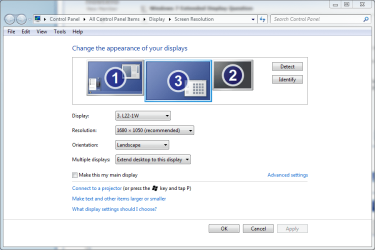
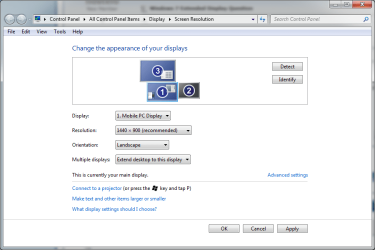
Right click desktop, choose Screen Resolution. Drag and drop displays as you want. For example, if you put display 2 on top of display 1, you have to move the mouse pointer over the top of the display 1 to enter display 2.

Kari
Attached Thumbnails
Windows 7 Extended Display Question-display_1.png   Windows 7 Extended Display Question-display_2.png   Windows 7 Extended Display Question-display_3.png  
My System SpecsSystem Spec
.


11 Dec 2009   #4

Windows 7 Ultimate 64-bit
Dominican Republic


That was so easy!

Thanks a lot Kari!

Can I ask another question while I'm at it?
My System SpecsSystem Spec
11 Dec 2009   #5

Windows 7 x64 Ultimate
A Finnish immigrant in Leipzig, Germany


Quote   Quote: Originally Posted by hostelo View Post
That was so easy!

Thanks a lot Kari!

Can I ask another question while I'm at it?
Of course, just ask...
My System SpecsSystem Spec
11 Dec 2009   #6

Windows 7 Ultimate 64-bit
Dominican Republic


Why when I open my Windows Media Center and try to use Media Broswer on the extended display it does not show completely

What I mean is when I maximize it in the Plasma TV the corners are like if it was too big for the screen, if I try to fix the resolution to make it smaller so the whole window can fit, media broswer then does not open.

Why is this?

Thanks
My System SpecsSystem Spec
11 Dec 2009   #7

Windows 7 x64 Ultimate
A Finnish immigrant in Leipzig, Germany


That is a question I don't know the answer. We have a whole sub forum for Media Center related issues. Check it here, I'm sure some of the MC gurus can help you.

Kari
My System SpecsSystem Spec
11 Dec 2009   #8

Windows 7 Ultimate 64-bit
Dominican Republic


thanks
My System SpecsSystem Spec
11 Dec 2009   #9

Windows 7, Linux


Quote   Quote: Originally Posted by hostelo View Post
Why when I open my Windows Media Center and try to use Media Broswer on the extended display it does not show completely

What I mean is when I maximize it in the Plasma TV the corners are like if it was too big for the screen, if I try to fix the resolution to make it smaller so the whole window can fit, media broswer then does not open.

Why is this?

Thanks
Sounds like a resolution conflict. Do you have HDMI cables running to the plasma? I'd try setting the resolutions for the monitor and the TV the same? I haven't actually done this since the last time we used a big TV we used it as the main monitor =P
My System SpecsSystem Spec
11 Dec 2009   #10

W7 x64
3rd Rock from the Sun


Quote   Quote: Originally Posted by Kari View Post
Right click desktop, choose Screen Resolution. Drag and drop displays as you want. For example, if you put display 2 on top of display 1, you have to move the mouse pointer over the top of the display 1 to enter display 2.

Kari
Never realised you could drag them around, makes my life far easier on a dual-screen vertical mount - many thanks...

+1 rep 4u
My System SpecsSystem Spec
Reply

 Windows 7 Extended Display Question problems?


Thread Tools


Similar help and support threads for: Windows 7 Extended Display Question
Thread Forum
Extended display over 3 monitors Graphic Cards
W7 Extended Display - should be ez, but its not Graphic Cards
Why my extended display went on reverse? Graphic Cards
Windows 7 extended display and Adobe 9 Software
Extended Display Hardware & Devices


All times are GMT -5. The time now is 05:08 PM.


Seven Forums Android App Seven Forums IOS App Follow us on Facebook

Windows 7 Forums is an independent web site and has not been authorized,
sponsored, or otherwise approved by Microsoft Corporation.
"Windows 7" and related materials are trademarks of Microsoft Corp.
© Designer Media Ltd
  

1 2 3 4 5 6 7 8 9 10 11 12 13 14 15 16 17 18 19 20 21 22 23 24 25 26 27 28 29 30 31 32