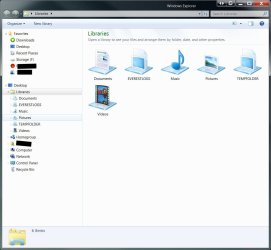
| Windows 7: I hate the "Libraries" bring back "My Computer" |
15 Dec 2009
|
#1 | | |
I hate the "Libraries" bring back "My Computer" I hate the "Libraries" bring back "My Computer"
Am I the only one whom dislikes the windows 7 windows explorer, I have ceased using the original "My" Folders years ago, all of my data is on NAS Servers, is there a replacement program that will allow me to customize file access more like XP My computer, All I want to do is access the data, I did not lose anything, I do not need to search for anything and I will organize my data the way I want to - not the way windows thinks I should
Also - I see colors quicker than I can read text - so in previous OS (XP) I would change the folders to icons, really weird that they retained the icons from the original info after I copied my icon folder to the C drive, however it appears as though i cannot change a folder to an icon in Windows 7 | My System Specs |
| |
16 Dec 2009
|
#2 | | |
Win 7 Explorer Me too,
I hate the win explorer forced on me in Win 7.
I hate the wishy-washy baby blue colour, the line spacing, the icons & yes the (can't delete) intrusive Libraries.
Does it not occur to MS that some of us depend upon Explorer & we want greater freedom & functionality?
Amazing to find myself saying the explorer layout in XP was superior, good work MS! | My System Specs | | OS win 7 CPU Intel Core i7-860 2.8GHz Motherboard Gigabyte GA-P55-UD3P P55 1156pin DDR3 MoBrd Memory 4 Gb Graphics Card Gigabyte PCI-E 1Gb 9600GT Sound Card On board Monitor(s) Displays 17" LG Flatron L1730S PSU 460 watts Case Coolmaster Centurion 05 Cooling 120mm + 80mm fans Hard Drives Seagate 1 Tb x 2 |
16 Dec 2009
|
#3 | | 64-bit Windows 7 Ultimate SP1 & Windows 8 Enterprise Texas |

Quote: Originally Posted by peterlonz Me too,
I hate the win explorer forced on me in Win 7.
I hate the wishy-washy baby blue colour, the line spacing, the icons & yes the (can't delete) intrusive Libraries.
Does it not occur to MS that some of us depend upon Explorer & we want greater freedom & functionality?
Amazing to find myself saying the explorer layout in XP was superior, good work MS! Hello Peter,
If you really want Libraries gone, then you can use the tutorials below to do so. Libraries Folder - Add or Remove from Navigation Pane
and Libraries Desktop Icon - Add or Remove
However, if you truly want "greater freedom & functionality", then you might consider trying them out for a bit first. Libraries let you access and arrange items from one or more folders quickly without moving them from their original location. Libraries themselves don't store your files or folders. Instead, they point to different folders on your hard disk, or on an external drive attached to your computer. This gives you easy access to a category of files no matter where they are stored. For instance, if you have music files on your hard disk and on an external drive, you can access all of your music files from the Music library.
Hope this helps,
Shawn | My System Specs | | Computer type PC/Desktop System Manufacturer/Model Number Self built custom OS 64-bit Windows 7 Ultimate SP1 & Windows 8 Enterprise CPU Intel i7-3930K 3.2 Ghz (O/C 4 Ghz) Motherboard ASRock X79 Extreme11 Memory 32 GB (8GBx4) G.SKILL DDR3 Quad PC3-19200 2400MHz Graphics Card Sapphire HD5870 Eyefinity 6 2GB Sound Card SB Recon 3Di Integrated Chip Monitor(s) Displays 3x 27" Asus VE278Q Screen Resolution 1920x1080 Keyboard Logitech Cordless Desktop MX 5500 Revolution Mouse Logitech Cordless Desktop MX 5500 Revolution PSU OCZ Series Gold OCZZ1000M 1000W Case Thermaltake Level 10 GT Snow Edition Cooling Corsair Hydro H100 Hard Drives 256GB OCZ Vector
160GB OCZ RevoDrive X2
2 x 1TB Samsung HDD HD154UI SATA Internet Speed 50 Mb/s Download and 2 Mb/s Upload Other Info Microsoft LifeCam Cinema
Lite-On iHBS212 12x BD Writer
Samsung CLX-3175FW Printer
Netgear WNDR3800 Router
Motorola SBG6580 Cable Modem
2x APC Back-UPS XS 1500 |
16 Dec 2009
|
#4 | | W7x64 Pro, SuSe 12.1/** W7 x64 Pro, XP MCE Indian Territory |
You still have essentially the same interface available as before by selecting Computer from the right side of the Start Menu...if you have it enabled in the Start Menu's Properties. | My System Specs | | System Manufacturer/Model Number DIY OS W7x64 Pro, SuSe 12.1/** W7 x64 Pro, XP MCE CPU Phenom II 1090T w/Noctua NH-D14 /**4400+ X2 w/CM Hyper TX 3 Motherboard ASRock 890FX Deluxe 4/**A8N-SLI Memory 2 x 2GB Patriot PGS34g1600LLKA/**4x1GB Corsair VS Graphics Card EVGA GTX460 SC/**EVGA 8800GTS Sound Card Asus Xonar D2X/**Xonar D1 Monitor(s) Displays Acer X233H, Dell E152FPc /**LG M237-WD Screen Resolution 1920x1080 & 1024x768/**1980x1080 Keyboard Logitech Media USB/**Saitek Eclipse Mouse Cordless Trackman Wheel/**Ditto PSU CM RS600 w/ APC BX1000G/**Antec 500 TP w/ APC BX1000 Case HAF922/**Antec 1040IIB Cooling 3x200mm, 1x140 and 1x120mm/**5x80mm fans Hard Drives WDC 2TB, 1.5TB, 1TB, 500GB,Seagate 500GB , Maxtor 80GB /**500GB Seagate & WDC 1TB Black Internet Speed 3.3Mbps Other Info SB 560 5.1 w/ Sennheiser RS140/**Creative T20 speakers, Dvico FusionHDTV7 Gold RT, Cisco E3000, HP 5510V AIO, Linksys E3000, Belkin F5U237 hub and **F5D8055 adapter
(** = 2nd rig) |
16 Dec 2009
|
#5 | | Windows 7 Ultimate (64) Rust Belt |
I personally don't accept change very well.  But after investing a little time in libraries I wouldn't dream of giving them up!
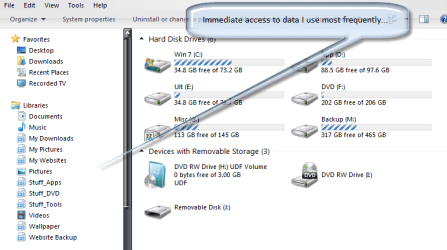
I see little difference between windows explorer in Windows 7 and explorer in Vista or XP except libraries, and they provide immediate access to the data important to me.
So to each his own, but I recommend spending a little time learning what they can do for you...
Regards- | My System Specs | | System Manufacturer/Model Number Home Grown OS Windows 7 Ultimate (64) CPU i7-2600K Motherboard Asus P8P67-M Pro Memory G.SKILL Ripjaws X Series 8GB (2 x 4GB) Graphics Card ATI 5750 Sound Card On-Board Monitor(s) Displays LG W2486L Screen Resolution 1920X1080 PSU Zalman ZM770-XT 770 Watts Case Antec 180 mini Cooling Cooler Master V8 Hard Drives Intel X-25M 80 Gig SSD | Intel X-25M 160 Gig SSD | WD Black 500MB - External eSata Internet Speed 15MB - Cable Other Info Sissy OC - 4.6 @ 1.3175 24/7 | 18' Idle - 55' Load |
16 Dec 2009
|
#6 | | Windows 7 Ultimate (64) Rust Belt |
| My System Specs | | System Manufacturer/Model Number Home Grown OS Windows 7 Ultimate (64) CPU i7-2600K Motherboard Asus P8P67-M Pro Memory G.SKILL Ripjaws X Series 8GB (2 x 4GB) Graphics Card ATI 5750 Sound Card On-Board Monitor(s) Displays LG W2486L Screen Resolution 1920X1080 PSU Zalman ZM770-XT 770 Watts Case Antec 180 mini Cooling Cooler Master V8 Hard Drives Intel X-25M 80 Gig SSD | Intel X-25M 160 Gig SSD | WD Black 500MB - External eSata Internet Speed 15MB - Cable Other Info Sissy OC - 4.6 @ 1.3175 24/7 | 18' Idle - 55' Load |
16 Dec 2009
|
#7 | | Windows 7 Home Premium x64(desktop), Windows 7 Professional x86(laptop) Worcester |
I don't use them, since there is only one partition on my HDD, and I am the only using my PC, but I agree it is a bit annoying if you click the task bar icon, then can't get into another folder on your user account, say, the downloads folder. | My System Specs | | System Manufacturer/Model Number Self Built OS Windows 7 Home Premium x64(desktop), Windows 7 Professional x86(laptop) CPU AMD Phenom II x4 965 @ 3.40GHz Black Edition Motherboard ASUS M4A785TD-V Evo Memory 4GB Corsair XMS3 DDR3 Graphics Card Sapphire HD 5770 1024MB Monitor(s) Displays 22" Viewsonic VX2260 Widescreen LCD Screen Resolution 1900x1080 (1080p) Keyboard Saitek Eclipse II Mouse Roccat Kova Gaming Mouse PSU 600W OCZ StealthXStream Case Antec 902 Ultimate Gaming Case Cooling Stock - CPU, GPU, PSU, 3x120MMcase fans 1x200mm case fan Hard Drives Samsung Spinpoint F3 1TB SATA, 32MB Cache, 7200 RPM |
16 Dec 2009
|
#8 | | |

Quote: Originally Posted by Tommyd I don't use them, since there is only one partition on my HDD, and I am the only using my PC, but I agree it is a bit annoying if you click the task bar icon, then can't get into another folder on your user account, say, the downloads folder. If you change the target of the Taskbars Explorer Icon properties to:
%windir%\explorer.exe /n,::{20D04FE0-3AEA-1069-A2D8-08002B30309D} Attachment 42206
It will open on "computer" instead of the libraries.
(Copy the existing target command if you wish to revert back to libraries) | My System Specs | | Computer type PC/Desktop System Manufacturer/Model Number Systems by SmartEyeball OS 8 Pro x64 CPU i7 3770K 4.6GHz Motherboard ASUS P8Z77 WS Memory 16GB G.Skill Trident X 2400mhz Graphics Card 3x Gigabyte GTX 670 OC WindForce *TRI SLI* Sound Card ALC898 / 5.1 receiver/ ATH-AD900 Headphones Monitor(s) Displays x3 Dell U2410 / 58" Samsung / "40 Sony Screen Resolution 5760*1200/ 1920*1200 / 1920*1080 Keyboard Topre Realforce // Ducky Shine MX Black // Filco Ninja TKL Mouse Razer Imperator + Thermaltake Theron PSU Corsair AX1200W Case Thermaltake Level 10 GT Snow Edition Cooling Noctua NH-D14 Hard Drives 2x Intel 520 240GB (RAID 0) * 2x WD Caviar Blacks 2TB (RAID 0) * 2TB WD Caviar Black Antivirus MSE Browser IE, FF Other Info GT Extreme V2 Sim Racing Cockpit + 40" LCD and K/B Mouse stand ▼
Fanatec CSR Elite Wheel + Clubsport Pedals + CSR shifter/7GS ▼
Buttkicker v2 Seat Rumbler with Dedicated 5.1 and Sub Woofer attached to frame ▼
=
Bloody Big Grin |
16 Dec 2009
|
#9 | | Windows 7 Ultimate X64 SP1 Cromer Norfolk UK |
whats wrong with Libraries? you have everything you normally access in one easy location! and if YOU really want my computer, then just click start>Computer, let me ask you whats easier? click the taskbar>music or click start>computer>c:\>Users>*your username*>My Music? i know which one i prefer..... | My System Specs | | Computer type PC/Desktop System Manufacturer/Model Number Self Built OS Windows 7 Ultimate X64 SP1 CPU Intel(R) Core(TM) i5-2500K CPU @ 3.30GHz Motherboard Intel(R) Core(TM) i5-2500K CPU @ 3.30GHz Memory 8GB 1333Mhz DDR3 Graphics Card NVIDIA GeForce GTX 460 Sound Card Realtek Monitor(s) Displays Acer Al1980, Screen Resolution 1360*768 Keyboard Alba USB Mouse IT Works Wireless USB PSU 750W Cooler Master Case Cooler Master Haf X Cooling Cooler Master Hyper TX3 Hard Drives 500GB SATA WBC
1TB WD Caviar Green
80GB IDE Samsung Internet Speed 12Mb/s Down 1.2 Mb/s Up |
16 Dec 2009
|
#10 | | |

Quote: Originally Posted by severedsolo whats wrong with Libraries? Nothing. Except I personally don't want everything in a library. Quote: i know which one i prefer..... So do I
I find that it takes less clicks to find something when I open explorer this way:
As opposed to this way:
It all comes down to a users personal preference. | My System Specs | | Computer type PC/Desktop System Manufacturer/Model Number Systems by SmartEyeball OS 8 Pro x64 CPU i7 3770K 4.6GHz Motherboard ASUS P8Z77 WS Memory 16GB G.Skill Trident X 2400mhz Graphics Card 3x Gigabyte GTX 670 OC WindForce *TRI SLI* Sound Card ALC898 / 5.1 receiver/ ATH-AD900 Headphones Monitor(s) Displays x3 Dell U2410 / 58" Samsung / "40 Sony Screen Resolution 5760*1200/ 1920*1200 / 1920*1080 Keyboard Topre Realforce // Ducky Shine MX Black // Filco Ninja TKL Mouse Razer Imperator + Thermaltake Theron PSU Corsair AX1200W Case Thermaltake Level 10 GT Snow Edition Cooling Noctua NH-D14 Hard Drives 2x Intel 520 240GB (RAID 0) * 2x WD Caviar Blacks 2TB (RAID 0) * 2TB WD Caviar Black Antivirus MSE Browser IE, FF Other Info GT Extreme V2 Sim Racing Cockpit + 40" LCD and K/B Mouse stand ▼
Fanatec CSR Elite Wheel + Clubsport Pedals + CSR shifter/7GS ▼
Buttkicker v2 Seat Rumbler with Dedicated 5.1 and Sub Woofer attached to frame ▼
=
Bloody Big Grin I hate the "Libraries" bring back "My Computer" problems? All times are GMT -5. The time now is 02:27 AM. | |