Windows 7 Forums Search
Welcome to Windows 7 Forums. Our forum is dedicated to helping you find solutions with any problems, errors or issues you are experiencing with Windows 7. The Windows 7 forum also covers news and updates and has an extensive Windows 7 tutorial section that covers a wide range of tips and tricks.


Windows 7 - Remove "Safely Remove Hardware" Icon


03-03-2009   #1


Windows 7


Remove "Safely Remove Hardware" Icon

Does anyone know how to remove the "safely remove hardware" icon in the taskbar? I do not mean hide it. I have my icons always show in the notification area because I don't like the arrow icon either.

Any ideas? Thanks.

My System SpecsSystem Spec
03-03-2009   #2


windows 7 ultimate 64bit


there is no option in "customize notification icons" when you right-click in the notification area?.
one other thing to check is whether or not your usb device is optimized for performance or quick removal.
My System SpecsSystem Spec
03-03-2009   #3


Windows 7 Ultimate x64 SP1


Hello Kentor, and welcome to Seven Forums.

I believe the only way for it to go away is to go into the Device Manager and open the properties for each drive listed in the "safely remove hardware" icon. Next, select the "Quick Removal" option under the Policies tab in Properties for each drive. This will of course disable write caching for the drives, but it should remove the icon.

Hope this helps,
Shawn
My System SpecsSystem Spec
.


03-03-2009   #4


Windows 7 Ultimate x64 SP1


Mine has disappeared in the 7048 build without doing anything Shawn..
My System SpecsSystem Spec
03-03-2009   #5


Windows 7 Ultimate x64 SP1


It's still on with my build 7048 x64. Both of my drives have write caching enabled though.

Remove "Safely Remove Hardware" Icon-srh.jpg
My System SpecsSystem Spec
03-03-2009   #6


Windows 7 Ultimate x64 SP1


Yeah, I do have write caching enabled, always..

Name:  systray.JPG
Views: 4702
Size:  10.6 KB
My System SpecsSystem Spec
03-03-2009   #7


Windows 7 Ultimate x64 SP1


Um, hopefully mine will disappear as well at some point to.
My System SpecsSystem Spec
03-03-2009   #8


Vista Ultimate SP2/Windows 7 Ultimate SP1/x64/XP SP3 x86 in VM


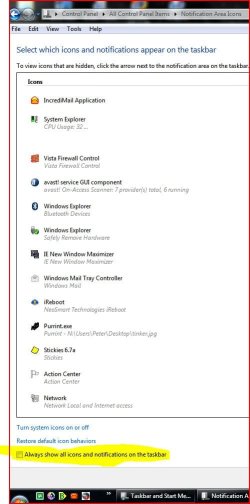
Mine disappears if I remove the "Always Show All Icons & Notifications In The Taskbar" checkmark from right-clicking the taskbar, Properties, Customize Notifcation Area, but then I have to adjust every single one to show that I want.
Attached Thumbnails
Remove "Safely Remove Hardware" Icon-na.jpg  
My System SpecsSystem Spec
03-04-2009   #9


Windows 7 Ultimate x64 SP1


Hey Shawn,

I found a free little app that removes the Safely Remove Hardware Icon from the sys tray.

my icon only appears if I plug in a usb device, it doesn't stay there like before..

But this app just takes the icon completely away or brings it back but you can still access the safely remove hardware applet while this app has the icon gone if you make the shortcut for it.

I was going to make the tut on how to make the Safely Remove Hardware shortcut but I see you already made it over at Vistax64.

Anyways, this little thing works good, I tested it out, just unblocked it and installed, no compatibility mode or anything. Pleae add it to your list here and at Vista please.

Remove "Safely Remove Hardware" Icon-iconremover.jpg

IconRemover
My System SpecsSystem Spec
03-04-2009   #10


Windows 7 Ultimate x64 SP1


Done Aaron.
My System SpecsSystem Spec
Reply

Remove "Safely Remove Hardware" Icon problems?


Thread Tools


Similar Threads for: Remove "Safely Remove Hardware" Icon
Thread Forum
Solved Safely Remove Hardware icon is present. Will not display popup "Safe.. General Discussion
Why does my hard disk appear in "Safely Remove Hardware" ? Hardware & Devices
"Safely remove hardware" not showing drive letter/label Hardware & Devices
How to disable Systray icon "Safely remove hardware and eject media"? General Discussion
Show icon for "safely remove hardware" General Discussion


All times are GMT -5. The time now is 02:25 AM.


Windows 7 Forums is an independent web site and has not been authorized,
sponsored, or otherwise approved by Microsoft Corporation.
"Windows 7" and related materials are trademarks of Microsoft Corp.
© Designer Media Ltd
  

1 2 3 4 5 6 7 8 9 10 11 12 13 14 15 16 17 18 19 20 21 22 23 24 25 26 27 28 29 30