Windows 7 Forums


Windows 7: Folder rename

16 Dec 2009   #1


Folder rename

i want to rename some of my folders using "webding" font , to be more precise i want to use the up arrow at the beggining and at the end of the folder's name. can this be done ?

My System SpecsSystem Spec

16 Dec 2009   #2

Windows 7 x64 (SP1)


Ummm....no...not in the sense what you want...
But you could use Unicode. "↑foldername↑"
My System SpecsSystem Spec
16 Dec 2009   #3


ok ... that ... how can i get that to work over here ?

whats unicode ? sorry im not very familiar with this termonology.
My System SpecsSystem Spec
.


16 Dec 2009   #4

Windows 7 Home Premium
Home of the Missouri Mule.


Alt-Keys work very well. Going to try to upload a short pdf file that will show the keys. If it doesn't work, Google alt-keys and you should find a guide.
Attached Files
File Type: pdf altKeys_e.pdf (267.6 KB, 40 views)
My System SpecsSystem Spec
16 Dec 2009   #5

Windows 7 Ultimate 64 bit
Singapore & Australia


Yes, you can do this.

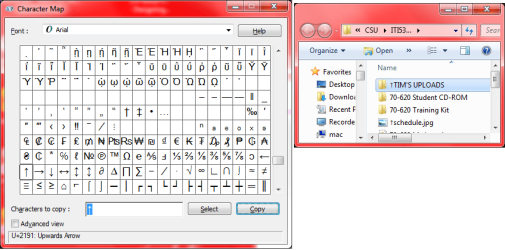
If you open up CHARMAP from the RUN command and search through it under arial font, you'll find an 'up arrow'.

Select it, highlight it, copy it and paste it into your folder/file names.
Attached Thumbnails
Folder rename-charmap.png  
My System SpecsSystem Spec
16 Dec 2009   #6

Windows 7 Ultimate 64 bit
Singapore & Australia


Quote   Quote: Originally Posted by Cato View Post
Alt-Keys work very well. Going to try to upload a short pdf file that will show the keys. If it doesn't work, Google alt-keys and you should find a guide.
Ah yes, ALT+24 is the shortcut to the same character in CHARMAP.EXE.

EDIT: You can use CHARMAP if you are on a laptop with no numerical number pad.
My System SpecsSystem Spec
16 Dec 2009   #7

Windows 7 Home Premium
Home of the Missouri Mule.


I couldn't remember for the life of me how to access CHARMAP until I read your post, Tim. I knew I had a pdf file that had some, because I always forget.

Thanks for the reminder...that I will more than likely not remember tomorrow.

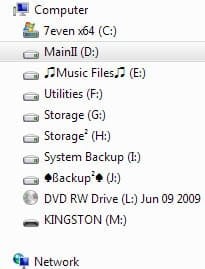
Some of the folders I've done this way:
Attached Images
 

Last edited by Cato; 17 Dec 2009 at 12:02 AM.. Reason: Add attachment.
My System SpecsSystem Spec
17 Dec 2009   #8

Windows 7 Ultimate 64 bit
Singapore & Australia


Quote   Quote: Originally Posted by Cato View Post
I couldn't remember for the life of me how to access CHARMAP until I read your post, Tim. I knew I had a pdf file that had some, because I always forget.

Thanks for the reminder...that I will more than likely not remember tomorrow.

Some of the folders I've done this way:
Hey that's a good idea (music folder etc).... off to change mine now
My System SpecsSystem Spec
17 Dec 2009   #9


thanks cato ,
all i need to do now is search for my symbol in the tables u uploaded and use the famous copy paste.
My System SpecsSystem Spec
17 Dec 2009   #10

Windows 7 Home Premium
Home of the Missouri Mule.


You don't even have to use copy/paste. Just type it in as a normal Rename using the Alt+code and you're good to go.
My System SpecsSystem Spec
Reply

 Folder rename problems?


Thread Tools


Similar help and support threads for: Folder rename
Thread Forum
Solved cannot rename folder General Discussion
Solved Create and then rename a new folder General Discussion
How do I rename this Folder? General Discussion
user folder rename Network & Sharing
Help me rename my user folder please General Discussion


All times are GMT -5. The time now is 12:05 AM.


Seven Forums Android App Seven Forums IOS App Follow us on Facebook

Windows 7 Forums is an independent web site and has not been authorized,
sponsored, or otherwise approved by Microsoft Corporation.
"Windows 7" and related materials are trademarks of Microsoft Corp.
© Designer Media Ltd
  

1 2 3 4 5 6 7 8 9 10 11 12 13 14 15 16 17 18 19 20 21 22 23 24 25 26 27 28 29 30 31 32