Windows 7 Forums


Windows 7: Is Filmstrip view really gone in Win 7? Help

20 Dec 2009   #1

Windows 7
 
 
Is Filmstrip view really gone in Win 7? Help

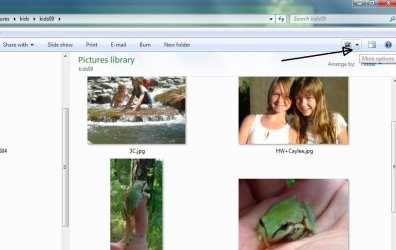
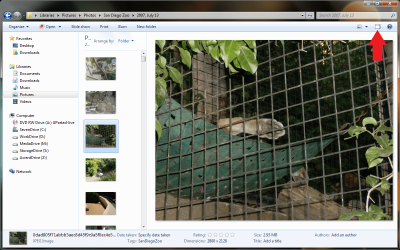
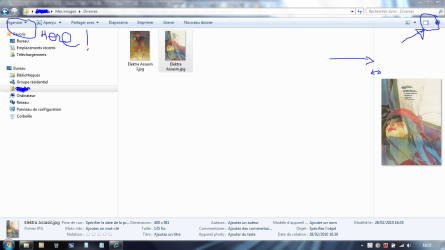
Just switch from XP to Win 7 and I'm a little amazed that the selection where you could see all your pictures in "Filmstrip" view is gone. Is this the case and if so, how do you simple see small images of all your pictures in a folder?

My System SpecsSystem Spec

20 Dec 2009   #2

Windows 7 Ultimate x64 SP1


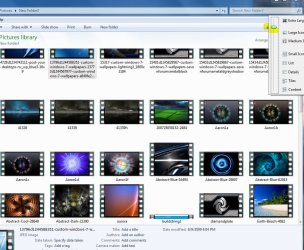
I just tried the download for the filmstrip borders in 7, it works for me. Had to log off and back on or restart.
Thumbnail Previews - Change Border

Last edited by Brink; 21 Dec 2009 at 11:53 PM.. Reason: updated link
My System SpecsSystem Spec
20 Dec 2009   #3

7 x64
Upstate, AZ


Quote   Quote: Originally Posted by badspell68 View Post
Just switch from XP to Win 7 and I'm a little amazed that the selection where you could see all your pictures in "Filmstrip" view is gone. Is this the case and if so, how do you simple see small images of all your pictures in a folder?

You really miss the sprockets, or you just want the thumbnails?
Attached Thumbnails
Is Filmstrip view really gone in Win 7? Help-clipboard01.jpg  
My System SpecsSystem Spec
.


20 Dec 2009   #4

Win 7 Pro


As RogerR notes, the extra large icon opportunity in Win 7 is fantastic. No more squinting or having to open full screen when reviewing photos
My System SpecsSystem Spec
20 Dec 2009   #5

Windows 7


"download for the filmstrip borders in 7" Is this an add-on?
I tried what was listed and I'm still getting Icons, no pictures?
My System SpecsSystem Spec
20 Dec 2009   #6

Windows 7 Ultimate x64 SP1


Quote   Quote: Originally Posted by badspell68 View Post
"download for the filmstrip borders in 7" Is this an add-on?
I tried what was listed and I'm still getting Icons, no pictures?

It's just a registry key edit. Did you reboot? Did you increase the size of the thumbnail view?

Is Filmstrip view really gone in Win 7? Help-capture.jpg


Or are you talking about something completely different...viewing pictures in slideshow mode???
My System SpecsSystem Spec
20 Dec 2009   #7

Windows 7


Nope, just want to look at pictures contained in their folders...just like I used to in XP, "filmstrip mode".
Registry key edit? Did all the re-sizing and did re-boot.
My System SpecsSystem Spec
20 Dec 2009   #8

Windows 7 Ultimate x64 SP1


Yeah, the tutorial I posted in my first post.

Download where it says number 4. Video Sprockets

Save it, go to where you saved it, right click on it and go to properties - unblock it where it says Unblock.

Right click on it again after you did that, click on where it says merge

Click on run, the UAC promt, Yes/OK whatever it says. Then reboot.
My System SpecsSystem Spec
21 Dec 2009   #9

Windows 7


OK, non of it makes any sense to my. You talk about installing a download? Where, how and what? I'm guessing there is no internal way to get 7 to work like XP in filmstrip mode.
My System SpecsSystem Spec
21 Dec 2009   #10

Windows 7 Ultimate x64 SP1


I guess you guess right then. Good Luck to you.
My System SpecsSystem Spec
Reply

 Is Filmstrip view really gone in Win 7? Help problems?


Thread Tools


Similar help and support threads for: Is Filmstrip view really gone in Win 7? Help
Thread Forum
Solved Outlook 2010 cannot change my mail view back to normal from list view Microsoft Office
can't view album art in windows explorer in thumbnail view General Discussion
How do I enable Filmstrip in explorer in win 7 64bit ? Music, Pictures & Video
If I change the view of one folder, the view of all folders changes?!? Customization
List View to Icon View Music, Pictures & Video


All times are GMT -5. The time now is 11:55 AM.


Seven Forums Android App Seven Forums IOS App Follow us on Facebook

Windows 7 Forums is an independent web site and has not been authorized,
sponsored, or otherwise approved by Microsoft Corporation.
"Windows 7" and related materials are trademarks of Microsoft Corp.
© Designer Media Ltd
  

1 2 3 4 5 6 7 8 9 10 11 12 13 14 15 16 17 18 19 20 21 22 23 24 25 26 27 28 29 30 31 32