|
Welcome to Windows 7 Forums. Our forum is dedicated to helping you find solutions with any problems, errors or issues you are experiencing with Windows 7. The Windows 7 forum also covers news and updates and has an extensive Windows 7 tutorial section that covers a wide range of tips and tricks.
Windows 7 - Seeing Double? |
03-09-2009
|
#1 | | |
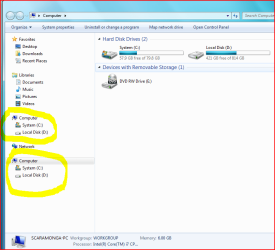
Seeing Double? I just noticed this when clicking on Windows Explorer icon on taskbar, I cant recall seeing it before
2 sets of drives? (right clicking start button and selecting Explorer from there, reveals 1 set of drives, as it should be).
Anyone get the same? | My System Specs | | |
03-09-2009
|
#2 | | Win7 Ultimate x64 on Desktop / Win7 Ultimate x86 on laptop / Win7 x86 Starter on Netbook |
I don't get 2 sets. I have seventeen partitions, so that's enough.... | My System Specs | | System Manufacturer/Model Number Dilithium Computers/Engineering (Myself) Star date 42.739285.5432.9 OS Win7 Ultimate x64 on Desktop / Win7 Ultimate x86 on laptop / Win7 x86 Starter on Netbook CPU AMD Phenom 965 X4 3.4Ghz cpu Black Edition Motherboard Gigabyte 790XT Memory 12 Gb DDR3 Graphics Card Nvidea Gforce GTX 470 Sound Card Onboard Realtek hi-fi Monitor(s) Displays Lg 3D led 23" Screen Resolution 1920x1080 Keyboard Logitech wireless K350 Mouse Logitech G500 gaming mouse. PSU OCZ 700W GameXstream Case Artec 10000 Cooling On board + many case fans Hard Drives Loads maxstore sata 1 & 2/ loads of partitions + 1Tb Hitachi sata 2. Ocz ssd. Internet Speed Talk talk. 11Mb Other Info My PC was hand built with matchsticks. xbox 360 controller. Printers,fax......... |
03-09-2009
|
#3 | | Windows 7 Ultimate x64 SP1 |

Quote: Originally Posted by scaramonga
Anyone get the same?
Nope.. | My System Specs | | System Manufacturer/Model Number Airbot 2.0 OS Windows 7 Ultimate x64 SP1 CPU Core i7 920 (D0) @ 4Ghz, *26c idle *65c full load on air Motherboard Asus P6X58D Premium - Sata 6Gb/s - USB 3.0 Memory 12GB DDR3 Corsair Dominator -CMD12GX3M6A1600C8 at 1600MHz Graphics Card EVGA GeForce GTX 480 -Aftermaket Accelero Xtreme Plus cooler Sound Card ASUS Xonar D2X Monitor(s) Displays 1 LG 24" Flatron W2453V-PF 1 Samsung 24" P2450H both 2ms RT Screen Resolution 1920x1080@60hz Keyboard Logitech Wireless MK700 Mouse Logitech Wireless MK700 PSU Corsair HX1000W Case Cooler Master HAF 932 Cooling Case Fans *3 230mm, *1 140mm/CPU - *Tuniq Tower 120 Extreme Hard Drives 1 OCZ Vertex2 180GB SSD
1 TB Samsung Spinpoint F1 7200RPM 32MB cache
2 500GB WD Caviar Blacks 7200RPM 32MB cache (WD5001AALS)
Pioneer DVD Burner DVR-S18M Internet Speed DL 15 Mbps UL 0.98 Mbps Other Info Processor-7.7 *RAM- 7.9 *Graphics-7.9 *Gaming Graphics- 7.9 *SSD- 7.8 W.E.I final score= 7.7
*Phone- Samsung Galaxy Nexus |
03-12-2009
|
#4 | | |
I've seen it in many flavors, but mostly I just attribute it to the panes not updating correctly once I have more than 4 Explorer windows open. See my thread: Windows Explorer left-pane not showing changes to folder names | My System Specs | | System Manufacturer/Model Number Self OS Windows 7 Beta 64bit CPU Core i7 920 (stock) Motherboard Gigabyte GA-EX58-UD3R Memory 6Gb DDR3 G.skill 1066 Graphics Card EVGA 9500GT 1Gb Sound Card integrated Monitor(s) Displays HP P1100 Screen Resolution 1280x1024 Keyboard MS Wireless Laser Keyboard 6000 v2.0 Mouse MS IntelliMouse Explorer 2.0 PSU PC Power & Cooling S61EPS 610W Case Raidmax Enzo ATX-617WY (yellow/black) Cooling 5 case fans (2x120mm, 3x80mm) Hard Drives WD 320Gb SATA, WD 750Gb SATA, WD 320Gb IDE, Maxtor 500Gb IDE Internet Speed 6Mbps System Manufacturer/Model Number Self Build 64bit OS Vista Ult64, Win7600 CPU Intel Core 2 Quad Q6600 @ 2400 MHz 64bit OS Motherboard Asus P5E3 Deluxe WiFi @p 64 bit OS Memory 4096 MB DDR3-SDRAM Graphics Card ATI Radeon HD 3870 Series x2 Crossfired Sound Card Realtek on board Monitor(s) Displays Samsung SyncMaster - 23 inches Screen Resolution 1680x1050 pixels at 60 Hz in True Colors Keyboard Wireless Mouse Wireless PSU Cooler Master 1000w Case Cooler Master Cosmos 1000. Cooling Fans and fresh air, Hard Drives Hitachi (250 GB)/Samsung 750 GB. /Barracuda 160 GB.
My Book 1 TB external.. Internet Speed Never fast enough Other Info I use a Magnum. |
03-12-2009
|
#6 | | Windows 7 Ultimate x64 SP1 |
Hi jfar,
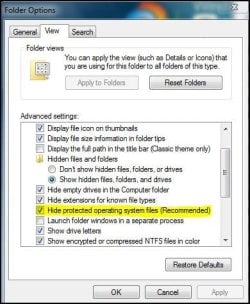
you'd just have to go back and enable hide the protected files in the Folder Options. | My System Specs | | System Manufacturer/Model Number Airbot 2.0 OS Windows 7 Ultimate x64 SP1 CPU Core i7 920 (D0) @ 4Ghz, *26c idle *65c full load on air Motherboard Asus P6X58D Premium - Sata 6Gb/s - USB 3.0 Memory 12GB DDR3 Corsair Dominator -CMD12GX3M6A1600C8 at 1600MHz Graphics Card EVGA GeForce GTX 480 -Aftermaket Accelero Xtreme Plus cooler Sound Card ASUS Xonar D2X Monitor(s) Displays 1 LG 24" Flatron W2453V-PF 1 Samsung 24" P2450H both 2ms RT Screen Resolution 1920x1080@60hz Keyboard Logitech Wireless MK700 Mouse Logitech Wireless MK700 PSU Corsair HX1000W Case Cooler Master HAF 932 Cooling Case Fans *3 230mm, *1 140mm/CPU - *Tuniq Tower 120 Extreme Hard Drives 1 OCZ Vertex2 180GB SSD
1 TB Samsung Spinpoint F1 7200RPM 32MB cache
2 500GB WD Caviar Blacks 7200RPM 32MB cache (WD5001AALS)
Pioneer DVD Burner DVR-S18M Internet Speed DL 15 Mbps UL 0.98 Mbps Other Info Processor-7.7 *RAM- 7.9 *Graphics-7.9 *Gaming Graphics- 7.9 *SSD- 7.8 W.E.I final score= 7.7
*Phone- Samsung Galaxy Nexus |
03-12-2009
|
#7 | | Windows 7 Ultimate 32-bit & 64-bit both SP1 |
Hi jfar,
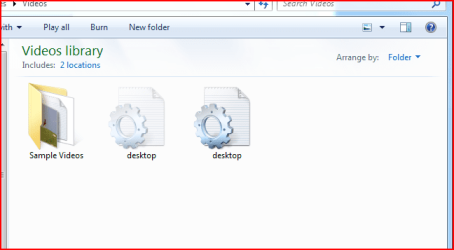
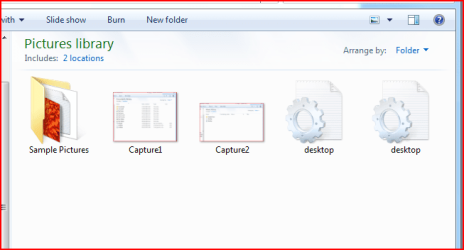
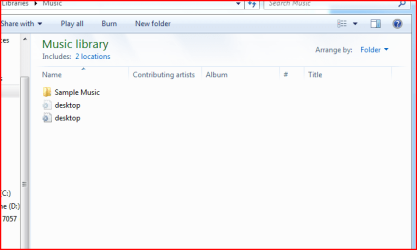
That is perfectly normal if in the View tab of Folder Options you have set the option to Show hidden files, folders, and drives and cleared the option Hide protected operating system files (Recommended). In your first example, Videos library, if you right click each of the desktop icons in turn and select Properties, you will see the location for one is C:\Users\User\Videos and the other is C:\Users\Public\Videos | My System Specs | | System Manufacturer/Model Number Home Built, N/A OS Windows 7 Ultimate 32-bit & 64-bit both SP1 CPU AMD Athlon (tm) 64 X2 Dual Core Processor 7550 @2.5GHz Motherboard Gigabyte GA-MA770-ES3 Memory 2 x 2GB PC2-6400 (DDR2-800), Ganged Mode, (4GB total) Graphics Card Nvidia GeForce GTX 550 Ti 1GB Sound Card Realtek High Definition on board solution (ALC 892) Monitor(s) Displays ViewSonic VA1912w Widescreen (VGA) Screen Resolution 1440x900 Keyboard Microsoft Digital Media Pro Keyboard (USB) Mouse Microsoft Comfort Optical Mouse 3000 (USB) PSU XFX Pro Series 850W Semi-Modular Case Antec NSK 4000B II Cooling 1 x 80mm Front Inlet (with filter) 1 x 120mm Rear Exhaust Hard Drives OCZ Petrol SSD 64GB SATA III
OCZ Petrol SSD 128GB SATA III
Samsung HD501LJ 500GB SATA II x2
Hitachi HDS721010CLA332 1TB SATA II
1 x Iomega 1.5TB Ext USB 2.0 Internet Speed NetGear DG834Gv3 ADSL Modem/Router (Ethernet) ~4.0 Mb/s (O2) Other Info PCI-Express SATA III controller (Marvell 88SE9128 chipset)
Optical Drive: HL-DT-ST BD-RE BH10LS30 SATA Bluray
Lexmark S305 Printer/Scanner/Copier (USB)
CTF-430 Tablet & Pen
WEI Score: |
03-12-2009
|
#8 | | |
Thanks all,Sorry I was away,yes somebody should give me a slap,for forgetting to redo those changes, now i reticked the boxes and rebooted, and there is one desktop icon in all the places bar pictures folder, now I checked on the 64 bit PC and there are no desktop icons in any of those places if you know what I mean,its just I cannot remember seeing the icons in those folders before, I may be wrong,has anybody else got one of the icons in there folders in 32bit 7057? | My System Specs | | System Manufacturer/Model Number Self Build 64bit OS Vista Ult64, Win7600 CPU Intel Core 2 Quad Q6600 @ 2400 MHz 64bit OS Motherboard Asus P5E3 Deluxe WiFi @p 64 bit OS Memory 4096 MB DDR3-SDRAM Graphics Card ATI Radeon HD 3870 Series x2 Crossfired Sound Card Realtek on board Monitor(s) Displays Samsung SyncMaster - 23 inches Screen Resolution 1680x1050 pixels at 60 Hz in True Colors Keyboard Wireless Mouse Wireless PSU Cooler Master 1000w Case Cooler Master Cosmos 1000. Cooling Fans and fresh air, Hard Drives Hitachi (250 GB)/Samsung 750 GB. /Barracuda 160 GB.
My Book 1 TB external.. Internet Speed Never fast enough Other Info I use a Magnum. All times are GMT -5. The time now is 03:33 AM. |  |