freiheit59
New member
- Local time
- 8:40 AM
- Messages
- 22
Dear Helper
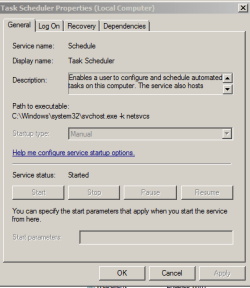
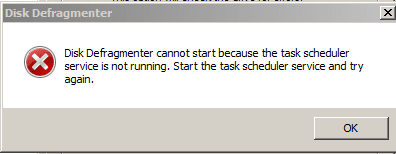
I wanted to make disk defragment to the drive C. but a dialog box tells me that the task scheduler is disabled. I tride to enable it but evey thing is gray. my os is win7 ultimate-64bit. so if there is any tip to fix this problem?
Thanks in advance
I wanted to make disk defragment to the drive C. but a dialog box tells me that the task scheduler is disabled. I tride to enable it but evey thing is gray. my os is win7 ultimate-64bit. so if there is any tip to fix this problem?
Thanks in advance
Attachments
My Computer
At a glance
Windows7 Ultimate 32bit-version 6.1.7600 Bult
- Computer Manufacturer/Model Number
- Toshiba satellite A200 1MB
- OS
- Windows7 Ultimate 32bit-version 6.1.7600 Bult
- Motherboard
- intel(R) core(TM)cpu T5300 @ 1.73GHz