Join Forum
|
Login
|
Today's Posts
|
Tutorials
|
Vista Forum
|
Windows 8 Forum
Windows 7 Help Forums
>
Windows 7 help and support
>
General Discussion
»
Windows 7: Changing mouse features
06 Jan 2010
#
1
RobertD
Windows 7 Pro
37 posts
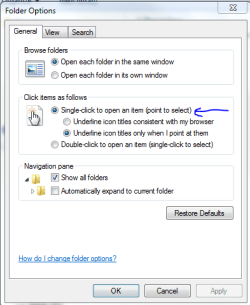
Changing mouse features
Formerly with XP, I could change mouse clicks from needing two to one within the
control panel. Now under 7, I can't find that option in the control panel. Anyplace else I could look for that, or is it even available within 7?
My System Specs
System Manufacturer/Model Number
Systemax/Venture
OS
Windows 7 Pro
06 Jan 2010
#
2
garysgold
Vista Ult 64 bit Seven Ult RTM x64
3,194 posts
Maine, USA
Open Windows Explorer. Click on Organize/folder and search options.
My System Specs
System Manufacturer/Model Number
Dell XPS420
OS
Vista Ult 64 bit Seven Ult RTM x64
CPU
Intel Core2 Quad Q6600 2.40 gigahertz
Memory
Crucial Ballistix 4x2GB PC2 6400
Graphics Card
NVIDIA GeForce 8600 GTS 256 MB
Sound Card
Creative SB X-Fi audio
Monitor(s) Displays
HP w2207 + HPvs15
Screen Resolution
1680x1050 + 1024x768
Keyboard
Microsoft Comfort Curve
Mouse
MX Revolution
Hard Drives
2-WD5000AAKS-500 GB WD5000AAV-500 GB external
Other Info
Wacom Intuos 2 Graphics Tablet Experience Index=5.5
06 Jan 2010
#
3
Qdos
W7 x64
4,027 posts
3rd Rock from the Sun
Quote: Originally Posted by
garysgold
Click on Organize/folder and search options.
Even in XP it was under Folder Options wasn't it?
My System Specs
System Manufacturer/Model Number
Custom built machine
OS
W7 x64
CPU
Intel Q9300 2.5Ghz Quad LGA775 (Would like Q9650)
Motherboard
Gigabyte GA-EP45T-UD3R (F6 Bios)
Memory
4Gb OCZ Gold 1,333Mhz
Graphics Card
Palit HD4850 O/C Sonic 512Mb DDR3, Dual DViD's
Sound Card
Azalia to twin Samson 50w Studio Monitors
Monitor(s) Displays
Twin Dell (E-IPS) U2311H 23.6" Screens
Screen Resolution
1920 x 1080 @ 60Hz
Keyboard
Cherry PS/2 custom model
Mouse
Lenovo USB laser "Thinkpad" Mouse
PSU
OCZ 600w
Case
Lian-Li PC8 acoustifoamed' aluminium tower
Cooling
Scythe 140mm Zipang
Hard Drives
Crucial M4 SSD, archives on twin Western Digital Caviar Black WD2002FAEX, 2TB, 7200rpm HDD's, Samsung Ritemaster CD/DVD Burner...
Internet Speed
ADSL2+ @14Mbps downstream & Cat6 Gigabit Ethernet
Antivirus
NOD32
Browser
Opera
Other Info
Silicon Dust HD Homerun Dual FTA (Ethernet) TV Tuners, Dray Tek Vigor 2850Vn router and 8x HP Gigabit Switch. Lian-Li CR26 Card Reader, Canon MF4430 iSensys laser printer/scanner.
.
06 Jan 2010
#
4
RobertD
Windows 7 Pro
37 posts
To garysgold and qdos: Thanks, you're right, it was in folders options (I forgot)
My System Specs
System Manufacturer/Model Number
Systemax/Venture
OS
Windows 7 Pro
Changing mouse features problems?
«
"Add a Device" Box is Blank and does not show any devic
|
Whatever happened to Search?
»
Thread Tools
Printable Version
Email this Page
Similar help and support threads for: Changing mouse features
Thread
Forum
Changing mouse click behaviour in taskbar
Customization
Changing from one USB mouse to another - USB driver uninstall needed?
Hardware & Devices
mouse pointer keeps changing in adobe photoshop cs5
Software
Changing UltraNav settings while a mouse is connected
Hardware & Devices
Mouse Pointers - Allow or Prevent Changing
Tutorials
All times are GMT -5. The time now is
05:53 AM
.
Contact Us
-
Windows 8 Support
-
Windows Vista Support
-
Legal
-
Privacy and cookies
-
Top
Windows 7 Forums is an independent web site and has not been authorized,
sponsored, or otherwise approved by Microsoft Corporation.
"Windows 7" and related materials are trademarks of Microsoft Corp.
©
Designer Media Ltd
1
2
3
4
5
6
7
8
9
10
11
12
13
14
15
16
17
18
19
20
21
22
23
24
25
26
27
28
29
30
31
32