Windows 7 Forums


Windows 7: Disable "NEW FOLDER" link in explorer toolbar

07 Jan 2010   #1
Arc

Windows 7 Home Premium 64 Bit SP 1
 
 
Disable "NEW FOLDER" link in explorer toolbar

HI EVERYBODY.
Perhaps nobody in the forum asked here for the same problem twice.


Earlier, you friends provide me two batch files to delete all new folders
either empty or full.

Can anybody please tell me how to disable the new folder button (red bordered)? If it is a registry edit, please tell me how to do so... or otherwise... PLEASE HELP ME.
Attached Thumbnails
Disable "NEW FOLDER" link in explorer toolbar-untitled.jpg  
My System SpecsSystem Spec

07 Jan 2010   #2

Windows 7 Pro 64 SP1
East Bay Area, CA


I'm not sure about disabling that button, but why don't you just give him his own account if you're going to let him use the computer.
My System SpecsSystem Spec
07 Jan 2010   #3
Arc

Windows 7 Home Premium 64 Bit SP 1


Quote   Quote: Originally Posted by derekimo View Post
I'm not sure about disabling that button, but why don't you just give him his own account if you're going to let him use the computer.
But the other drives where data are stored are accessible from either user account
My System SpecsSystem Spec
.


07 Jan 2010   #4

64-bit Windows 7 Ultimate SP1 & Windows 8 Enterprise
Texas


Hello Arc,

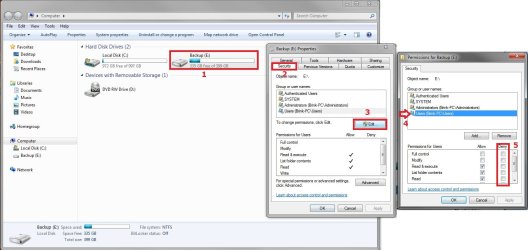
You can change the permission levels to "Deny" only his standard account access to the drives. Be sure to only deny his account. You do not want to deny your's or all accounts.
Disable "NEW FOLDER" link in explorer toolbar-permissions.jpg
While your at it, you might also consider using Parental Controls on his account to further restrict his account.

Hope this helps,
Shawn

Last edited by Brink; 07 Jan 2010 at 01:40 PM.. Reason: typo
My System SpecsSystem Spec
07 Jan 2010   #5
jav

Windows 7 Ultimate x86 SP1


Or maybe easier method will be virtualization?
Shadow Defender - the easiest PC/laptop security and privacy protection tool
Returnil - The Real Security for your home or business - Download RVS now to protect your PC.

That way all changes will be reverted back after restart.
And there will be no need to log out and log in to his account when he just comes along when you are working.
You will save your files and just turn on virtualization, and he can even install programms delete your files.
Restart and as if nothing even happened
My System SpecsSystem Spec
07 Jan 2010   #6

Windows 7 x86/x64, Server 2008r2, Web Server 2008


We had a program like that at my high school. Deep Freeze....
My System SpecsSystem Spec
07 Jan 2010   #7
Arc

Windows 7 Home Premium 64 Bit SP 1


Quote   Quote: Originally Posted by Brink View Post
Hello Arc,

You can change the permission levels to "Deny" only his standard account access to the drives. Be sure to only deny his account. You do not want to deny your's or all accounts.
Attachment 46162
While your at it, you might also consider using Parental Controls on his account to further restrict his account.

Hope this helps,
Shawn
Hi Brink,
Thank you for your valuable advice. I am changing the permissions now.
BTW, I follow your posts and tutorials regularly. They are so helpful for me.
My System SpecsSystem Spec
07 Jan 2010   #8
Arc

Windows 7 Home Premium 64 Bit SP 1


Quote   Quote: Originally Posted by jav View Post
Or maybe easier method will be virtualization?
Shadow Defender - the easiest PC/laptop security and privacy protection tool
Returnil - The Real Security for your home or business - Download RVS now to protect your PC.

That way all changes will be reverted back after restart.
And there will be no need to log out and log in to his account when he just comes along when you are working.
You will save your files and just turn on virtualization, and he can even install programms delete your files.
Restart and as if nothing even happened
Hi Jav!
I have one more question to you. In order to install Shadow Defender, am I to disable or uninstall my current antivirus?
My System SpecsSystem Spec
07 Jan 2010   #9

64-bit Windows 7 Ultimate SP1 & Windows 8 Enterprise
Texas


You're welcome arc. Thank you.

No, you will not need to uninstall or disable anything else to install Shadow Defender, but it's not a free program.
My System SpecsSystem Spec
07 Jan 2010   #10
jav

Windows 7 Ultimate x86 SP1


Quote   Quote: Originally Posted by Arc View Post
Hi Jav!
I have one more question to you. In order to install Shadow Defender, am I to disable or uninstall my current antivirus?
No you don't need to disable or uninstall aything.
As Shadowdefender is virtualization program not Anti Virus.
But as Brink pointed out ShadowDefender isn't free. But it sells lifetime license.

If you follow second link.
It is Returnil.
It has free version aswell.
to see difference between paind and free returnill:
How to secure your PC? - See Returnil's Products (Returnil Virtual System Home Free, Home Lux, Enterprise Classic and Premier)

It has build in Anti Virus aswell.
But you can disable it's AV if you have your own AV and don't need it.
It also has Anti executable function. (but in your case it's not needed)

Post back if you need anymore questions.
My System SpecsSystem Spec
Reply

 Disable "NEW FOLDER" link in explorer toolbar problems?


Thread Tools


Similar help and support threads for: Disable "NEW FOLDER" link in explorer toolbar
Thread Forum
Adding "Empty the Recycle Bin" to the explorer toolbar globally? Customization
Windows Explorer toolbar displaying multiple "New text file" Customization
Explorer bar "Downloads" link under favourites does not work General Discussion
Disable the "undo" functionality of win 7 explorer (file operations) General Discussion
"New Folder" Button in Explorer Toolbar General Discussion


All times are GMT -5. The time now is 12:13 PM.


Seven Forums Android App Seven Forums IOS App Follow us on Facebook

Windows 7 Forums is an independent web site and has not been authorized,
sponsored, or otherwise approved by Microsoft Corporation.
"Windows 7" and related materials are trademarks of Microsoft Corp.
© Designer Media Ltd
  

1 2 3 4 5 6 7 8 9 10 11 12 13 14 15 16 17 18 19 20 21 22 23 24 25 26 27 28 29 30 31 32