Windows 7 Forums


Windows 7: disable " Force Shutdown" confirm in windows ultimate

09 Jan 2010   #1

windows 7
 
 
disable " Force Shutdown" confirm in windows ultimate

hey guys.

i like to know how to force the computer to shutdown when i click " shutdown".

after i got windows 7 every time i try to shutdown the computer it will tell me
" there are programs still running in the background" and you can either choose
" Force shutdown" or " cancel "

i want it to choose " force shutdown" automatic and to be able shut it down without the message popping up and just shutdown.


i have a program that shutdown always @ 4 am it will always stuck on the windows shutdown confirm , and i watch hulu videos in firefox, and at 4 am which i am sleeping , the message will be " firefox is still running " do you want to " force shutdown" or " Cancel" . i'l see that in the morning
My System SpecsSystem Spec

09 Jan 2010   #2

Windows 7 Enterprise (x64); Windows Server 2008 R2 (x64)
Earth - I wish I was on Risa


Open a CMD Prompt and type: shutdown /f /s /t 0 that should do it, or use the shut down shortcut below.

Shut Down Computer Shortcut - Create

Last edited by Brink; 24 Apr 2011 at 10:58 AM.. Reason: added link
My System SpecsSystem Spec
09 Jan 2010   #3

windows 7


ahh!! it worked. thanks so much!!!!

is there any way to run this every day @ 4:30 am? i used a program in xp and it work wonders but in 7 it won't./
My System SpecsSystem Spec
.


09 Jan 2010   #4

Windows 7 Home Premium SP1, clean install, upgrade disc
CT


Quote   Quote: Originally Posted by wr332 View Post
ahh!! it worked. thanks so much!!!!

is there any way to run this every day @ 4:30 am? i used a program in xp and it work wonders but in 7 it won't./

Type task scheduler in start menu. You can schedule it there.
My System SpecsSystem Spec
09 Jan 2010   #5

windows 7


thanks for reply. i try that but it won't work.

this is what you put in cmd command

C:\>shutdown /f /s /t 0

i scheduled it and it run it but computer won't shutdown.

i even double click. it won't shut down. only if i type shutdown /f /s /t 0 in cmd it will.
My System SpecsSystem Spec
09 Jan 2010   #6

Windows 7


maybe you can make a BAT file with "shutdown /f /s /t 0" and use Task Scheduler from Windows to run the BAT file every day.
My System SpecsSystem Spec
09 Jan 2010   #7

Windows 7 Home Premium SP1, clean install, upgrade disc
CT


I thought that it would work. The adjustments suggested by the above poster may be a solution. If not how about this?


Windows 7 schedule auto shutdown Windows 7 Home
My System SpecsSystem Spec
09 Jan 2010   #8

windows 7


they won't work.

i need to find a way to use ( shutdown /f /s /t 0 ) command work but just double click or schedule.

for shutdown /f /s /t 0 command to work. i need to open cmd windows and type it in,.

if i try to double click it will give me errors

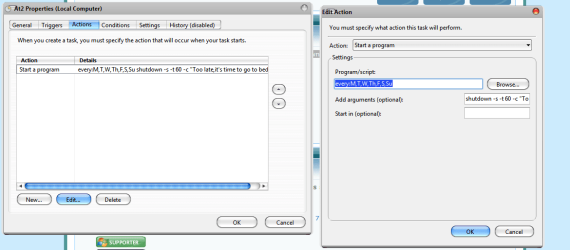
see the attached images
Attached Thumbnails
disable " Force Shutdown" confirm in windows ultimate-asdasdasd.png   disable " Force Shutdown" confirm in windows ultimate-2222222222.jpg  
My System SpecsSystem Spec
09 Jan 2010   #9

Windows 7 Enterprise (x64); Windows Server 2008 R2 (x64)
Earth - I wish I was on Risa


Try: "cmd /c shutdown /f /s /t 0"
My System SpecsSystem Spec
09 Jan 2010   #10

windows 7


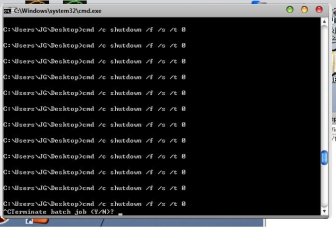
man... this is hard.. all errors

view attached image

FYI: i put the commands in shutdown.bat and put the commands in and then double click it.
Attached Thumbnails
disable " Force Shutdown" confirm in windows ultimate-fghfghfgh.jpg  
My System SpecsSystem Spec
Reply

 disable " Force Shutdown" confirm in windows ultimate problems?


Thread Tools


Similar help and support threads for: disable " Force Shutdown" confirm in windows ultimate
Thread Forum
Solved May I safely disable "Media Features" from "Windows Features" menu? Media Center
Solved Disable "Windows has recovered from an unexpected shutdown" message BSOD Help and Support
Turning off "Force Shutdown"? General Discussion
Solved What is folder "confirm.aspx_files" ? An installed Program? Software
Start menu -> Shutdown Button - "shut down" and "sleep" Customization


All times are GMT -5. The time now is 12:05 AM.


Seven Forums Android App Seven Forums IOS App Follow us on Facebook

Windows 7 Forums is an independent web site and has not been authorized,
sponsored, or otherwise approved by Microsoft Corporation.
"Windows 7" and related materials are trademarks of Microsoft Corp.
© Designer Media Ltd
  

1 2 3 4 5 6 7 8 9 10 11 12 13 14 15 16 17 18 19 20 21 22 23 24 25 26 27 28 29 30 31 32