
| Windows 7: How to turn off the Language bar |
12 Jan 2010
|
#1 | | Windows 7 Home Premium 32bit Australia |
How to turn off the Language bar I just did a repair install of Windows 7, and now eveyrtime UAC comes up, the Language bar appear on top.
And at the log on screen there is a square at top left that says EN
How to i get rid of these? | My System Specs |
| System Manufacturer/Model Number Custom Build OS Windows 7 Home Premium 32bit CPU Intel Core 2 duo E7200 @2.53GHz 2.27GHz Motherboard Gigabyte EP43DS3 Memory 4GB Ram Graphics Card ATI Radeon HD 4800 Series Screen Resolution 1680 x 1050 Keyboard Microsoft Wireless Keyboard 800 Mouse Microsoft Wireless Mouse 1000 |
12 Jan 2010
|
#2 | | W7x64 Pro, SuSe 12.1/** W7 x64 Pro, XP MCE Indian Territory |
When you right click the Taskbar for the context menu and select Toolbars, is the language bar listed? If so, disable it. | My System Specs | | System Manufacturer/Model Number DIY OS W7x64 Pro, SuSe 12.1/** W7 x64 Pro, XP MCE CPU Phenom II 1090T w/Noctua NH-D14 /**4400+ X2 w/CM Hyper TX 3 Motherboard ASRock 890FX Deluxe 4/**A8N-SLI Memory 2 x 2GB Patriot PGS34g1600LLKA/**4x1GB Corsair VS Graphics Card EVGA GTX460 SC/**EVGA 8800GTS Sound Card Asus Xonar D2X/**Xonar D1 Monitor(s) Displays Acer X233H, Dell E152FPc /**LG M237-WD Screen Resolution 1920x1080 & 1024x768/**1980x1080 Keyboard Logitech Media USB/**Saitek Eclipse Mouse Cordless Trackman Wheel/**Ditto PSU CM RS600 w/ APC BX1000G/**Antec 500 TP w/ APC BX1000 Case HAF922/**Antec 1040IIB Cooling 3x200mm, 1x140 and 1x120mm/**5x80mm fans Hard Drives WDC 2TB, 1.5TB, 1TB, 500GB,Seagate 500GB , Maxtor 80GB /**500GB Seagate & WDC 1TB Black Internet Speed 3.3Mbps Other Info SB 560 5.1 w/ Sennheiser RS140/**Creative T20 speakers, Dvico FusionHDTV7 Gold RT, Cisco E3000, HP 5510V AIO, Linksys E3000, Belkin F5U237 hub and **F5D8055 adapter
(** = 2nd rig) |
12 Jan 2010
|
#3 | | |
Click"Start", then "Control Panel"
2. Hit "Date, Time, Language, and Regional Options", then "Regional and Language Options"
3. Press "Languages" tab, then "Details" button
4. Choose "Langage Bar" button at bottom, and then uncheck "Show the language bar on the desktop"
5. Press "OK" and the Language Bar will be gone
Note: You can always just recheck to enable it again
If you really want it gone so you can't ever see it again:
1. Go to "Start", then "Run"
2. Type "Regsvr32.exe /u msutb.dll" and press enter
3. The Language bar will never bother you again
Note: The "Language Bar" button described above will be grayed-out (unaccessible) for good as well, meaning you can never renable it | My System Specs | | |
13 Jan 2010
|
#4 | | Windows 7 Home Premium 32bit Australia |
None of tho two opition work  it still appears when UAC gives me a promt and the log on screen | My System Specs | | System Manufacturer/Model Number Custom Build OS Windows 7 Home Premium 32bit CPU Intel Core 2 duo E7200 @2.53GHz 2.27GHz Motherboard Gigabyte EP43DS3 Memory 4GB Ram Graphics Card ATI Radeon HD 4800 Series Screen Resolution 1680 x 1050 Keyboard Microsoft Wireless Keyboard 800 Mouse Microsoft Wireless Mouse 1000 |
13 Jan 2010
|
#5 | | Windows Seven Home Premium SP1 I Live At Home |
Try what was said above, but do it when UAC pops up. | My System Specs | | System Manufacturer/Model Number New Laptop! - Samsung RV515 OS Windows Seven Home Premium SP1 CPU AMD E-450 Dual Core - 1.66GHz FSB 800MHz Memory 4 GB DDR3 Graphics Card ATI Radeon HD 6470M 1GB GDDR3 Sound Card Integrated Monitor(s) Displays 15.6" ClearCrystal Display Screen Resolution 1366x768 Keyboard PS2 Mouse TouchPad Case Notebook Cooling Stock Hard Drives 1 Integrated 500GB hard drive
1 External HDD 1TB Internet Speed Download: 3.15 mb/s Upload: 0.38 mb/s |
02 Feb 2010
|
#6 | | |
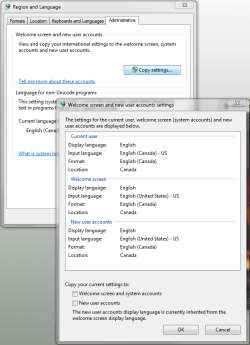
I figured it out. You need to go to Region and Language in control panel and remove all but the keyboard you want. See when I installed this last time I set my location as Canada which is correct but then it gives me 3 keyboards. So i immediately thought ok I will just remove the other keyboard but they were still on the welcome screen. So the next critical step is to go to the administrative tab and copy settings over to new users and welcome screen. | My System Specs | | System Manufacturer/Model Number Custom OS Windows 7 Ultimate x64 CPU QX6700 @ 3.2Ghz (temporarily till I get the drive to tweak) Motherboard Asus Maximus Formula Memory 8gb (4x2gb) OCZ PC2-8500 Graphics Card GTX280 Sound Card Auzentech Prelude Monitor(s) Displays Samsung 244T & 940BF Screen Resolution 1920x1200 & 1280x1024 Keyboard Saitech Eclipse II Mouse Logitech G9 PSU Seasonic M-12 700w Case Lian Li PC-6077B Cooling Liquid (D-tek Fuzion 2/DDC+/240GTX) Hard Drives 2 x Hitatchi 7K500 500GB in raid 0 Internet Speed 22Mbit burst - 15 Mbit typical down / 500Kbit up Other Info http://pics.livejournal.com/bun_bun/pic/001c64ww |
03 Feb 2010
|
#7 | | Windows Seven Home Premium SP1 I Live At Home |
Glad you found it | My System Specs | | System Manufacturer/Model Number New Laptop! - Samsung RV515 OS Windows Seven Home Premium SP1 CPU AMD E-450 Dual Core - 1.66GHz FSB 800MHz Memory 4 GB DDR3 Graphics Card ATI Radeon HD 6470M 1GB GDDR3 Sound Card Integrated Monitor(s) Displays 15.6" ClearCrystal Display Screen Resolution 1366x768 Keyboard PS2 Mouse TouchPad Case Notebook Cooling Stock Hard Drives 1 Integrated 500GB hard drive
1 External HDD 1TB Internet Speed Download: 3.15 mb/s Upload: 0.38 mb/s |
01 Mar 2010
|
#8 | | Windows 7 Home Premium 32bit Australia |
Thank you it worked | My System Specs | | System Manufacturer/Model Number Custom Build OS Windows 7 Home Premium 32bit CPU Intel Core 2 duo E7200 @2.53GHz 2.27GHz Motherboard Gigabyte EP43DS3 Memory 4GB Ram Graphics Card ATI Radeon HD 4800 Series Screen Resolution 1680 x 1050 Keyboard Microsoft Wireless Keyboard 800 Mouse Microsoft Wireless Mouse 1000 |
22 Apr 2010
|
#9 | | Windows 7 Ultimate 32-bit (6.1, Build 7600) Pampanga |
Thank you removing unwanted keys works | My System Specs | | System Manufacturer/Model Number HP Pavilion dv6 Notebook PC OS Windows 7 Ultimate 32-bit (6.1, Build 7600) CPU Intel(R) Core(TM)2 Duo CPU T6500 @ 2.10GHz (2 CPUs), ~2 Memory 4096MB RAM Graphics Card ATI Mobility Radeon HD 4500 Series Sound Card Digital Audio (S/PDIF) |
13 Sep 2010
|
#10 | | Windows 7 x64 Ultimate SP1 Croatia |
After a reinstall, I found out that this thread needs a bump, badly. Also, a place in the tutorial would be nice. Brink? | My System Specs | | System Manufacturer/Model Number Asus N73SV OS Windows 7 x64 Ultimate SP1 CPU Core i7-2630QM Motherboard Intel HM 65 Memory 6 GB DDR3 Graphics Card Nvidia GT 540M / Intel HD 3000 - Optimus switching Sound Card HD Audio (Intel Azalia/Realtek) ALC269 Monitor(s) Displays LED flat panel Screen Resolution 1920 x 1080 Hard Drives 2x Seagate Momentus 640 GB - 1,28 TB in total Internet Speed 4 MB/256 kbps Other Info External HDs
WD Elements 1,5 TB
WD MyBook 500 GB How to turn off the Language bar problems? All times are GMT -5. The time now is 11:34 PM. | |