Windows 7 Forums


Windows 7: Deleting the "Searches" folder from my user folder?

14 Jan 2010  
nogills

Windows 7 Home Premium 32-bit
14 posts
Atlanta, GA
 
 
Deleting the "Searches" folder from my user folder?

Hey guys is there anyway to delete the Searches folder from my user folder? I mean i can delete it and whatever but it just keeps coming back. I don't even have Search Indexing enabled so I don't know why it keeps coming back. Any ideas? I just don't like an empty folder that I don't use taking up space.

My System SpecsSystem Spec

14 Jan 2010  
Crispy

Windows 7 Ultimate x64 Service Pack 1 (Build 6.1.7601)
1,115 posts
Aus, Qld


My System SpecsSystem Spec
15 Jan 2010  
Brink

64-bit Windows 7 Ultimate SP1 & Windows 8 Enterprise
47,741 posts
Texas


Hello Nogills,

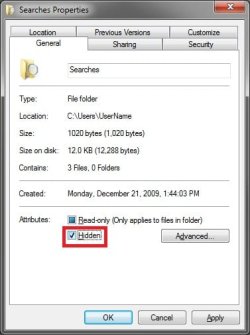
Since it is a system file, it will just keep being recreated not long after you delete it. The Searches folder is also used to save your searches in Windows Explorer as well. It is not tied to the index. You cannot delete it, but you can hide the C:\Users\(user-name)\Searches folder to not see it anymore.

Deleting the "Searches" folder from my user folder?-searches.jpg

Hope this helps,
Shawn
My System SpecsSystem Spec
.


15 Jan 2010  
nogills

Windows 7 Home Premium 32-bit
14 posts
Atlanta, GA


I just tried making it hidden and even though I select the "Hidden" checkbox and click apply and ok, it doesn't make it hidden. I clicked refresh and even logged off and back on and it still isn't hidden. ?
My System SpecsSystem Spec
15 Jan 2010  
Brink

64-bit Windows 7 Ultimate SP1 & Windows 8 Enterprise
47,741 posts
Texas


Umm, it appears that it only hides it at the C:\Users\(user-name)\Searches location and not from the Start Menu location despite it being marked as hidden at both locations. It appears to be one of those special folder locations in the Start Menu like how the Desktop folder in Favorites (navigation pane) show all the available shortcuts even though you do not have them turned on for your desktop.
My System SpecsSystem Spec
Reply

 Deleting the "Searches" folder from my user folder? problems?


Thread Tools


Similar help and support threads for: Deleting the "Searches" folder from my user folder?
Thread Forum
Solved How to setup users/groups/permissions for a user "home" folder General Discussion
Solved Problems after deleting "AppData" folder by mistake General Discussion
User folder "Searches" problem General Discussion
"Default User" junction point folder issue General Discussion
Can't Access "Default User" folder in Users Folder General Discussion


All times are GMT -5. The time now is 02:37 AM.


Windows 7 Forums is an independent web site and has not been authorized,
sponsored, or otherwise approved by Microsoft Corporation.
"Windows 7" and related materials are trademarks of Microsoft Corp.
© Designer Media Ltd