
 |
Welcome to Windows 7 Forums. Our forum is dedicated to helping you find solutions with any problems, errors or issues you are experiencing with Windows 7. The Windows 7 forum also covers news and updates and has an extensive Windows 7 tutorial section that covers a wide range of tips and tricks.
Windows 7 - Win 7 Troubleshooting settings |
01-15-2010
|
#1 | | Windows 7 Professional 32-bit (6.1, Build 7600) |
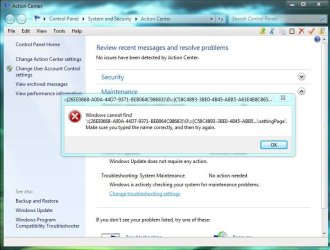
Win 7 Troubleshooting settings  Anyone know how to repair this? | My System Specs | | System Manufacturer/Model Number Averatec 6130HS-20 OS Windows 7 Professional 32-bit (6.1, Build 7600) CPU Intel(R) Pentium(R) 4 3.00 GHz HT Memory 2.0 GB Graphics Card ATI Mobility Radeon 9600 64MB Sound Card Realtek AC'97 Audio Screen Resolution 1280 x 800 Mouse Targus PAWM10 Wireless Optical Laptop Mouse Cooling 20 Inch Box Fan Hard Drives Seagate 96023A 60GB 7200RPM -
Seagate FreeAgentDesktop 250GB |
01-15-2010
|
#2 | | |
You need to be more specific.
Did you get that error when trying to open the Action Center?
Or when you clicked on something in the Action Center? sfc /scannow <- click link | My System Specs | | System Manufacturer/Model Number Self Built OS Win 7 Ultimate 32bit CPU C2D E6600 2.4Ghz Motherboard Intel D965WH Memory 4G Kingston KHX5400D2 Graphics Card EVGA GTX 570 HD SC (012-P3-1573-KR) Sound Card On-Board Monitor(s) Displays Samsung 226BW Screen Resolution 1680 x 1050 PSU Corsair TX750W Case In-Win C589 Cooling Stock Intel Cooling Hard Drives 2 x 250 Seagate Barracuda
2 x 500 Seagate Barracuda (Raid1) |
01-15-2010
|
#3 | | Windows 7 Professional 32-bit (6.1, Build 7600) |

Quote: Originally Posted by Tepid You need to be more specific.
Did you get that error when trying to open the Action Center?
Or when you clicked on something in the Action Center? sfc /scannow <- click link clicked on something in the Action Center maintenance > Change troubleshooting settings
Also, clicking Troubleshooting in Action Center does nothing | My System Specs | | System Manufacturer/Model Number Averatec 6130HS-20 OS Windows 7 Professional 32-bit (6.1, Build 7600) CPU Intel(R) Pentium(R) 4 3.00 GHz HT Memory 2.0 GB Graphics Card ATI Mobility Radeon 9600 64MB Sound Card Realtek AC'97 Audio Screen Resolution 1280 x 800 Mouse Targus PAWM10 Wireless Optical Laptop Mouse Cooling 20 Inch Box Fan Hard Drives Seagate 96023A 60GB 7200RPM -
Seagate FreeAgentDesktop 250GB |
01-15-2010
|
#4 | | |

Quote: Originally Posted by Greg S 
Quote: Originally Posted by Tepid You need to be more specific.
Did you get that error when trying to open the Action Center?
Or when you clicked on something in the Action Center? sfc /scannow <- click link clicked on something in the Action Center Yeah you should do what Tepid suggested sfc /scannow, follow that tutorial. | My System Specs | | System Manufacturer/Model Number compaq sr5410f case OS Windows 7 Pro 64 SP1 CPU AMD X2 4450E @ 2.3 ghz Motherboard Biostar MCP6P M2+ Memory 4.0 g Graphics Card Nvidia GeForce 9600 GT , 512mb Sound Card onboard Monitor(s) Displays auria eq2367 Screen Resolution 1920 x 1080 Keyboard logitech wave cordless Mouse logitech LX8 cordless laser mouse PSU 250 watts Case compaq Cooling couple fans Hard Drives 1 tb Hitachi HDT721010SLA scsi, 500 gb external Internet Speed comcast hi speed 19 dn 8 up Other Info Laptop specs: HP g7-1365dx /
CPU: AMD A6-3420M APU with Radeon(tm) HD Graphics /
RAM: Crucial 8Gb (2x4Gb) /
SSD: Crucial M4-CT128M4SSD2 ATA Device/ FW 000F /
GFX: AMD Radeon HD 6520G /
OS: Microsoft Windows 7 Professional 64-bit 7601 Multiprocessor Free Service Pack 1 |
01-15-2010
|
#5 | | Windows 7 Professional 32-bit (6.1, Build 7600) |

Quote: Originally Posted by derekimo 
Quote: Originally Posted by Greg S 
Quote: Originally Posted by Tepid You need to be more specific.
Did you get that error when trying to open the Action Center?
Or when you clicked on something in the Action Center? sfc /scannow <- click link clicked on something in the Action Center Yeah you should do what Tepid suggested sfc /scannow, follow that tutorial. Does this auto replace files or does it prompt for install disk? | My System Specs | | System Manufacturer/Model Number Averatec 6130HS-20 OS Windows 7 Professional 32-bit (6.1, Build 7600) CPU Intel(R) Pentium(R) 4 3.00 GHz HT Memory 2.0 GB Graphics Card ATI Mobility Radeon 9600 64MB Sound Card Realtek AC'97 Audio Screen Resolution 1280 x 800 Mouse Targus PAWM10 Wireless Optical Laptop Mouse Cooling 20 Inch Box Fan Hard Drives Seagate 96023A 60GB 7200RPM -
Seagate FreeAgentDesktop 250GB |
01-15-2010
|
#6 | | |

Quote: Originally Posted by Greg S 
Quote: Originally Posted by derekimo 
Quote: Originally Posted by Greg S clicked on something in the Action Center Yeah you should do what Tepid suggested sfc /scannow, follow that tutorial. Does this auto replace files or does it prompt for install disk? No you don't need a disk, It just scans and fixes corrupt files. Just follow the tutorial in the link SFC /SCANNOW Command - System File Checker | My System Specs | | System Manufacturer/Model Number compaq sr5410f case OS Windows 7 Pro 64 SP1 CPU AMD X2 4450E @ 2.3 ghz Motherboard Biostar MCP6P M2+ Memory 4.0 g Graphics Card Nvidia GeForce 9600 GT , 512mb Sound Card onboard Monitor(s) Displays auria eq2367 Screen Resolution 1920 x 1080 Keyboard logitech wave cordless Mouse logitech LX8 cordless laser mouse PSU 250 watts Case compaq Cooling couple fans Hard Drives 1 tb Hitachi HDT721010SLA scsi, 500 gb external Internet Speed comcast hi speed 19 dn 8 up Other Info Laptop specs: HP g7-1365dx /
CPU: AMD A6-3420M APU with Radeon(tm) HD Graphics /
RAM: Crucial 8Gb (2x4Gb) /
SSD: Crucial M4-CT128M4SSD2 ATA Device/ FW 000F /
GFX: AMD Radeon HD 6520G /
OS: Microsoft Windows 7 Professional 64-bit 7601 Multiprocessor Free Service Pack 1 |
01-16-2010
|
#7 | | Windows 7 Professional 32-bit (6.1, Build 7600) |
Well the only thing sfc did was replace the worthless themes and wallpapers I had deleted. Anywho, it didn't fix my problem. | My System Specs | | System Manufacturer/Model Number Averatec 6130HS-20 OS Windows 7 Professional 32-bit (6.1, Build 7600) CPU Intel(R) Pentium(R) 4 3.00 GHz HT Memory 2.0 GB Graphics Card ATI Mobility Radeon 9600 64MB Sound Card Realtek AC'97 Audio Screen Resolution 1280 x 800 Mouse Targus PAWM10 Wireless Optical Laptop Mouse Cooling 20 Inch Box Fan Hard Drives Seagate 96023A 60GB 7200RPM -
Seagate FreeAgentDesktop 250GB |
01-16-2010
|
#8 | | |

Quote: Originally Posted by Greg S Well the only thing sfc did was replace the worthless themes and wallpapers I had deleted. Anywho, it didn't fix my problem. The next thing I would suggest is a repair install Repair Install
Unless you've got a system image from before that started happening, the repair install will keep all your programs and settings. | My System Specs | | System Manufacturer/Model Number compaq sr5410f case OS Windows 7 Pro 64 SP1 CPU AMD X2 4450E @ 2.3 ghz Motherboard Biostar MCP6P M2+ Memory 4.0 g Graphics Card Nvidia GeForce 9600 GT , 512mb Sound Card onboard Monitor(s) Displays auria eq2367 Screen Resolution 1920 x 1080 Keyboard logitech wave cordless Mouse logitech LX8 cordless laser mouse PSU 250 watts Case compaq Cooling couple fans Hard Drives 1 tb Hitachi HDT721010SLA scsi, 500 gb external Internet Speed comcast hi speed 19 dn 8 up Other Info Laptop specs: HP g7-1365dx /
CPU: AMD A6-3420M APU with Radeon(tm) HD Graphics /
RAM: Crucial 8Gb (2x4Gb) /
SSD: Crucial M4-CT128M4SSD2 ATA Device/ FW 000F /
GFX: AMD Radeon HD 6520G /
OS: Microsoft Windows 7 Professional 64-bit 7601 Multiprocessor Free Service Pack 1 |
01-16-2010
|
#9 | | Windows 7 Professional 32-bit (6.1, Build 7600) |

Quote: Originally Posted by derekimo 
Quote: Originally Posted by Greg S Well the only thing sfc did was replace the worthless themes and wallpapers I had deleted. Anywho, it didn't fix my problem. The next thing I would suggest is a repair install Repair Install
Unless you've got a system image from before that started happening, the repair install will keep all your programs and settings. OK, I may have to go this route but I'm going to keep searching for awhile first. There has to be a way to just repair the Windows Troubleshooting out there somewhere. | My System Specs | | System Manufacturer/Model Number Averatec 6130HS-20 OS Windows 7 Professional 32-bit (6.1, Build 7600) CPU Intel(R) Pentium(R) 4 3.00 GHz HT Memory 2.0 GB Graphics Card ATI Mobility Radeon 9600 64MB Sound Card Realtek AC'97 Audio Screen Resolution 1280 x 800 Mouse Targus PAWM10 Wireless Optical Laptop Mouse Cooling 20 Inch Box Fan Hard Drives Seagate 96023A 60GB 7200RPM -
Seagate FreeAgentDesktop 250GB |
01-16-2010
|
#10 | | Windows 7 Ultimate, Ubuntu 10.04 LTS - the Lucid Lynx |

Quote: Originally Posted by Greg S Attachment 47865Anyone know how to repair this? Hi Greg, Welcome to SF,
I guess it's worth creating a New Windows Administrator and try it there. It might be a corrupt User Profile
Hope this helps,
Captain | My System Specs | | System Manufacturer/Model Number Custom Build OS Windows 7 Ultimate, Ubuntu 10.04 LTS - the Lucid Lynx Motherboard Asus A8N-VM Memory 2 GB Graphics Card Nvidia GeForce 6150 Sound Card Sound Blaster Audigy 24-Bit Monitor(s) Displays Samsung SyncMaster 2253LW 21.6" Widescreen LCD Monitor Hard Drives 320 GB - Internal
1 TB WD External Win 7 Troubleshooting settings problems? All times are GMT -5. The time now is 04:18 AM. |  |