Secondary drives being shut down

TeddyKGB

New member
Local time
11:01 PM
Messages
9
I am not sure if this is a W7 "issue" but I assume it is because I never noticed it in XP.

I have 4 drives in my PC. 1 for the OS, 1 backup, 1 data and 1 backup for the data drive.

What I have noticed the recently is that while the PC is running I can hear a drive power down and slowly stop spinning. If I trry to access the files on that drive it powers back up and I get to the files just fine.

While it is not a big issue I don't like having my drives start and stop all the time just because of the wear on the motor.

Is this a setting I am not aware of or anything I can do to change this?
 

My Computer My Computer

At a glance

seven
OS
seven
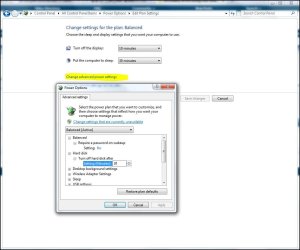
Right click the desktop, choose personalize. Then at bottom, screen saver. Then "change power settings." Choose a performance plan, then go into "change plan settings" and you will have hard drive power options after finally choosing "change advanced power settings."
 

My Computer My Computer

At a glance

7600.20510 x86P4 550 3.4 GHz HT running at 3.5 GHzOCZ 2 GB(2x1GB) DDR400mHz running @ 414 mHzHIS Radeon HD 3850 IceQ 3 Turbo HDMI Dual DL-...
Computer Manufacturer/Model Number
self built
OS
7600.20510 x86
CPU
P4 550 3.4 GHz HT running at 3.5 GHz
Motherboard
MSI PM8M3-V (MS-7211 v1.x) Micro-ATX mainboard
Memory
OCZ 2 GB(2x1GB) DDR400mHz running @ 414 mHz
Graphics Card(s)
HIS Radeon HD 3850 IceQ 3 Turbo HDMI Dual DL-DVI AGP
Sound Card
MOTU Traveler firewire studio interface 192 kHz 24 bit
Monitor(s) Displays
22" widescreen Acer X223W LCD, 17" Compaq P75 CRT
Screen Resolution
1680x1050 and 1280x1024
Hard Drives
SATA I x2 WD, 400 GB and 120 GB, SATA 2 WD Caviar Black 1 TB
PSU
350W generic
Case
Cybertronpc, it glows blue
Cooling
stock cpu fan, Ice-Q 3 gpu and system, many case fans
Keyboard
Logitch Classical Keyboard 200
Mouse
Logitech Mediaplay cordless
Internet Speed
1792/448 kbits/sec
Other Info
SATA II PCI fake RAID adapter, 1 GB Readyboost, original ATI Remote Wonder (even works with WMC perfectly), Logitech Rumblepad 2 game controller x2
Thanks torrentg!
 

My Computer My Computer

At a glance

seven
OS
seven
I am not sure if this is a W7 "issue" but I assume it is because I never noticed it in XP.

I have 4 drives in my PC. 1 for the OS, 1 backup, 1 data and 1 backup for the data drive.

What I have noticed the recently is that while the PC is running I can hear a drive power down and slowly stop spinning. If I trry to access the files on that drive it powers back up and I get to the files just fine.

While it is not a big issue I don't like having my drives start and stop all the time just because of the wear on the motor.

Is this a setting I am not aware of or anything I can do to change this?


Hi TeddyKGB,

Its just power management putting the drive to sleep to preserve its life-span and power usage ;)

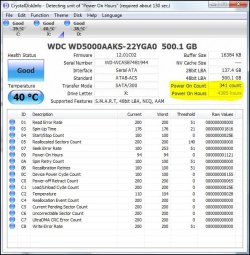
Hard-Drives will spinup and down thousands of times over their life-span, its better running the least amount of time because there's less wear n tear usage of the drive while its running so dont be concerned about the drive spinning up or down ;)

Its the amount of hours the drive is running that can be more concerning for the motor ;)


Hdds.JPG

If you like, you can change the settings here:

PowerManagement.JPG
 
Back
Top