
Hey folks,
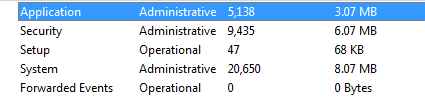
A couple days ago, my system started acting up. Any time that I start up or come out of sleep, my system acts like it wants to find some new USB device. For about 10 minutes, my system will alternate between the 'dum-dee' and 'dee-dum' sounds, like I am constantly plugging in and unplugging in a USB drive. I have tried to unplug all my USB devices, yet the system still does this. I have looked in my event viewer and notice that I get a huge number of events listed, most around the time that I am starting up my system. The list of logs is listed below. After about 10 minutes, the system seems either to get tired of looking, or is done with what needs to be done and then works fine. Any ideas? Any idea of how to figure out what is causing this behavior?
Eric
A couple days ago, my system started acting up. Any time that I start up or come out of sleep, my system acts like it wants to find some new USB device. For about 10 minutes, my system will alternate between the 'dum-dee' and 'dee-dum' sounds, like I am constantly plugging in and unplugging in a USB drive. I have tried to unplug all my USB devices, yet the system still does this. I have looked in my event viewer and notice that I get a huge number of events listed, most around the time that I am starting up my system. The list of logs is listed below. After about 10 minutes, the system seems either to get tired of looking, or is done with what needs to be done and then works fine. Any ideas? Any idea of how to figure out what is causing this behavior?
Eric
Attachments
My Computer
At a glance
7 Home PremiumIntel Quad Core Q66004gbNvidia Geforce 8600GT
- Computer Manufacturer/Model Number
- My own build
- OS
- 7 Home Premium
- CPU
- Intel Quad Core Q6600
- Motherboard
- Intel DG33TL
- Memory
- 4gb
- Graphics Card(s)
- Nvidia Geforce 8600GT
- Hard Drives
- 250gb
750gb
500gb


