| Windows 7: Aero theme disappeared! |
20 Jan 2010
|
#1 | | |
Aero theme disappeared! Hello,
I just recently got a new HP ENVY 15 running Windows 7. Up until yesterday everything was running fine. I believe I compiled a LaTeX document, and a package was missing, so I launched the package manager, and suddenly a message appeared that said that the aero color scheme had been disabled. Since then, I have been unable to reenable the aero glass effect or any of the other fancy features. I doubt LaTeX is what caused the problem, but that's the last thing I was doing at the time.
Since then, I've tried EVERYTHING to try to fix this, and nothing has worked! I've restarted my computer several times. I've closed all programs and disabled all unnecessary processes and tried to reenable aero and that didn't work.
I believe the issue is that for some reason Desktop Composition is disabled, so the Desktop Window Manager isn't working. I tried editing the Composition and CompositionPolicy in the registry - they immediately switch back! I tried doing net stop uxsms followed by net start uxsms, and that didn't work either. I tried updating my drivers but they are already up to date. I tried rerunning the Windows Experience Index which did not do anything.
The event viewer shows some suspicious messages. At about the time where the issue started, an event is listed:
A request to disable the Desktop Window Manager was made by process (Skype)
However, I've tried ending Skype with no results, and also, I had been using Skype for the last few days with no problems. Following that message are numerous of these:
The Desktop Window Manager has exited with code (0x40010004)
The Desktop Window Manager was unable to start because the desktop composition setting is disabled
The Desktop Window Manager has exited with code (0xc00002fe)
The Desktop Window Manager was unable to start because the desktop composition setting is disabled
The Desktop Window Manager has exited with code (0x80070224)
etc.
I've also tried going to control panel > system and security > find and fix problems > appearance and personalization > display aero desktop effects, and running the troubleshooter, but it said that the problem couldn't be detected.
Does anyone have any idea what could be wrong? I've tried every suggestion I can find on the web and nothing has worked. | My System Specs |
| System Manufacturer/Model Number HP ENVY 15 OS Windows 7 CPU Intel i7 Q720 1.6GHz Memory 6GB Graphics Card ATI Mobility Radeon HD 4830 |
20 Jan 2010
|
#2 | | W7x64 Pro, SuSe 12.1/** W7 x64 Pro, XP MCE Indian Territory |
Have you gone into Services and tried to enable and start the Desktop Window Manager Session Manager there?
EDIT: I have no idea of why Skype disabled it, because I did have Skype until recently, and it never disabled that for me. | My System Specs | | System Manufacturer/Model Number DIY OS W7x64 Pro, SuSe 12.1/** W7 x64 Pro, XP MCE CPU Phenom II 1090T w/Noctua NH-D14 /**4400+ X2 w/CM Hyper TX 3 Motherboard ASRock 890FX Deluxe 4/**A8N-SLI Memory 2 x 2GB Patriot PGS34g1600LLKA/**4x1GB Corsair VS Graphics Card EVGA GTX460 SC/**EVGA 8800GTS Sound Card Asus Xonar D2X/**Xonar D1 Monitor(s) Displays Acer X233H, Dell E152FPc /**LG M237-WD Screen Resolution 1920x1080 & 1024x768/**1980x1080 Keyboard Logitech Media USB/**Saitek Eclipse Mouse Cordless Trackman Wheel/**Ditto PSU CM RS600 w/ APC BX1000G/**Antec 500 TP w/ APC BX1000 Case HAF922/**Antec 1040IIB Cooling 3x200mm, 1x140 and 1x120mm/**5x80mm fans Hard Drives WDC 2TB, 1.5TB, 1TB, 500GB,Seagate 500GB , Maxtor 80GB /**500GB Seagate & WDC 1TB Black Internet Speed 3.3Mbps Other Info SB 560 5.1 w/ Sennheiser RS140/**Creative T20 speakers, Dvico FusionHDTV7 Gold RT, Cisco E3000, HP 5510V AIO, Linksys E3000, Belkin F5U237 hub and **F5D8055 adapter
(** = 2nd rig) |
20 Jan 2010
|
#3 | | |
Yep, I tried that... no results though... | My System Specs | | System Manufacturer/Model Number HP ENVY 15 OS Windows 7 CPU Intel i7 Q720 1.6GHz Memory 6GB Graphics Card ATI Mobility Radeon HD 4830 |
20 Jan 2010
|
#4 | | W7x64 Pro, SuSe 12.1/** W7 x64 Pro, XP MCE Indian Territory |
If it were me, I would uninstall Skype and then try restarting the service from services again. | My System Specs | | System Manufacturer/Model Number DIY OS W7x64 Pro, SuSe 12.1/** W7 x64 Pro, XP MCE CPU Phenom II 1090T w/Noctua NH-D14 /**4400+ X2 w/CM Hyper TX 3 Motherboard ASRock 890FX Deluxe 4/**A8N-SLI Memory 2 x 2GB Patriot PGS34g1600LLKA/**4x1GB Corsair VS Graphics Card EVGA GTX460 SC/**EVGA 8800GTS Sound Card Asus Xonar D2X/**Xonar D1 Monitor(s) Displays Acer X233H, Dell E152FPc /**LG M237-WD Screen Resolution 1920x1080 & 1024x768/**1980x1080 Keyboard Logitech Media USB/**Saitek Eclipse Mouse Cordless Trackman Wheel/**Ditto PSU CM RS600 w/ APC BX1000G/**Antec 500 TP w/ APC BX1000 Case HAF922/**Antec 1040IIB Cooling 3x200mm, 1x140 and 1x120mm/**5x80mm fans Hard Drives WDC 2TB, 1.5TB, 1TB, 500GB,Seagate 500GB , Maxtor 80GB /**500GB Seagate & WDC 1TB Black Internet Speed 3.3Mbps Other Info SB 560 5.1 w/ Sennheiser RS140/**Creative T20 speakers, Dvico FusionHDTV7 Gold RT, Cisco E3000, HP 5510V AIO, Linksys E3000, Belkin F5U237 hub and **F5D8055 adapter
(** = 2nd rig) |
20 Jan 2010
|
#5 | | |
I will try that, though I don't think Skype is the issue. One thing I notice is that if I go to computer > properties > advanced system properties > performance > settings, and I select "custom" and check "Enable Desktop Composition", and then I hit click Okay, when I go back into the settings, "Enable Desktop Composition" is unchecked, as if something is either blocking it, or immediately disabling it! Is there any way to tell what is causing this interference? The event viewer doesn't seem to say. | My System Specs | | System Manufacturer/Model Number HP ENVY 15 OS Windows 7 CPU Intel i7 Q720 1.6GHz Memory 6GB Graphics Card ATI Mobility Radeon HD 4830 |
20 Jan 2010
|
#6 | | Windows 7 Ultimate Signature Edition FL |
if all else fails use your installation disc to restore system files. | My System Specs | | System Manufacturer/Model Number Custom OS Windows 7 Ultimate Signature Edition CPU Intel Core i7 Extreme 3.33GHz Motherboard EVGA X-58 SLI Classified Memory 12GB DDR3 Graphics Card 2x EVGA 285 2GB in SLI Sound Card Creative Labs X-Fi ExtremeGamer Monitor(s) Displays 30" Viewsonic PSU Thermaltake 1000w supporting quad SLI Case Thermaltake Armor Full Tower Cooling Thermaltake V1 CPU+DIY Liquid cooling Hard Drives 2x1TB Western Digital 7200RPM in RAID 0/1TB WD My Book External HDD |
20 Jan 2010
|
#7 | | W7x64 Pro, SuSe 12.1/** W7 x64 Pro, XP MCE Indian Territory |
I don't know of any set procedure to diagnose a problem like this, it would just be a matter of trial and error. If it gets to the point that you get tired of it, then valtonray's advise about a system restore may be the best path to take (assuming that you have a restore point available that correlates to a time just prior to the onset of the problem). | My System Specs | | System Manufacturer/Model Number DIY OS W7x64 Pro, SuSe 12.1/** W7 x64 Pro, XP MCE CPU Phenom II 1090T w/Noctua NH-D14 /**4400+ X2 w/CM Hyper TX 3 Motherboard ASRock 890FX Deluxe 4/**A8N-SLI Memory 2 x 2GB Patriot PGS34g1600LLKA/**4x1GB Corsair VS Graphics Card EVGA GTX460 SC/**EVGA 8800GTS Sound Card Asus Xonar D2X/**Xonar D1 Monitor(s) Displays Acer X233H, Dell E152FPc /**LG M237-WD Screen Resolution 1920x1080 & 1024x768/**1980x1080 Keyboard Logitech Media USB/**Saitek Eclipse Mouse Cordless Trackman Wheel/**Ditto PSU CM RS600 w/ APC BX1000G/**Antec 500 TP w/ APC BX1000 Case HAF922/**Antec 1040IIB Cooling 3x200mm, 1x140 and 1x120mm/**5x80mm fans Hard Drives WDC 2TB, 1.5TB, 1TB, 500GB,Seagate 500GB , Maxtor 80GB /**500GB Seagate & WDC 1TB Black Internet Speed 3.3Mbps Other Info SB 560 5.1 w/ Sennheiser RS140/**Creative T20 speakers, Dvico FusionHDTV7 Gold RT, Cisco E3000, HP 5510V AIO, Linksys E3000, Belkin F5U237 hub and **F5D8055 adapter
(** = 2nd rig) |
20 Jan 2010
|
#8 | | |
The ENVY 15 doesn't have a CD drive >.<
I'm going to buy an external one soon though, but I'd like to find a fix for this anyway.
Last edited by Brink; 20 Jan 2010 at 11:26 PM..
Reason: removed unneeded comment
| My System Specs | | System Manufacturer/Model Number HP ENVY 15 OS Windows 7 CPU Intel i7 Q720 1.6GHz Memory 6GB Graphics Card ATI Mobility Radeon HD 4830 |
20 Jan 2010
|
#9 | | |
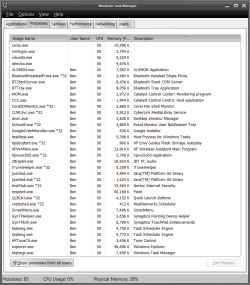
Here are my currently running processes. Anything in this list look suspicious? (I realize there is a Skype thing there - I disabled it, but it didn't have any effect.) | My System Specs | | System Manufacturer/Model Number HP ENVY 15 OS Windows 7 CPU Intel i7 Q720 1.6GHz Memory 6GB Graphics Card ATI Mobility Radeon HD 4830 |
20 Jan 2010
|
#10 | | W7x64 Pro, SuSe 12.1/** W7 x64 Pro, XP MCE Indian Territory |
It's not that a particular program or process would look more suspicious than another, but scanning down the list, the question rises whether you really need all of those processes on a regular basis? I have no way to know what you do need, so I can make any particular recommendations, except that I doubt that you need 2 x taskengs running, and probably not even one. realsched is something that I would get rid of, along with the Google Crash Handler, the Corel and iTunes helper. I also doubt that you need all of those HP processes along with some others that I don't recognize. The only process that should appear in the Task Manager are those that are system critical or belong to programs that you are currently using.
EDIT: I forgot another that need to go to file 13...justsched. | My System Specs | | System Manufacturer/Model Number DIY OS W7x64 Pro, SuSe 12.1/** W7 x64 Pro, XP MCE CPU Phenom II 1090T w/Noctua NH-D14 /**4400+ X2 w/CM Hyper TX 3 Motherboard ASRock 890FX Deluxe 4/**A8N-SLI Memory 2 x 2GB Patriot PGS34g1600LLKA/**4x1GB Corsair VS Graphics Card EVGA GTX460 SC/**EVGA 8800GTS Sound Card Asus Xonar D2X/**Xonar D1 Monitor(s) Displays Acer X233H, Dell E152FPc /**LG M237-WD Screen Resolution 1920x1080 & 1024x768/**1980x1080 Keyboard Logitech Media USB/**Saitek Eclipse Mouse Cordless Trackman Wheel/**Ditto PSU CM RS600 w/ APC BX1000G/**Antec 500 TP w/ APC BX1000 Case HAF922/**Antec 1040IIB Cooling 3x200mm, 1x140 and 1x120mm/**5x80mm fans Hard Drives WDC 2TB, 1.5TB, 1TB, 500GB,Seagate 500GB , Maxtor 80GB /**500GB Seagate & WDC 1TB Black Internet Speed 3.3Mbps Other Info SB 560 5.1 w/ Sennheiser RS140/**Creative T20 speakers, Dvico FusionHDTV7 Gold RT, Cisco E3000, HP 5510V AIO, Linksys E3000, Belkin F5U237 hub and **F5D8055 adapter
(** = 2nd rig) Aero theme disappeared! problems? All times are GMT -5. The time now is 12:36 AM. | |