| | Welcome to Windows 7 Forums. Our forum is dedicated to helping you find solutions with any problems, errors or issues you are experiencing with Windows 7. The Windows 7 forum also covers news and updates and has an extensive Windows 7 tutorial section that covers a wide range of tips and tricks. | Windows 7 - Make Fingerprint the default way to login
|
01-22-2010
|
#1 | | |
Make Fingerprint the default way to login I just upgraded my lenovo T61p to Windows 7 Enterprise. It was using Vista business before. When i was on vista and i started or locked the laptop i was able to just swipe my finger on the fingerprint and it would log me on or unlock the laptop. I have set up the biometrics on in windows 7 but when i start or lock the computer it defaults to push Alt+Ctrl+Delete. If i push Alt+Ctrl+Delete it then give me the option of how to login (type in password, fingerprint, or guest).
How can i make it skip the Alt+Ctrl+Delete part and default to just give me option to scan my fingerprint or enter username like it worked in Vista?
Thanks for the help
Carlos
| My System Specs | | System Manufacturer/Model Number IBM Lenovo T61p OS Windows 7 Enterprise |
01-22-2010
|
#2 | | |
Have u installed fingerprint software? The option to set are in the software. | My System Specs | | System Manufacturer/Model Number Lenovo ThinkPad T60 OS Windows 7 Ultimate 64Bit CPU GenuineIntel Intel(R) Core(TM) DuoCore T2400 @ 1.83GHz Motherboard Intel(R) 82801G (ICH7 Family) Memory 2.00 GB Graphics Card Mobile Intel(R) 945 Express Chipset Sound Card SoundMAX Integrated Digital HD Audio Monitor(s) Displays ThinkPad Display Screen Resolution 1400x1050 Keyboard Standard Keyboard Mouse HID-compliant Mouse Hard Drives 100Gb SATA Internet Speed Cable Broadband - 54Mbps Other Info Intel(R) PRO/1000 PL Network Connection
11a/b/g Wireless LAN Mini PCI Express Adapter |
01-22-2010
|
#3 | | |
I used the Windows 7 BioMetric Device to can my fingerprints and it is allowing me to login using my fingers. What i need to know is how to make Win 7 Skip the making me press Alt+Ctl+Delete before it will let me scan my finger. | My System Specs | | System Manufacturer/Model Number IBM Lenovo T61p OS Windows 7 Enterprise |
01-22-2010
|
#4 | | |
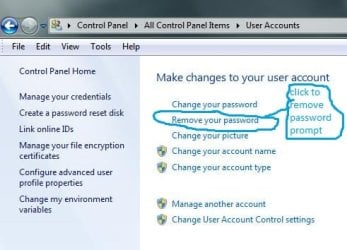
Would removing/deleting password option on the account do it? | My System Specs | | System Manufacturer/Model Number Lenovo ThinkPad T60 OS Windows 7 Ultimate 64Bit CPU GenuineIntel Intel(R) Core(TM) DuoCore T2400 @ 1.83GHz Motherboard Intel(R) 82801G (ICH7 Family) Memory 2.00 GB Graphics Card Mobile Intel(R) 945 Express Chipset Sound Card SoundMAX Integrated Digital HD Audio Monitor(s) Displays ThinkPad Display Screen Resolution 1400x1050 Keyboard Standard Keyboard Mouse HID-compliant Mouse Hard Drives 100Gb SATA Internet Speed Cable Broadband - 54Mbps Other Info Intel(R) PRO/1000 PL Network Connection
11a/b/g Wireless LAN Mini PCI Express Adapter |
01-22-2010
|
#5 | | W7x64 Pro, SuSe 12.1/** W7 x64 Pro, XP MCE |
newtowin7,
Generally, responses to a thread are answers, but I have a question. I know nothing about these scanners, but your question made me curious, so I did a little searching on eBay and Google, and found a multitude of scanners available for as little as $10 to more than I could ever spend.
I know that if it were a government or business with high security documents to protect, price would be no object, but for someone that simply wants the convenience of a scanner vs typing passwords, what is the least price required to purchase a good scanner? For me, it would seem to be reliability that would be most important, as that I doubt that I will ever have anybody trying to hack my computer anyway. Of course, it would be easier for them to cut a finger off the user than cracking a good password, but I really have no worries about that. | My System Specs | | System Manufacturer/Model Number DIY OS W7x64 Pro, SuSe 12.1/** W7 x64 Pro, XP MCE CPU Phenom II 1090T w/Noctua NH-D14 /**4400+ X2 w/CM Hyper TX 3 Motherboard ASRock 890FX Deluxe 4/**A8N-SLI Memory 2 x 2GB Patriot PGS34g1600LLKA/**4x1GB Corsair VS Graphics Card EVGA GTX460 SC/**EVGA 8800GTS Sound Card Asus Xonar D2X/**Xonar D1 Monitor(s) Displays Acer X233H, KDS AV-7TF/**LG M237-WD Screen Resolution 1920x1080 & 1280x1024/**1980x1080 Keyboard Logitech Media USB/**Saitek Eclipse Mouse Cordless Trackman Wheel/**Ditto PSU CM RS600 w/ APC BX1000G/**Antec 500 TP w/ APC BX1000 Case HAF922/**Antec 1040IIB Cooling 3x200mm, 1x140 and 1x120mm/**5x80mm fans Hard Drives WDC 2TB, 1.5TB, 1TB, 500GB,Seagate 500GB , Maxtor 80GB /**500GB Seagate & WDC 1TB Black Internet Speed 3.3Mbps Other Info SB 560 5.1 w/ Sennheiser RS140/**Creative T20 speakers, Dvico FusionHDTV7 Gold RT, Cisco E3000, HP 5510V AIO, Linksys E3000, Belkin F5U237 hub and **F5D8055 adapter
(** = 2nd rig) |
01-22-2010
|
#6 | | |
Just a suggestion.
Start Menu > Control Panel > System and Security > Administrative Tools > Local Security Policy > Then on the left under 'Local Policies' double click Security Options > Scroll down to 'Interactive logon: Do not require Ctrl Alt Del' double click that > select disabled.
Might be worth a shot | My System Specs | | System Manufacturer/Model Number Dell Vostro 1000 OS Windows 7 Ultimate x86 CPU AMD Sempron 3600+ Graphics Card ATI Radeon Xpress 1150 Monitor(s) Displays Generic PnP Monitor Screen Resolution 1200 x 800 Mouse Logitech V320 Cordless Optical Mouse Hard Drives WD Scorpio Blue 500 GB (WD5000BEVT) |
01-22-2010
|
#7 | | |
This is what i meant, by password removal. | My System Specs | | System Manufacturer/Model Number Lenovo ThinkPad T60 OS Windows 7 Ultimate 64Bit CPU GenuineIntel Intel(R) Core(TM) DuoCore T2400 @ 1.83GHz Motherboard Intel(R) 82801G (ICH7 Family) Memory 2.00 GB Graphics Card Mobile Intel(R) 945 Express Chipset Sound Card SoundMAX Integrated Digital HD Audio Monitor(s) Displays ThinkPad Display Screen Resolution 1400x1050 Keyboard Standard Keyboard Mouse HID-compliant Mouse Hard Drives 100Gb SATA Internet Speed Cable Broadband - 54Mbps Other Info Intel(R) PRO/1000 PL Network Connection
11a/b/g Wireless LAN Mini PCI Express Adapter |
01-23-2010
|
#8 | | Windows 7 Enterprise (x64); Windows Server 2008 R2 (x64) |
| My System Specs | | System Manufacturer/Model Number Dell OP760 OS Windows 7 Enterprise (x64); Windows Server 2008 R2 (x64) Memory 8GB Monitor(s) Displays 2 Dell 19" LCD Screen Resolution 1280x1024 Keyboard Dell Mouse Dell Optical Internet Speed 40meg |
05-04-2010
|
#9 | | |
I am reviving this thread.
I have installed the software and fingerprint login works fine.
But when I lock my login, I get my usual windows login and below other credentials. I click on other credentials and now the screen shows both my fingerprint and windows login. I click on the fingerprint login and swipe my finger and voila it works.
Now, I need the windows login to go off and show only my fingerprint login. Is this possible. I am using the Authentec TrueSuite on Acer laptop. | My System Specs | | System Manufacturer/Model Number Acer 5738z Laptop OS Windows 7 Ultimate CPU Pentium DC Motherboard Acer Memory 3GB Graphics Card Intel GMA 4500M Sound Card Realtek HD, Intel HD Monitor(s) Displays Acer 15.6" HD LCD Screen Resolution 1366x768 Keyboard Acer Mouse Powerlogic Hard Drives WDC 320GB
Seagate FreeAgent GO 250GB Ext. HDD Internet Speed 2MBps |
06-08-2010
|
#10 | | |
Hey,
You could try this article which I found useful during setup: Enable Logon Using Biometric Fingerprint Reader in Windows 7 x86 & x64
Hope it helps,
Mike 
Quote: Originally Posted by newtowin7 I just upgraded my lenovo T61p to Windows 7 Enterprise. It was using Vista business before. When i was on vista and i started or locked the laptop i was able to just swipe my finger on the fingerprint and it would log me on or unlock the laptop. I have set up the biometrics on in windows 7 but when i start or lock the computer it defaults to push Alt+Ctrl+Delete. If i push Alt+Ctrl+Delete it then give me the option of how to login (type in password, fingerprint, or guest).
How can i make it skip the Alt+Ctrl+Delete part and default to just give me option to scan my fingerprint or enter username like it worked in Vista?
Thanks for the help
Carlos | My System Specs | | Make Fingerprint the default way to login problems? All times are GMT -5. The time now is 03:09 AM. |  |