Windows 7 Forums


Windows 7: input layout changin automatically, how to turn it off?

25 Jan 2010   #1

Windows 7 Ultimate x64
Norway
 
 
input layout changing automatically[Solved]

Hi, I've just noticed that Windows 7 changes input layout when I ex. open Winamp, It automatically changing from Norwegian to English all the time, It mostly happens when I minimize and maximize programs.
Can anyone help me to disable this, I google'd this but nothing came up.
This is really annoying -.-

Watch this vid if you didnt understand.
http://www.youtube.com/watch?v=oKDcYrMQu7w


Last edited by Jorbazz; 16 Feb 2010 at 04:17 AM..
My System SpecsSystem Spec

09 Feb 2010   #2

Windows 7 Ultimate x64
Norway


Anyone?
My System SpecsSystem Spec
09 Feb 2010   #3

W7x64 Pro, SuSe 12.1/** W7 x64 Pro, XP MCE
Indian Territory


Is is possible that the problem is in Winamp, instead of Windows 7. Have you tried reinstalling it?
My System SpecsSystem Spec
.


10 Feb 2010   #4

Windows 7 Ultimate x64
Norway


It's not only Winamp, it happens with firefox, steam, an almost all my games
My System SpecsSystem Spec
10 Feb 2010   #5

Windows 7 x64 Ultimate
A Finnish immigrant in Leipzig, Germany


Language bar remembers the language set to individual applications as long as the process is running. In your case it looks like you have Nynorsk (New Norwegian) as your default language but you also have English keyboard layout installed.

At some point you have changed the input language in Messenger to English, so as long as Messenger process is running the input language is switched to the last used i.e. English every time Messenger has focus, being the active window.

If you have Nynorsk as your default input language, this small issue should fix itself when closing Messenger (completely exit it) and re-launching it.

Shortly: the chosen input language in an application resets to default only when application is closed. Otherwise the application uses the last used input language. Read more here.

Kari
My System SpecsSystem Spec
14 Feb 2010   #6

Windows 7 Ultimate x64
Norway


But is there any way to turn this off? in registry or something?
My System SpecsSystem Spec
14 Feb 2010   #7

Windows 7 Ultimate x32
Macedonia


Go to control panel>region and languages>keyboards and languages>change keyboards, set english as default language.
I don't now will this help but you can try
cheers

Last edited by Grimmjow; 14 Feb 2010 at 08:57 PM.. Reason: Yeap, it does help.
My System SpecsSystem Spec
15 Feb 2010   #8

Windows 7 x64 Ultimate
A Finnish immigrant in Leipzig, Germany


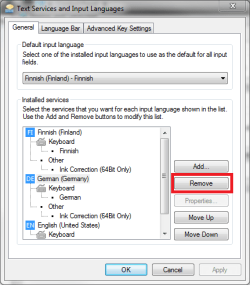
To add to what Grimmjow said, if you want to use just one keyboard layout you can remove the unnecessary ones and only use for example your native Norwegian layout.

Kari
Attached Thumbnails
input layout changin automatically, how to turn it off?-remove_lang.png  
My System SpecsSystem Spec
16 Feb 2010   #9

Windows 7 Ultimate x64
Norway


Problem solved I had removed all other layouts, but it was something bugs with the default layout.
My System SpecsSystem Spec
Reply

 input layout changin automatically, how to turn it off? problems?


Thread Tools


Similar help and support threads for: input layout changin automatically, how to turn it off?
Thread Forum
Monitors will not automatically turn off Hardware & Devices
Tablet PC Input Panel to appear automatically? General Discussion
force turn off monitor automatically General Discussion
Does PSU automatically take required input? Hardware & Devices
Problem with Monitor can't turn off automatically. Graphic Cards


All times are GMT -5. The time now is 06:22 AM.


Seven Forums Android App Seven Forums IOS App Follow us on Facebook

Windows 7 Forums is an independent web site and has not been authorized,
sponsored, or otherwise approved by Microsoft Corporation.
"Windows 7" and related materials are trademarks of Microsoft Corp.
© Designer Media Ltd
  

1 2 3 4 5 6 7 8 9 10 11 12 13 14 15 16 17 18 19 20 21 22 23 24 25 26 27 28 29 30 31 32