| Windows 7: Help: These files can't be opened. Your Internet... |
27 Jan 2010
|
#1 | | Windows 7 Ultimate 32 bit |
Help: These files can't be opened. Your Internet... Windows 7 Ultimate 32 bit
UAC Disabled
Toshiba Satellite p300
Hi there,
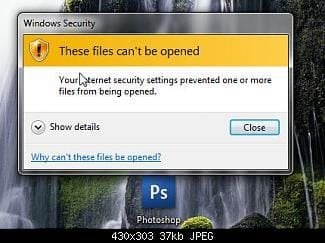
I turned on my computer this morning and suddenly all hell has broken loose. Every time I try and open an exe file I get a Windows Security alert box telling me that:
"These files can't be opened. Your Internet security settings prevented one or more files from being opened."
I've read through every thread I can find on the topic and none of the "answers" have worked for me.
I can start programs (and essentially open exe files) if I open them via an associated file type. For example I managed to start firefox by opening an .html document and I've got thunderbird open through the use of an .eml file.
I can't start cmd, regedit, msconfig etc... unless I boot the computer in safe mode with command prompt. Safe mode by itself still produces the same "Windows Security" dialogue boxes.
I have tried the following common "solutions" with no luck:
1) Right click the exe, click Properties
Click the Unblock button
Click OK
2) Adding exe to Control Pannel > Windows Defender > Tools > Options > Excluded file types
3) Start / Control Panel / Internet Options.
(Internet Options control panel appears)
Click "Security" tab.
Click "Local Intranet"
Drag slider to "Low"
Click "Sites" button.
Click "Advanced" button.
Enter the IP Address of the NAS / SMB/ CIFS / whatever server and click "Add."
Click "Close"
4) Remove the registry key - HKEY_CURRENT_USER\Software\Microsoft\Windows\CurrentVersion\Explorer\FolderTypes\{EF87B4CB-F2CE-4785-8658-4CA6C63E38C6}\TopViews\{00000000-0000-0000-0000-000000000000}
5) Creating a completely new admin profile. - This one was interesting, when I logged into the account there was no aero theme - it went right back to basics.
So any ideas?
Thanks in advance. | My System Specs |
| OS Windows 7 Ultimate 32 bit |
27 Jan 2010
|
#2 | | Windows 7 Home Premium SP1, clean install, upgrade disc CT |
Rather than suffer with this problem, I would try a system restore, that is what the feature is for.
In lieu of that, what happened last night? Did you install a new program, was there any other incident that could have caused this?
If there is no other answer, it could be a virus. Run your Anti Virus. Download and use Malwarebytes.
You can also try to disable your A/V, see if that helps. | My System Specs | | System Manufacturer/Model Number Dell XPS 420 OS Windows 7 Home Premium SP1, clean install, upgrade disc CPU Intel Core2 processsor Q8200(2.33Ghz 1333FSB) Quad Core Tech Motherboard Dell Memory 6 gb Graphics Card ATI Radeon 256MB HD3650 Sound Card Intergrated 7.1 Channel Audio Monitor(s) Displays Dell SP2009W 20" Keyboard Dell USB Keyboard Mouse Dell Premium Optical USB Cooling Fan Hard Drives 640 GB Serial ATA Hard drive Internet Speed DSL 2.85 |
27 Jan 2010
|
#3 | | Windows 7 Ultimate 32 bit |
Unfortunately I can't even run a system restore, presumably because it is essentially an exe.
There were several updates that were installed when I shut my computer down last night so I'm now guessing that's where the problem lies (hadn't even thought about that before). Is there a way to revert back from the updates to see if that really is the problem?
EDIT: I'm uninstalling my last night updates now and will report back with the results.
Thanks | My System Specs | | OS Windows 7 Ultimate 32 bit |
27 Jan 2010
|
#4 | | Windows 7 Home Premium SP1, clean install, upgrade disc CT |
If you are not sucessful, try this method. Hope that it works for you. Using Last Known Good Configuration | My System Specs | | System Manufacturer/Model Number Dell XPS 420 OS Windows 7 Home Premium SP1, clean install, upgrade disc CPU Intel Core2 processsor Q8200(2.33Ghz 1333FSB) Quad Core Tech Motherboard Dell Memory 6 gb Graphics Card ATI Radeon 256MB HD3650 Sound Card Intergrated 7.1 Channel Audio Monitor(s) Displays Dell SP2009W 20" Keyboard Dell USB Keyboard Mouse Dell Premium Optical USB Cooling Fan Hard Drives 640 GB Serial ATA Hard drive Internet Speed DSL 2.85 |
27 Jan 2010
|
#5 | | Windows 7 Ultimate 32 bit |
Argh, still nothing. I guess I'll try running the last known good configuration. - Thanks | My System Specs | | OS Windows 7 Ultimate 32 bit |
27 Jan 2010
|
#6 | | Windows 7 Home Premium SP1, clean install, upgrade disc CT |
If that does not work, try this.
Run a virus scan.
Download malwarebytes and run a scan. If no success try to
Go to search
Type CMD do not hit enter
Right click on CMD run as adminitrator
In CMD type sfc /scannow.
If it finds errors, run several times. | My System Specs | | System Manufacturer/Model Number Dell XPS 420 OS Windows 7 Home Premium SP1, clean install, upgrade disc CPU Intel Core2 processsor Q8200(2.33Ghz 1333FSB) Quad Core Tech Motherboard Dell Memory 6 gb Graphics Card ATI Radeon 256MB HD3650 Sound Card Intergrated 7.1 Channel Audio Monitor(s) Displays Dell SP2009W 20" Keyboard Dell USB Keyboard Mouse Dell Premium Optical USB Cooling Fan Hard Drives 640 GB Serial ATA Hard drive Internet Speed DSL 2.85 |
27 Jan 2010
|
#7 | | Windows 7 Ultimate x64 + x86 + Windows 8 x64 Newport, South Wales, UK |
If you have the Windows 7 install dvd you can gain access to your restore points by using the repair my computer option after boot - may be worth a try.
There is also access to a command prompt where you can run the sfc if you cannot do so in windows
I also think a malware scan may be in order as soon as you can as this sort of total block on exe files has been due to a virus in the past | My System Specs | | Computer type PC/Desktop System Manufacturer/Model Number Real World Computing (Me + a little help from Acer) OS Windows 7 Ultimate x64 + x86 + Windows 8 x64 CPU AMD Phenom II X6 1035T 2.6 GHz Motherboard Aspire M3400 Memory 4Gb PC10600 DDR3 1333 MHz Graphics Card NVIDIA GeForce 315 512MB Sound Card OnBoard - Realtek High Definition Audio Monitor(s) Displays Philips 32" HDTV, (HDMI) + 26" TV (VGA) Screen Resolution 1920 x 1080 @60Hz + 1360 x 768 @60Hz Keyboard Microsoft Wireless 800 or Stock Acer, (depends where I sit) Mouse Microsoft Wireless 800 or Stock Acer, (depends where I sit) PSU Stock (400W) Case Acer M3400 Cooling Stock Hard Drives 500 GB Seagate ST3500418AS SATA II
1 TB Hitachi HDS5C1010CLA382 SATAII
1 TB Samsung Spinpoint F1 HD103SI SATA II (external)
Plus various other (client ) HDDs as needed Internet Speed Temporaray 3G Dongle Antivirus Avast Browser Chrome Other Info USB Capture + Webcam(s) Bamboo Digitizer tablet
Also run Acer AspireOne 530h Netbook, Dual Core Atom + 1GB (Win7 Ult x86) Plus various test systems for new projects |
27 Jan 2010
|
#8 | | Windows 7 Ultimate 32 bit |
Solved!
Did lots of scans with malwarebytes etc... and nothing fixed it.
Then I did a system restore back to just before a critical update a couple of days ago and everything's back to normal.
Thanks everyone for all your help! | My System Specs | | OS Windows 7 Ultimate 32 bit |
27 Jan 2010
|
#9 | | Windows 7 Home Premium SP1, clean install, upgrade disc CT |
Figures, first suggestion. Good luck | My System Specs | | System Manufacturer/Model Number Dell XPS 420 OS Windows 7 Home Premium SP1, clean install, upgrade disc CPU Intel Core2 processsor Q8200(2.33Ghz 1333FSB) Quad Core Tech Motherboard Dell Memory 6 gb Graphics Card ATI Radeon 256MB HD3650 Sound Card Intergrated 7.1 Channel Audio Monitor(s) Displays Dell SP2009W 20" Keyboard Dell USB Keyboard Mouse Dell Premium Optical USB Cooling Fan Hard Drives 640 GB Serial ATA Hard drive Internet Speed DSL 2.85 |
26 May 2010
|
#10 | | Windows 7 Enterprise 64bit Portland |
These files can't be opened We had the same problem while attempting to open files from the Internet as well. Setting these for both the Internet and Intranet settings should take care of it. The setting I found that was blocking me from opening files on my LAN is “Launching applications and unsafe files”. Normal Systems and Personal Computers
This is an error from Internet Explorer security settings found under your “Tools” –> “Internet Options” –> “Security” tab –> “Local intranet” or “Internet”. These files can't be opened. Your Internet security settings prevented one or more files from being opened | iLERTECH
Last edited by nickiler; 26 May 2010 at 02:57 PM..
Reason: weird text in posting
| My System Specs | | System Manufacturer/Model Number Optiplex 960 OS Windows 7 Enterprise 64bit CPU Dual Quad-Core Memory 8GB Graphics Card NVidia Quadro NVS 450 Monitor(s) Displays 3 Monitors - ViewSonic VP2030b 21in- Hard Drives Raid configuration with 300GB Other Info Also owne a Tablet x61 Lenovo Laptop Help: These files can't be opened. Your Internet... problems? All times are GMT -5. The time now is 08:27 AM. | |