Windows 7 Forums Search
Welcome to Windows 7 Forums. Our forum is dedicated to helping you find solutions with any problems, errors or issues you are experiencing with Windows 7. The Windows 7 forum also covers news and updates and has an extensive Windows 7 tutorial section that covers a wide range of tips and tricks.


Windows 7 - Erase a write protected usb

 
02-07-2010   #1


Windows 7 Home Premium x64 & Ultimate x64


Erase a write protected usb

I have a write protected usb memory stick and i cant use it because its write protected, for some reason????? i cant even format it!!, it has no valuable data on it and can be wiped, i just want to be able to use it.

Charlie

My System SpecsSystem Spec
02-07-2010   #2
Dom


Windows Seven Ultimate Ver. 6.1 Build 7600


Go to Computer, and right click on your USB drive and click on 'Properties'. Once there go to the 'Security' tab (top of window). Below 'Permissions for authenticated users' there is an 'Advanced' button. Click on it. On the 'Owners' tab, there should be an 'Edit' button. Now, select your username in the bottom box, and make sure the checkbox at the bottom is checked. Click on okay, then once it has changed ownership, click on Ok on all 'Properties' windows. You should now have full control of your USB memory stick.
My System SpecsSystem Spec
02-07-2010   #3


Windows 7 Ultimate x64


Right click on the USB drive in My Computer, go to Properties, then click on the Security tab. Make sure the box for Writes Allowed is checked, if not, log into an admin account and enable it for users.

Otherwise, right click and format.
My System SpecsSystem Spec
.


02-07-2010   #4


Windows 7 Home Premium x64 & Ultimate x64


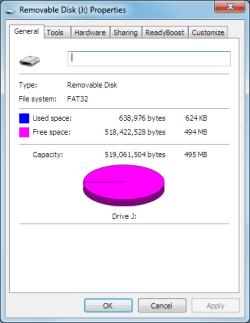
cant, this is what my window looks like, and i cant format it either, trust me ive tried. The data on the disk can be deleted if need be.
Attached Thumbnails
Erase a write protected usb-capture.png  
My System SpecsSystem Spec
02-07-2010   #5


Windows 7 Home Premium x64 & Ultimate x64


i have an admin account aswell
My System SpecsSystem Spec
02-07-2010   #6


Windows 7 Pro


What if you right click My Computer | Manage | Disk management. Here right click on the dirve and choose delete volume. Once deleted, right click and choose New volume I think and create a new space. Then format it.
My System SpecsSystem Spec
02-07-2010   #7


Win 7 Ultimate 32bit


What kind of thumb drive is it?
Brand/Model?

If it is locked by Firmware, then there is nothing you can do but use whatever software that locked it to unlock it.
My System SpecsSystem Spec
02-07-2010   #8


Windows 7 Ultimate 32bit SP1


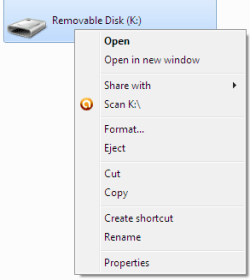
From your computer Right click on the thumbdrive .... in the dropdown list does it say "Format"?
My System SpecsSystem Spec
02-08-2010   #9


Windows 7 Home Premium x64 & Ultimate x64


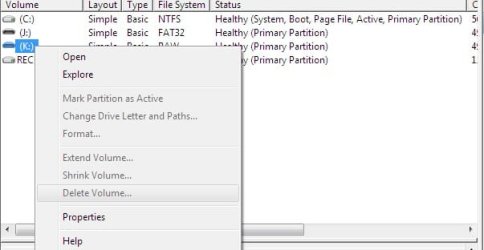
cant use disk management either delete volume is blacked out.

my friend gave me it and said he couldn't get them to work and if they don't work just throw them away. they don't have a make on them or a model.
Attached Thumbnails
Erase a write protected usb-untitled.jpg  
My System SpecsSystem Spec
02-08-2010   #10


Windows 7 Home Premium x64 & Ultimate x64


jacee, i do have format in the menu
My System SpecsSystem Spec
Reply

 Erase a write protected usb problems?


Thread Tools


Similar Threads for: Erase a write protected usb
Thread Forum
Solved WRITE protected Flashdrive Hardware & Devices
HDD write protected Hardware & Devices
Slave HDD Write Protected Hardware & Devices
Disk (dvd rw) is write protected General Discussion
Disc is write protected Hardware & Devices


All times are GMT -5. The time now is 04:34 AM.


Windows 7 Forums is an independent web site and has not been authorized,
sponsored, or otherwise approved by Microsoft Corporation.
"Windows 7" and related materials are trademarks of Microsoft Corp.
© Designer Media Ltd
  

1 2 3 4 5 6 7 8 9 10 11 12 13 14 15 16 17 18 19 20 21 22 23 24 25 26 27 28 29 30