Windows 7 Forums Search
Welcome to Windows 7 Forums. Our forum is dedicated to helping you find solutions with any problems, errors or issues you are experiencing with Windows 7. The Windows 7 forum also covers news and updates and has an extensive Windows 7 tutorial section that covers a wide range of tips and tricks.


Windows 7 - Is there a way to put the Computer icon on the taskbar?

 
02-15-2010   #1


Windows 7x64 Premium


Is there a way to put the Computer icon on the taskbar?

I'm talikng about the icon that looks like a pc tower/monitor and when you click on it you see your ''C'' Hdd. I'd like to have it at the bottom on the taskbar with my libraries folder. I've tried a couple of things and don't seem to work. thanks

My System SpecsSystem Spec
02-15-2010   #2


W 7 64-bit Ultimate


Hello Davv.


See if the tutorial , at the link below will do the trick for you.

Recycle Bin - Pin to Taskbar
My System SpecsSystem Spec
02-15-2010   #3


W 7 64-bit Ultimate


Quote   Quote: Originally Posted by Bare Foot Kid View Post
Hello Davv.


See if the tutorial , at the link below will do the trick for you.

Recycle Bin - Pin to Taskbar

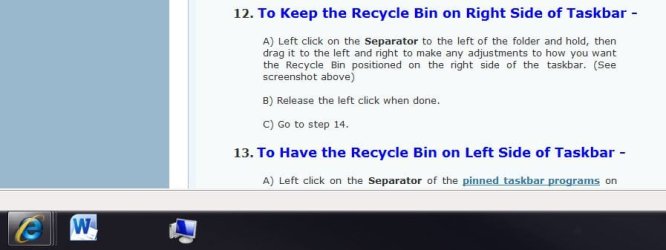
It works.

Is there a way to put the Computer icon on the taskbar?-1.jpg
My System SpecsSystem Spec
.


02-15-2010   #4
Dom


Windows Seven Ultimate Ver. 6.1 Build 7600


You can use BareFoot's method, but for me i tend to use keyboard shortcuts a lot.
The keyboard shortcut for 'Computer' is

'Windows' + 'E'.
My System SpecsSystem Spec
02-15-2010   #5
R A


W7PRO/ULT 32/64


See this tutorial:

Computer - Pin to Taskbar
My System SpecsSystem Spec
Reply

 Is there a way to put the Computer icon on the taskbar? problems?


Thread Tools


Similar Threads for: Is there a way to put the Computer icon on the taskbar?
Thread Forum
Solved How to do taskbar icon to open with same icon and not thread Customization
How To Get This Wi-Fi Icon in Taskbar ? Customization
Taskbar Icon Themes and Styles
MSE taskbar-icon fix #2 ! System Security
Windows 7 use shortcut icon as taskbar icon General Discussion


All times are GMT -5. The time now is 04:39 AM.


Windows 7 Forums is an independent web site and has not been authorized,
sponsored, or otherwise approved by Microsoft Corporation.
"Windows 7" and related materials are trademarks of Microsoft Corp.
© Designer Media Ltd
  

1 2 3 4 5 6 7 8 9 10 11 12 13 14 15 16 17 18 19 20 21 22 23 24 25 26 27 28 29 30