Windows 7 Forums


Windows 7: "Sort by" doesn't show up in desktop context menu

22 Feb 2010   #1

Windows 7 Professional (final) x64
Germany
 
 
"Sort by" doesn't show up in desktop context menu

Hi there,


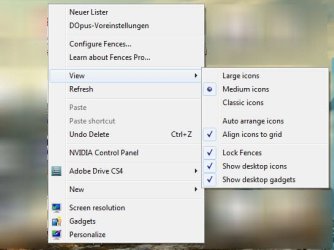
I have a weird and frustrating problem: In my desktop context menu, the option "Sort by" doesn't show up. I don't know why and did some Google searches but almost everything I found was related to explorer issues, not to desktop issues!

I also read through "How to Change the Desktop Icons View Alignment and Sort By Order in Vista" and "How to Change the Group By - Sort By - Arrange By View in Windows 7 Explorer", yet the only thing I found is that indeed the "Sort by" option should be available.

I also found
Quote:
You’ve always been able to auto-arrange your desktop icons by right-clicking on the desktop and choosing “Sort By.” Now Windows 7 makes it even easier. To auto-arrange the desktop icons according to your default settings, simply press and hold F5. Order is instantly accomplished.
Source: 7 Windows 7 Tips: Part 3 (Now you have 21 total things to try!) - Windows Live
which I consider being ridiculous, at least from my feeling at the moment.

*edit* Attached an actual screenshot.

I hope there is a way out and that M$ did not kill off this important 101-feature!

Thanks in advance!

Kind regards.
Attached Thumbnails
"Sort by" doesn't show up in desktop context menu-win7-desktop-sortby.jpg  

Last edited by KnowledgeWorker; 22 Feb 2010 at 12:19 PM..
My System SpecsSystem Spec

22 Feb 2010   #2

W 7 64-bit Ultimate
The Lowcountry


Hello KnowledgeWorker.


Please excuse my mess but I get "sort by" on my desktop though I'm not sure where to start to help you sort your issue; I'm sure someone else with some knowledge of it will come along to help shortly.

"Sort by" doesn't show up in desktop context menu-desk2.jpg
My System SpecsSystem Spec
22 Feb 2010   #3

Windows 7 Ultimate x64 ®™
West Yorkshire


Shows in mine too, but like you say, searching google doesn't provide any obvious answer. The only thing I could suggest until someone can offer a better solution, is to use a reg file. I use this one - windows-7-registry-tweaks.zip
My System SpecsSystem Spec
.


22 Feb 2010   #4

Windows 7 Professional (final) x64
Germany


Hi

@BareFootKid: Indeed, your setup seems to be right/unbroken, congrats

@FZ21Z: Great website recommendation, thx! Yet I'm hesitant to install the *.reg. From which article page did you get it? Please point me to the article URL (I'm already searching for it), thanks.
My System SpecsSystem Spec
22 Feb 2010   #5

Windows 7 Ultimate x64 ®™
West Yorkshire


It's an attachment I uploaded here, and can't remember where I got it from. I also posted it in this thread - New drop down menu missing - with a couple of images to show it.
My System SpecsSystem Spec
22 Feb 2010   #6

Windows 7 Ultimate x64 ®™
West Yorkshire


Found it - Collection of Registry Tweaks for Windows 7 - Tweaking with Vishal
Quote:
* Adds "Copy To" and "Move To" options in files and folders context menu, so that you can easily copy and move them to other locations.

* Sets Windows to automatically end task of programs which are either hanged or taking longer time than expected to exit.

* Decreases menus show delay time, it'll show the sub-menus fast when you select their parent menu.

* Disables the low disk space check so that you don't get the annoying low disk space notification in system tray.

* Sets Windows to not waste time in searching for a program which no longer exists in your system when you try to open its shortcut.

* Disables "search on Internet" prompt in "Open with" window so that it directly opens the program list.

* Speeds up the Explorer navigation.

* Adds "Take Ownership" option in files and folders context menu so that you can easily take ownership of files and folders in case you want to replace them for customization purpose.
My System SpecsSystem Spec
22 Feb 2010   #7

Windows 7 Professional (final) x64
Germany


Thanks FZ21Z, good to know. I also also looked at the "raw code" already.

I did already integrate the first and last point, the last one via a reg edit posted here and the first via Tera Copy. Although this is a useful regedit, I don't see how it changes / solves my problem. Indeed it does not after applying.
My System SpecsSystem Spec
22 Feb 2010   #8

Windows 7 Professional (final) x64
Germany


SOLVED: The problem is Fences (free version) by Stardock Corporation.
After uninstalling "Sort by" is showing up again.
My System SpecsSystem Spec
22 Feb 2010   #9

W 7 64-bit Ultimate
The Lowcountry


Hello KnowledgeWorker, glad to see you got it sorted.
My System SpecsSystem Spec
25 Oct 2012   #10

windows 7 ultimate
 
 
Sort by in content menu

RIGHT ON,

i had deleted the Fences but that did not work but forgot to uninstall and that did it.

THANKS.

Ps: I kind of liked Fences so did you find an solution around the problem of getting both?
My System SpecsSystem Spec
Reply

 "Sort by" doesn't show up in desktop context menu problems?


Thread Tools


Similar help and support threads for: "Sort by" doesn't show up in desktop context menu
Thread Forum
Remove "set as desktop background" in Explorer Context Menu Customization
Solved Add "play all" for my music and "slideshow" to images context menu? Music, Pictures & Video
Solved Remove "Restore previous versions" and "Share with" from context menu Customization
Cascading "My Computer" menu in desktop context menu Customization
Add "New->Sticky Note" to desktop context menu? Customization


All times are GMT -5. The time now is 03:53 AM.


Seven Forums Android App Seven Forums IOS App Follow us on Facebook

Windows 7 Forums is an independent web site and has not been authorized,
sponsored, or otherwise approved by Microsoft Corporation.
"Windows 7" and related materials are trademarks of Microsoft Corp.
© Designer Media Ltd
  

1 2 3 4 5 6 7 8 9 10 11 12 13 14 15 16 17 18 19 20 21 22 23 24 25 26 27 28 29 30 31 32