| Windows 7: can't move Temporary Internet Files |
22 Feb 2010
|
#1 | | |
can't move Temporary Internet Files I had this problem on my last Windows 7 install but can't recall how I got it to work.
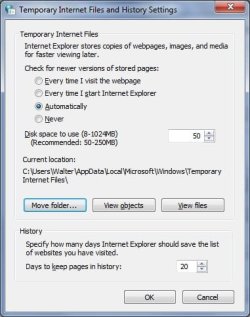
Using Control Panel -> IE options (NO browser windows or any windows of any kind open), I can change the location to D. I can see there is a TIF folder on D now. When I log off (per the popup) and log back on, it's still pointing to C. I've tried multiple times and can't get it to stick.
*sigh* | My System Specs |
| System Manufacturer/Model Number Custom OS Windows 7 CPU AMD Phenom II X2 (dual-core) Motherboard GA-MA785GM-US2H Memory 4G Graphics Card integrated ATI HD 4200 Sound Card integrated Monitor(s) Displays Samsung 24" Screen Resolution 1920x1080 Keyboard Microsoft Digital Media Pro Mouse Logitech WIRED! PSU Ultra X4 500W Case Ultra X-blaster Hard Drives 1 SATA (750GB, 32MB cache, 7200 RPM)
1 IDE (80GB, 8MB cache, 7200 RPM)
1 SSD (Intel 320, 120GB, installed but not activated) Internet Speed 15 Mbps FIOS |
22 Feb 2010
|
#2 | | Windows 7 Ultimate x64 SP1 Coimbatore/India Doha/Qatar |
Hello,
Am not sure about what you have mentioned. Can you please be more specific about the option, you are referring to ? | My System Specs | | System Manufacturer/Model Number Dell Inspiron N5010 OS Windows 7 Ultimate x64 SP1 CPU Intel Core i3 Memory 4 GB DDR3 Screen Resolution 1366 X 768 Hard Drives Seagate 500 GB Internet Speed 4 MBPS |
22 Feb 2010
|
#3 | | |
All IE browsers closed.
Control Panel -> Internet Options (same thing would come via IE menubar Tools -> Options).
Browsing History - SETTINGS. Click on there to MOVE the Temporary Internet Files (TIF) folder.
I can change it to D (navigate to D via the tree (+) applet. Click on OK and back on prior applet I can see it's changed from C: longpathnametoinstalledTIFfilelocation to D:\TIF.
The popup then tells me I will be logged off to COMPLETE the move. I'm logged off. Logging back on (no shutdown) shows them BACK to C: originallongpathname. | My System Specs | | System Manufacturer/Model Number Custom OS Windows 7 CPU AMD Phenom II X2 (dual-core) Motherboard GA-MA785GM-US2H Memory 4G Graphics Card integrated ATI HD 4200 Sound Card integrated Monitor(s) Displays Samsung 24" Screen Resolution 1920x1080 Keyboard Microsoft Digital Media Pro Mouse Logitech WIRED! PSU Ultra X4 500W Case Ultra X-blaster Hard Drives 1 SATA (750GB, 32MB cache, 7200 RPM)
1 IDE (80GB, 8MB cache, 7200 RPM)
1 SSD (Intel 320, 120GB, installed but not activated) Internet Speed 15 Mbps FIOS |
22 Feb 2010
|
#4 | | Windows 7 x64 finally! North Carolina |
Jim, do you mean you moved the file location at this configuration window and it comes back with the C location? | My System Specs | | System Manufacturer/Model Number Wally, Innc. OS Windows 7 x64 finally! CPU AMD Athlon II X2 240 Motherboard Biostar TA790GX XE Memory OCZ Platinum 4GB DDR2 1066 (will not work past 800MHz) Graphics Card MSI R4670-MD1G Radeon HD 4670 1GB 128-bit GDDR3 Sound Card ATI High Definition Audio Device Realtek ALC888 Monitor(s) Displays HP w19e Screen Resolution 1440x900 Keyboard wired, many keys Mouse HP wireless, 2 buttons, 1 wheel PSU Athena Power Micro ATX 400W Case HEC 6T 6T10BB Black MicroATX Mini Tower Cooling stock Hard Drives Western Digital Caviar Green WD5000AADS 500GB SATA
Western Digital Caviar Blue WD5000AAKS 500GB SATA Internet Speed DSL 2Mb (recently getting 1.65M!) |
22 Feb 2010
|
#5 | | |
Yes, that's the screen.
After changing the location, it SHOWS as D: TIF.
However, upon closing and logging off (but not rebooting), it's back to C: .
As well, this DID occur upon my initial Windows 7 install a month ago. I got it working but can't recall how (but it was buggy back then).
Could it be that there was already a TIF folder ON D: (from my last attempt at getting this to work) such that it's seeing a folder ALREADY existing called TIF? | My System Specs | | System Manufacturer/Model Number Custom OS Windows 7 CPU AMD Phenom II X2 (dual-core) Motherboard GA-MA785GM-US2H Memory 4G Graphics Card integrated ATI HD 4200 Sound Card integrated Monitor(s) Displays Samsung 24" Screen Resolution 1920x1080 Keyboard Microsoft Digital Media Pro Mouse Logitech WIRED! PSU Ultra X4 500W Case Ultra X-blaster Hard Drives 1 SATA (750GB, 32MB cache, 7200 RPM)
1 IDE (80GB, 8MB cache, 7200 RPM)
1 SSD (Intel 320, 120GB, installed but not activated) Internet Speed 15 Mbps FIOS |
24 Feb 2010
|
#6 | | |
Bump.
I tried moving to my E: drive which definitely has NO TIF folder on it. It still won't move. | My System Specs | | System Manufacturer/Model Number Custom OS Windows 7 CPU AMD Phenom II X2 (dual-core) Motherboard GA-MA785GM-US2H Memory 4G Graphics Card integrated ATI HD 4200 Sound Card integrated Monitor(s) Displays Samsung 24" Screen Resolution 1920x1080 Keyboard Microsoft Digital Media Pro Mouse Logitech WIRED! PSU Ultra X4 500W Case Ultra X-blaster Hard Drives 1 SATA (750GB, 32MB cache, 7200 RPM)
1 IDE (80GB, 8MB cache, 7200 RPM)
1 SSD (Intel 320, 120GB, installed but not activated) Internet Speed 15 Mbps FIOS |
24 Feb 2010
|
#7 | | Windows 7 Professional x64 Rednecksville |
Let's rule out the possibility of a conflict with another program.
Perform a selective startup and try moving the folder.
If it works, we can start looking for the rogue program. | My System Specs | | System Manufacturer/Model Number Custom OS Windows 7 Professional x64 CPU Intel i7 2600K OC'd @ 4620 MHz Motherboard Asus P8Z68-V Pro Memory 16GB GSkill Sniper 2133 Mhz (4x4GB) Graphics Card EVGA GeForce GTX 480 SuperClocked+ Sound Card Realtek High Definition Audio Monitor(s) Displays 2x Acer S273HLbmii 27" Screen Resolution 2 x 1920x1080 Keyboard Logitech MK320 (wireless) Mouse Logitech MK320 (wireless) PSU Corsair HW Series 750w (modular) Case Cooler Master HAF 932 Advanced Blue Edition Cooling CM Hyper 212+ CPU cooler, 3x 230mm + 1x 140mm case fans Hard Drives 64GB Crucial M4 SSD
Storage: Hitachi 1TB 5400RPM, Samsung 1.5TB 5400RPM Internet Speed 30 Mb/s : 2 Mb/s |
24 Feb 2010
|
#8 | | |
Great suggestion.
I disabled ALL items in STARTUP:
Microsoft Security Essentials
Adobe Reader and Acrobat Manager
Adobe Reader
Microsoft Intellitype (keyboard software)
Logitech QuickCam Ribbon
PowerReg (logitech webcam?)
Java updater
Office XP
The Control Panel -> Internet Options applet NEVER works in trying to move TIF.
You have to use the exact same applet but via Internet Explorer -> Options. Go figure. IOW, I figured it would be safer to move TIF while IE is NOT open. Seems the opposite.
Of the above, I'd guess Security has to be the culprit as this is the only DIFFERENT software I have on my PC compared to last Windows 7 install (no antivirus other than what's on Windows Windows 7 by default).
Thanks for the excellent suggestion. Thoughts? | My System Specs | | System Manufacturer/Model Number Custom OS Windows 7 CPU AMD Phenom II X2 (dual-core) Motherboard GA-MA785GM-US2H Memory 4G Graphics Card integrated ATI HD 4200 Sound Card integrated Monitor(s) Displays Samsung 24" Screen Resolution 1920x1080 Keyboard Microsoft Digital Media Pro Mouse Logitech WIRED! PSU Ultra X4 500W Case Ultra X-blaster Hard Drives 1 SATA (750GB, 32MB cache, 7200 RPM)
1 IDE (80GB, 8MB cache, 7200 RPM)
1 SSD (Intel 320, 120GB, installed but not activated) Internet Speed 15 Mbps FIOS |
24 Feb 2010
|
#9 | | |
what are the permissions on the new drive and folder you're trying to move the TIF to? | My System Specs | | |
24 Feb 2010
|
#10 | | |

Quote: Originally Posted by brady what are the permissions on the new drive and folder you're trying to move the TIF to? I have no idea. How do I get that information? If I right-click the drive (properties), it shows Authenticated Users, Systems, Jim/admin, Jim/user.
Let's review:
Original Windows 7 install by store provided C: and D: partitions.
On THIS Windows 7 install, my E: F: IDE drive was also attached (wasn't last time). E: and F: were formatted by INITIAL Windows 7 install as this drive was added after-the-fact.
Is this a potential "SID" of some type? | My System Specs | | System Manufacturer/Model Number Custom OS Windows 7 CPU AMD Phenom II X2 (dual-core) Motherboard GA-MA785GM-US2H Memory 4G Graphics Card integrated ATI HD 4200 Sound Card integrated Monitor(s) Displays Samsung 24" Screen Resolution 1920x1080 Keyboard Microsoft Digital Media Pro Mouse Logitech WIRED! PSU Ultra X4 500W Case Ultra X-blaster Hard Drives 1 SATA (750GB, 32MB cache, 7200 RPM)
1 IDE (80GB, 8MB cache, 7200 RPM)
1 SSD (Intel 320, 120GB, installed but not activated) Internet Speed 15 Mbps FIOS can't move Temporary Internet Files problems? All times are GMT -5. The time now is 06:16 AM. | |