Hello to ALL,
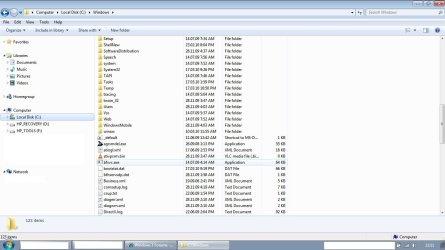
Windows Explorer in details view does not display the columns headers bar (name, type, date, size etc...) - it was there since the installation in DEC'09 but today when i opened the WE it wasn't there. The folders and files are still showed in columns, from view/choose details... menu i can select/clear which columns to appear but the columns names are not displayed.
Has anyone encountered such a behavior? Any idea how to restore the columns headers bar to be displayed?
Appreciate your help.
Thanks / Nicky
Windows Explorer in details view does not display the columns headers bar (name, type, date, size etc...) - it was there since the installation in DEC'09 but today when i opened the WE it wasn't there. The folders and files are still showed in columns, from view/choose details... menu i can select/clear which columns to appear but the columns names are not displayed.
Has anyone encountered such a behavior? Any idea how to restore the columns headers bar to be displayed?
Appreciate your help.
Thanks / Nicky
My Computer
At a glance
Windows 7 Professional 32bit
- OS
- Windows 7 Professional 32bit