Windows 7 Forums


Windows 7: Very BIG size, "windows folder"

23 Feb 2010  
sandhee

Windows 7 Enterprise
2 posts
 
 
Very BIG size, "windows folder"

I am use my windows 7 enterprise for my notebook. my current folder windows size is almost 15 GB. I always update my win 7, use my windows update. whats the problem?what's I should be check?thanks before.

My System SpecsSystem Spec

23 Feb 2010  
richc46

Windows 7 Home Premium SP1, clean install, upgrade disc
15,045 posts
CT


Welcome

I do not see the problem, my window folder is almost 13gb. If you want to get back some HD space, go to c drive, >right click>properties>disc clean up, including system files.

Windows 7 uses space for back up, system image, and back up and restore, plus shadow copies.
My System SpecsSystem Spec
23 Feb 2010  
whs

Vista, Windows7, Mint Mate, Zorin, Windows 8
17,869 posts
Florida in winter, Black Forest/Germany


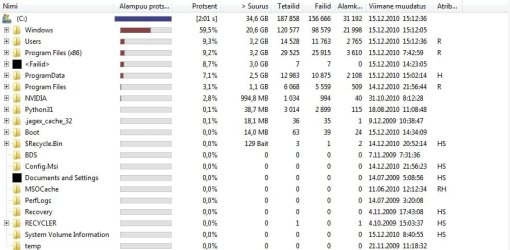
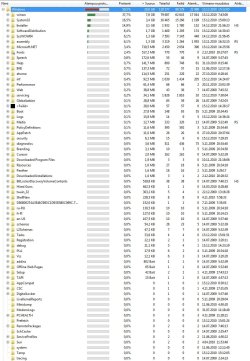
I don't think you are outside the norm. But if you think there is a problem, you have to be more specific. Run WinDirStat and post the upper left pane. Then run vssadmin list shadowstorage in elevated Command Prompt and post the results. Only then will we be able to see whether you have a problem.
My System SpecsSystem Spec
.


23 Feb 2010  
valtonray

Windows 7 Ultimate Signature Edition
1,604 posts
FL


thats pretty normal. as mentioned you can run disk clean up if you want but there isn't anything to worry about here.
My System SpecsSystem Spec
24 Feb 2010  
karlsnooks

MS Windows 7 Ultimate SP1 64-bit
10,288 posts
Austin, Texas


OK people, you made me curious. Windows Explorer shows me with 9.17 GB.

I do delete old restore points, use cleanmgr.exe (otherwise known as Disk Cleanup) and also CCleaner.

karl
My System SpecsSystem Spec
24 Feb 2010  
richc46

Windows 7 Home Premium SP1, clean install, upgrade disc
15,045 posts
CT


Karl,

It is my hunch that the big difference is due to shadow copies, which you clean with your version of disc clean.

If the OS version of disc clean is used and you include the system files, do regular maintenance you will get results like yours.
My System SpecsSystem Spec
24 Feb 2010  
sandhee

Windows 7 Enterprise
2 posts


OK guys.thanks for all ur advice, i'm new in windows 7..thank again for all your post, its very helpfull.
My System SpecsSystem Spec
24 Feb 2010  
whs

Vista, Windows7, Mint Mate, Zorin, Windows 8
17,869 posts
Florida in winter, Black Forest/Germany


Quote   Quote: Originally Posted by sandhee View Post
OK guys.thanks for all ur advice, i'm new in windows 7..thank again for all your post, its very helpfull.
If you use the tools I have posted above, you will get a better insight of how the disk space is being used.
My System SpecsSystem Spec
14 Dec 2010  
Plitter

Windows 7 Ultimate 64bit
6 posts


You guys are talking how its not out of norm, I would like to know what is concidered to be the norm for the Windows folder, as mine is now 21.2GB.

Thanks in advance.
My System SpecsSystem Spec
14 Dec 2010  
whs

Vista, Windows7, Mint Mate, Zorin, Windows 8
17,869 posts
Florida in winter, Black Forest/Germany


Quote   Quote: Originally Posted by Plitter View Post
You guys are talking how its not out of norm, I would like to know what is concidered to be the norm for the Windows folder, as mine is now 21.2GB.

Thanks in advance.
If you install and uninstall programs very often, you may get a bloated winsxs folder. Check with WinDirStat where the biggies are.
My System SpecsSystem Spec
Reply

 Very BIG size, "windows folder" problems?


Thread Tools


Similar help and support threads for: Very BIG size, "windows folder"
Thread Forum
Folder file size "housekeeping" Backup and Restore
My c:\windows folder has a couple of strange files: "Dõ„" and "@ù#" General Discussion
Solved Hiding unused "removable storage" devices from "Computer" folder Customization
What's the diffrent between "size" and "size on Disk"? General Discussion
Solved Accidentally "Take Ownership" of the whole "Windows" folder. General Discussion


All times are GMT -5. The time now is 11:45 PM.


Windows 7 Forums is an independent web site and has not been authorized,
sponsored, or otherwise approved by Microsoft Corporation.
"Windows 7" and related materials are trademarks of Microsoft Corp.
© Designer Media Ltd