I have just switched OS to Windows 7, and i am impressed so far.
I want to backup my data on an external harddrive. I would like to use the function ROBOCOPY in the command windows because then i don't have to third party program running all the time. But the copying stops at a folder that it cannot access. The folder is "c:\Users\"MyUser"\Documents\My Music", but the folder doesn't exist in the directory. I have checked the folder with explorer and commando prompt, but its not there.
I have made a screenshot of the failure:
I am using the following command:
REM Starting Syncronizing with external harddrive
cd %0\..\
robocopy "C:\Users\Halberg\Documents" "Backup\Documents" /MIR /ETA
4 x 4GB DDR3-1600 Corsair Vengeance CMZ8GX3M2A1600C9B (16GB)
Graphics Card(s)
MSI GeForce GTX770 Gaming OC 2GB
Sound Card
Realtek High Definition on board solution (ALC 898)
Monitor(s) Displays
ViewSonic VA1912w Widescreen (VGA)
Screen Resolution
1440x900
Hard Drives
OCZ Agility 3 SSD 120GB SATA III x2 (RAID 0)
Samsung HD501LJ 500GB SATA II x2
Hitachi HDS721010CLA332 1TB SATA II
Iomega 1.5TB Ext USB 2.0
WD 2.0TB Ext USB 3.0
4 x 4GB DDR3-1600 Corsair Vengeance CMZ8GX3M2A1600C9B (16GB)
Graphics Card(s)
MSI GeForce GTX770 Gaming OC 2GB
Sound Card
Realtek High Definition on board solution (ALC 898)
Monitor(s) Displays
ViewSonic VA1912w Widescreen (VGA)
Screen Resolution
1440x900
Hard Drives
OCZ Agility 3 SSD 120GB SATA III x2 (RAID 0)
Samsung HD501LJ 500GB SATA II x2
Hitachi HDS721010CLA332 1TB SATA II
Iomega 1.5TB Ext USB 2.0
WD 2.0TB Ext USB 3.0
Well i have allready read that post, and it dosen't give me any way to enable the autorun.ini located on USB drives. But thanks for the quick answer anyway.
The designers of W7 decided to disable the AutoRun capability on USB devices other than removable optical media for security reasons.
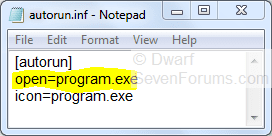
Because of this change in security, some devices which automatically executed programs when plugged into a computer running Vista might not appear to work when plugged into a computer running W7. You will need to click on Open folder to view files from the options that pop up when you insert the drive. There should be an entry called autorun.inf and if you click on it the file will open in Notepad. This will reveal the name of the program (see highlighted example) that would have run automatically had AutoRun not been disabled for that device. You can run that program directly from Windows Explorer.
My Computer
At a glance
Windows 8.1 Pro RTM x64Intel Core-i5-3570K 4-core @ 3.4GHz (Ivy Brid...4 x 4GB DDR3-1600 Corsair Vengeance CMZ8GX3M2...MSI GeForce GTX770 Gaming OC 2GB
4 x 4GB DDR3-1600 Corsair Vengeance CMZ8GX3M2A1600C9B (16GB)
Graphics Card(s)
MSI GeForce GTX770 Gaming OC 2GB
Sound Card
Realtek High Definition on board solution (ALC 898)
Monitor(s) Displays
ViewSonic VA1912w Widescreen (VGA)
Screen Resolution
1440x900
Hard Drives
OCZ Agility 3 SSD 120GB SATA III x2 (RAID 0)
Samsung HD501LJ 500GB SATA II x2
Hitachi HDS721010CLA332 1TB SATA II
Iomega 1.5TB Ext USB 2.0
WD 2.0TB Ext USB 3.0
Ye but i hopped there were a way to get around that because i wanted to autorun the ROBOCOPY batch file i wrote when i plugged in my external harddrive. But it seems like MS have totaly shut down the possibility to do so in W7. It would have made my life much easier.