Windows 7 Forums Search
Welcome to Windows 7 Forums. Our forum is dedicated to helping you find solutions with any problems, errors or issues you are experiencing with Windows 7. The Windows 7 forum also covers news and updates and has an extensive Windows 7 tutorial section that covers a wide range of tips and tricks.


Windows 7 - Accounts and duplication


03-02-2010   #1


Win7 x64


Accounts and duplication

I'm new to Windows 7 and there are quite a few changes since XP. I'm on Windows 7 Pro 64-bit and it is running fine except for some functions that I can not figure. I'm the only user of this PC.

For example, I have an user account which I take will limit me on various options. I tried to view the temporary Internet folder, to copy a flv video to my desktop, which I'm not allowed to open - "Location is not available" and "Access is denied". Okay, I can accept that and then opened a new account Administrator with all rights.
Same story, I have ticked "Show hidden files, folders, and drives". What gives?

Because I started a new Admin account I now have a blank Desktop except for two progs that were originally installed "Everyone". Is there an easy (or quicker) way to have the Admin account Desktop with all I've done on my user account Desktop? All and everything I've set must be redone in the Admin account? Even if I access any installed prog shortcut on my user Desktop it it seen as a first time run? Incl Windows Live Mail.

I can understand that Windows 7 sees these two accounts as dif people and keeping all separated but I'm pushing my luck
Any tips most welcome.

My System SpecsSystem Spec
03-02-2010   #2


Windows 7 Professional x64


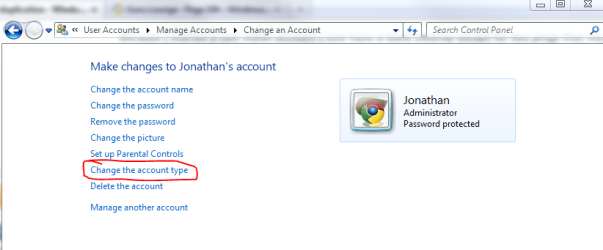
What you could do is log into your new admin account, then change your other account to also be administrator.

Accounts and duplication-capture.png
My System SpecsSystem Spec
03-02-2010   #3


Windows 7 Home Premium SP1, clean install, upgrade disc


Welcome

If everything else fails, use this special administrator account, with additional authority.

If everything is set up correctly, I feel the special adm account will not be necessary

Built-in Administrator Account - Enable or Disable[2]=User Accounts

http://www.mydigitallife.info/2007/0...windows-vista/
The above work in Vista and Windows 7
My System SpecsSystem Spec
.


03-02-2010   #4


Windows 7 (7600) x86


Quote   Quote: Originally Posted by lonny View Post
For example, I have an user account which I take will limit me on various options. I tried to view the temporary Internet folder, to copy a flv video to my desktop, which I'm not allowed to open - "Location is not available" and "Access is denied". Okay, I can accept that and then opened a new account Administrator with all rights.
Same story, I have ticked "Show hidden files, folders, and drives". What gives?
If you are getting "Access Denied" then you are trying to access a junction point which is not the real location. If you are receving access denied in your User folder that is an indication that it is a junction. (See the link in ma signature for more information.)

Temporary Internet Files is located here:
C:\Users\[username]\AppData\Local\Microsoft\Windows\Temporary Internet Files
My System SpecsSystem Spec
03-04-2010   #5


Win7 x64


Thanks folk, I've followed all suggested.

Jonathan_King - I've changed the account as suggested and that solved 99% of the issues. What I found weird was that I have two administrator accounts, one is titled "administrator" and the other "administrators". Can I remove/delete/disable one w/o any repercussions?
At some stage in the past I've changed a setting and found afterwards that the desktop of that account changed to blank, all icons missing except for two progs?

I currently have two .ini files on my desktop, are they involved:
1 = desktop.ini
[.ShellClassInfo]
LocalizedResourceName=@%SystemRoot%\...l32.dll,-21799

2 = desktop.ini
[.ShellClassInfo]
LocalizedResourceName=@%SystemRoot%\...l32.dll,-21769
IconResource=%SystemRoot%\system32\imageres.dll,-183

richc46 - maybe one of the above two acc is this "special administrator" acc?

logicearth - yep, what an eye opener. I followed various links in the tree and there were many "links" marked with a shortcut arrow and/or a small lock icon. They all ended at nothing should I select them. The "lock" icons now gone after Jonathan_King's tip.
Eventually found a clean route. This is a drastic change from XP, thanks.
My System SpecsSystem Spec
03-04-2010   #6


Windows 7 (7600) x86


The two desktop.ini files on the desktop...One in is your user account's "Desktop" folder, the other is in Public/Desktop. Public's desktop is shared across all accounts.

Administrators with an "s" is a group. Administrator without an "s" is the big boss user that is normally turned off. Aka., Hidden Administrator account.
My System SpecsSystem Spec
03-09-2010   #7


Win7 x64


Thanks logicearth, that is most interesting info, Googled it heavy and learnt a lot.
I currently have two options to select when I boot up, an Admin acc and my "own" acc which I use. Is there a way of changing it so that I only have one option or even better that I'm logged in automatically to my own acc? I do not use a password.
My System SpecsSystem Spec
Reply

Accounts and duplication problems?


Thread Tools


Similar Threads for: Accounts and duplication
Thread Forum
audio CD duplication software Software
New VM Duplication tool (XP Mode and others) Virtualization
Windows 7 RTM XP Mode (XP SP3) Duplication Tool Availab News
Duplication of files Performance & Maintenance
Logic with duplication of contacts Browsers & Mail


All times are GMT -5. The time now is 12:05 AM.


Windows 7 Forums is an independent web site and has not been authorized,
sponsored, or otherwise approved by Microsoft Corporation.
"Windows 7" and related materials are trademarks of Microsoft Corp.
© Designer Media Ltd
  

1 2 3 4 5 6 7 8 9 10 11 12 13 14 15 16 17 18 19 20 21 22 23 24 25 26 27 28 29 30