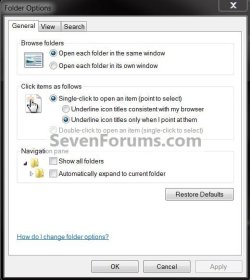
In Firefox, a single click used to change tabs, now it requires a double click. This type of change has also appeared in other programs, so it seems to be a system problem not just a Firefox problem.
Is there somewhere in Win 7 settings where I can set programs to respond to single click rather than double click?
Is there somewhere in Win 7 settings where I can set programs to respond to single click rather than double click?
My Computer
At a glance
Windows 7 X64Inte Core 2 Duo E6420 Socket 77LGA [email protected]DDR2 Dula 8192 MBytes Symmetric DRAM Freq 400...NVIDIA GeForce 8800 GTS, Perfm level 3D, V A2...
- OS
- Windows 7 X64
- CPU
- Inte Core 2 Duo E6420 Socket 77LGA [email protected]
- Motherboard
- ASUSTek Computer P5B-Deluxe Rev 1.xx, Chipset P965/G965
- Memory
- DDR2 Dula 8192 MBytes Symmetric DRAM Freq 400 MHz FSB 2:3
- Graphics Card(s)
- NVIDIA GeForce 8800 GTS, Perfm level 3D, V A2, Mem 320 MByte
- Hard Drives
- USB 2 * 2 Terabytes.
USB 1 * 500 GiG
4 SETA
- Other Info
- Mainboard Model P5B-Deluxe (0x0000035B - 0x15997268)
Caches: L2 D-Chache 32 KBytes x2 8-way set associative, 64-byte line size.
L1 I-Chache 32 KBytes x2 8-way set associative, 64-byte line size.
L2 Cache 4096 KBytes 16-way set associative, 64-byte line size.
Graphic Interface version PCI-Express
BIOS American Mega Trends V 1101 03/09/2007
Chipset
----------------------------------