| Windows 7: How to create a file in a folder? |
09 Mar 2010
|
#1 | | Windows 7 Home Premium (x64) (build 7600) Where Leesburg used to be |
How to create a file in a folder? I usually hang around fora dealing with antique farm equipment and always feels sorry for the guy who asks how to adjust the main jet on a Farmall H carb and two out of three responders tell him how to use the Search function. So I've spent a day or two worth of spare time searching through the Tutorials.
I've found a lot of interesting stuff (and a good bit I don't follow) but I haven't found this: When I right click on a folder and then click "New" the only options are "Folder" and "Briefcase."
With XP I would click on a folder, then File up at the top of the Window, then New and and get a menu that included Text Document, Bitmap Image, etc.
This new version of Win Explorer doesn't have File, just Organize.
What'll I do?
Thanks, Wm | My System Specs |
| System Manufacturer/Model Number HP Pavilion p6320y OS Windows 7 Home Premium (x64) (build 7600) CPU 2.80 gigahertz AMD Phenom IIX4 820 Quad Core Motherboard Board: PEGATRON CORPORATION VIOLET6 6.01 Memory 8 GB Graphics Card NVIDIA GeForce 9100 Sound Card Realtek High Definition Audio Monitor(s) Displays Samsung SyncMaster [Monitor] (19.9"vis, s/n H9LS234374, Febr Screen Resolution 1360x768 Hard Drives WDC WD10 EADS-65M2B0 SCSI Disk Device (1000.20 GB)
Seagate FreeAgent Pro USB Device [Hard drive] (500.11 GB) Internet Speed It's stupid Hughesnet /quick in the AM, glacial in the PM |
09 Mar 2010
|
#2 | | 64-bit Windows 7 Ultimate SP1 & Windows 8 Enterprise Texas |
Hello Will, and welcome to Seven Forums.
It depends on what folder you right click in. In system folders, you may only get the Folder option in the New context menu. However, for when you right click and click on "New" on the desktop and in other user folders, you should get the full New context menu list.
If not, then you may be missing a few. New Context Menu - Remove & Restore Default Menu Items
Hope this helps,
Shawn | My System Specs | | Computer type PC/Desktop System Manufacturer/Model Number Self built custom OS 64-bit Windows 7 Ultimate SP1 & Windows 8 Enterprise CPU Intel i7-3930K 3.2 Ghz (O/C 4 Ghz) Motherboard ASRock X79 Extreme11 Memory 32 GB (8GBx4) G.SKILL DDR3 Quad PC3-19200 2400MHz Graphics Card Sapphire HD5870 Eyefinity 6 2GB Sound Card SB Recon 3Di Integrated Chip Monitor(s) Displays 3x 27" Asus VE278Q Screen Resolution 1920x1080 Keyboard Logitech Cordless Desktop MX 5500 Revolution Mouse Logitech Cordless Desktop MX 5500 Revolution PSU OCZ Series Gold OCZZ1000M 1000W Case Thermaltake Level 10 GT Snow Edition Cooling Corsair Hydro H100 Hard Drives 256GB OCZ Vector
160GB OCZ RevoDrive X2
2 x 1TB Samsung HDD HD154UI SATA Internet Speed 50 Mb/s Download and 2 Mb/s Upload Other Info Microsoft LifeCam Cinema
Lite-On iHBS212 12x BD Writer
Samsung CLX-3175FW Printer
Netgear WNDR3800 Router
Motorola SBG6580 Cable Modem
2x APC Back-UPS XS 1500 |
09 Mar 2010
|
#3 | | W 7 64-bit Ultimate The Lowcountry |
Hello willfick, welcome to Seven Forums!
As Brink has said, this is what I get when I r click an empty spot the desktop. | My System Specs | | System Manufacturer/Model Number * BFK Customs * OS W 7 64-bit Ultimate CPU Intel Q9550 Yorkfield Motherboard ASUS P5Q Pro Memory 8GB Dominator 8500C5D Graphics Card ATI : XFX 5870 Sound Card Realtek HD Audio 7-1 Monitor(s) Displays 1x 47" LCD HDMI & 3x 26" LCD HDMI Screen Resolution 1920x1080P & 1920x1200 Keyboard Microsoft 500 Mouse Razer Diamondback 3G PSU Corsair 620HX Case Cooler Master RC-690 Cooling Tuniq Tower 120, 2x 140mm and 3x 120mm case fans Hard Drives 1x 80GB Intel X25-M G2 SSD : 1x 500GB & 1x 640GB WD Caviar Black(s) Internet Speed 14 Mb/s Other Info 1x Koutech 3Gb/s SATA HDD Hot Swap Rack |
10 Mar 2010
|
#4 | | Windows 7 Home Premium (x64) (build 7600) Where Leesburg used to be |
Thanks, y'all.
I do get all the menu items when I r-click the Desktop but when I ....
Whoa. As I type along I suddenly realize what was meant by r-click on any open space in a folder. I open Win Explorer, drill to folder to which I want to add file, put the arrow out in a blank spot, r-click and New has all the options. Works like a charm.
Sometimes words mean what they say.
I still miss File, though.
Thanks, Wm
PS, BFK, What part of the Low Country? Myself, I'm from Walterboro, but I live in Richland County now. | My System Specs | | System Manufacturer/Model Number HP Pavilion p6320y OS Windows 7 Home Premium (x64) (build 7600) CPU 2.80 gigahertz AMD Phenom IIX4 820 Quad Core Motherboard Board: PEGATRON CORPORATION VIOLET6 6.01 Memory 8 GB Graphics Card NVIDIA GeForce 9100 Sound Card Realtek High Definition Audio Monitor(s) Displays Samsung SyncMaster [Monitor] (19.9"vis, s/n H9LS234374, Febr Screen Resolution 1360x768 Hard Drives WDC WD10 EADS-65M2B0 SCSI Disk Device (1000.20 GB)
Seagate FreeAgent Pro USB Device [Hard drive] (500.11 GB) Internet Speed It's stupid Hughesnet /quick in the AM, glacial in the PM |
10 Mar 2010
|
#5 | | Windows 7 x64 Ultimate A Finnish immigrant in Leipzig, Germany |
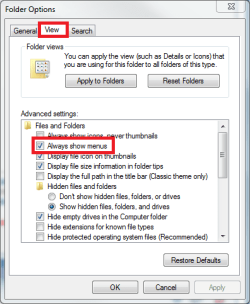
To get the menu bar to Explorer, you have to enable it from Control Panel > Folder Options:
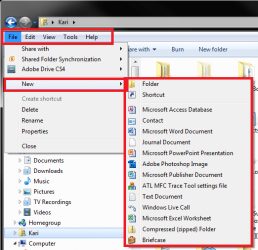
When you have done that, you get the File menu you are missing. It is a context menu, it changes depending on where you are.
Here's the File > New when in a user folder:
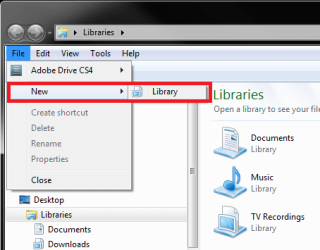
This is how the same menu point looks when in Libraries:
Hope this helps.
Kari | My System Specs | | Computer type Laptop System Manufacturer/Model Number HP ENVY 17-1150eg OS Windows 7 x64 Ultimate CPU 1.6 GHz Intel Core i7-720QM Processor Memory 6 GB Graphics Card ATI Mobility Radeon HD 5850 Graphics Sound Card Beats sound system with integrated subwoofer Monitor(s) Displays 17" laptop display, 22" LCD and 32" Full HD TV through HDMI Screen Resolution 1600*900, 1680*1050 and 1920*1080 Keyboard Logitech diNovo Media Desktop Laser (bluetooth) Mouse Logitech MX1000 Laser (Bluetooth) Hard Drives Internal: 2 x 500 GB SATA Hard Disk Drive 7200 rpm
External: 2TB for backups, 3TB USB3 network drive for media Internet Speed 50/10 Mbps VDSL Antivirus MSE, Windows Defender Browser Maxthon 3.5.2. Other Info Windows 7 Ultimate Retail Full in English, additional Guest-user accounts in Finnish, German and Swedish (Working languages English & Swedish, Family language German, my own language, mother tongue, Finnish. I really need Ultimate to get to use Language Packs!) |
10 Mar 2010
|
#6 | | W 7 64-bit Ultimate The Lowcountry |

Quote: Originally Posted by willfick Thanks, y'all.
I do get all the menu items when I r-click the Desktop but when I ....
Whoa. As I type along I suddenly realize what was meant by r-click on any open space in a folder. I open Win Explorer, drill to folder to which I want to add file, put the arrow out in a blank spot, r-click and New has all the options. Works like a charm.
Sometimes words mean what they say.
I still miss File, though.
Thanks, Wm
PS, BFK, What part of the Low Country? Myself, I'm from Walterboro, but I live in Richland County now.
Hello Wm.
I'm in Summerville, as you know about 25 w. of Charleston proper.
I'm pleased to see you're getting it sorted. | My System Specs | | System Manufacturer/Model Number * BFK Customs * OS W 7 64-bit Ultimate CPU Intel Q9550 Yorkfield Motherboard ASUS P5Q Pro Memory 8GB Dominator 8500C5D Graphics Card ATI : XFX 5870 Sound Card Realtek HD Audio 7-1 Monitor(s) Displays 1x 47" LCD HDMI & 3x 26" LCD HDMI Screen Resolution 1920x1080P & 1920x1200 Keyboard Microsoft 500 Mouse Razer Diamondback 3G PSU Corsair 620HX Case Cooler Master RC-690 Cooling Tuniq Tower 120, 2x 140mm and 3x 120mm case fans Hard Drives 1x 80GB Intel X25-M G2 SSD : 1x 500GB & 1x 640GB WD Caviar Black(s) Internet Speed 14 Mb/s Other Info 1x Koutech 3Gb/s SATA HDD Hot Swap Rack |
11 Mar 2010
|
#7 | | Windows 7 Home Premium (x64) (build 7600) Where Leesburg used to be |
Thanks again, y'all. I've got File back, menus look right; on to the next learning opportunity.
Wm
PS - BFK, I still remember from being a thirteen year old playing Sousaphone in the High Scool Band that Summerville had the longest Christmas parade route.... | My System Specs | | System Manufacturer/Model Number HP Pavilion p6320y OS Windows 7 Home Premium (x64) (build 7600) CPU 2.80 gigahertz AMD Phenom IIX4 820 Quad Core Motherboard Board: PEGATRON CORPORATION VIOLET6 6.01 Memory 8 GB Graphics Card NVIDIA GeForce 9100 Sound Card Realtek High Definition Audio Monitor(s) Displays Samsung SyncMaster [Monitor] (19.9"vis, s/n H9LS234374, Febr Screen Resolution 1360x768 Hard Drives WDC WD10 EADS-65M2B0 SCSI Disk Device (1000.20 GB)
Seagate FreeAgent Pro USB Device [Hard drive] (500.11 GB) Internet Speed It's stupid Hughesnet /quick in the AM, glacial in the PM |
11 Mar 2010
|
#8 | | W 7 64-bit Ultimate The Lowcountry |
Hello Wm.
I'm pleased to see you've found a solution. | My System Specs | | System Manufacturer/Model Number * BFK Customs * OS W 7 64-bit Ultimate CPU Intel Q9550 Yorkfield Motherboard ASUS P5Q Pro Memory 8GB Dominator 8500C5D Graphics Card ATI : XFX 5870 Sound Card Realtek HD Audio 7-1 Monitor(s) Displays 1x 47" LCD HDMI & 3x 26" LCD HDMI Screen Resolution 1920x1080P & 1920x1200 Keyboard Microsoft 500 Mouse Razer Diamondback 3G PSU Corsair 620HX Case Cooler Master RC-690 Cooling Tuniq Tower 120, 2x 140mm and 3x 120mm case fans Hard Drives 1x 80GB Intel X25-M G2 SSD : 1x 500GB & 1x 640GB WD Caviar Black(s) Internet Speed 14 Mb/s Other Info 1x Koutech 3Gb/s SATA HDD Hot Swap Rack How to create a file in a folder? problems? All times are GMT -5. The time now is 05:33 AM. | |