| Windows 7: Most efficient/safest way to port files from XP to 7? |
12 Mar 2010
|
| | Win7 Professional 64 153 posts |
Most efficient/safest way to port files from XP to 7? I am apologizing right off the bat for asking a question that has probably been answered, multiple times, on this board, but I have looked and can't find the answer.
My son is coming home from college in a week, with a newly-purchased Sony VPCCW290X, Windows 7 Home Premium 64 bit, replacing his current Lenovo running XP Home. I'll be configuring the computer, and a big part of this will be getting the files and functionality synched up.
Obviously, I know I'll need to reinstall software on the new machine. I believe Office 2007 is the only paid software that is involved. Will it be an issue installing it on a new computer, when it's already installed on an old one? Otherwise, the main programs on it are freebies like Irfanview, PDFCreator, iTunes, Skype.
After the software is installed, 90% of the battle, I'm guessing, can be done by using the Windows Easy Transfer program. I have an external HD and will be copying files from XP to 7. And I assume that's pretty self-explanatory, but if it's not, please tell me any quirks to look out for. And at a minimum, I assume that this will bring over EVERY document for EVERY user on the old XP laptop, right?
Next, I'll want to make his Firefox profile on the new computer run FF exactly as it had run on the old one - same preferences, extensions, passwords. Will Windows Easy Transfer do this for me, and if not, how do I do it? I am smart enough to get it with googling/trial/error, but why reinvent the wheel since someone else here would have tried it.
Next, I'll want him to be able to use the shared printer we have at home. This printer is an HP Deskjet 920C (yes, I know, ancient) that is connected to an XP Pro computer, and shared wirelessly by the other computers in the house. Any special tricks to make that happen?
Next, I'll want to make it painless to connect to the internet. Configuring it to work on our home wireless network will be pretty simple I assume, as long as I can detect the MAC address on it. We have a Netgear G router at home, using 128-bit WEP, and suppressing broadcast of the SSID. I've added access to the network before when his friends and their laptops have come over, so I'm comfortable I can do it easily here, but I've never had a Windows 7 computer on the network before.
I'm more concerned about configuring it to "smartly" connect. By that I mean the old Lenovo had the "Access Connections" program on it. This would look first for an Ethernet connection and connect to the internet that way if one was detected, and it would then look first for the college WLAN and finally our home WLAN, connecting to the first one it found. He's not super computer literate - will he easily be able to configure for these when he returns to college? Do most computers - more specifically does this computer - have some type of utility to make this relatively easy?
Last, I'd like to be able to access the hard drive of the Windows 7 computer over our home network from my XP Pro machine. Is this easily configurable, and if so how?
Of course if there's anything I've missed here - again, the idea is to get all the files and functionality from an XP Home laptop to a Windows 7 laptop - please let me know.
Again, I realize that what I ask here has probably been answered elsewhere, so I will appreciate being patiently pointed to good answers to these questions.
Thanks! | My System Specs |
| System Manufacturer/Model Number custom-built OS Win7 Professional 64 CPU Intel I3 550 (3.2 GHz) Motherboard GIGABYTE|GA-H55M-S2V H55 1156 R Memory 8 gig (2x4gig Kingston DDR 3) Graphics Card Intel HD graphics (from CPU) Sound Card Realtek ALC888B Monitor(s) Displays ViewSonic Screen Resolution 1280x1024 Hard Drives WDC WD800JD-22MSA1 (80 gig C drive for OS and programs)
WDC WD5000AAKS-00V1A0 (2x500 gig drives, software mirrored in a RAID 1 configuration, as a D drive, for documents and data) Internet Speed download > 15 mbps; upload approx 1 mbps |
12 Mar 2010
|
| | Vista, Windows7, Mint Mate, Zorin, Windows 8 17,871 posts Florida in winter, Black Forest/Germany |
1. The Office license is usually for 3 systems (at least Home and Student edition)
2. I suggest to skip easy transfer. Just copy the files to an external device (USB stick or disk) and then copy them into Windows 7 folders. Use this, in both XP and Windows 7.
3. For the printer you'll have to find a Windows 7 driver (if available)
4. Since the Sony is a laptop, you only have to connect from the Network and Sharing center to the router
5. The most difficult problem in the first few days will be to deal with the very different Windows 7 interface (different from XP) and functions. But that can be learned. If you have any questions, just ask here. We are here 24/7.
Note: Not all programs you may have used in XP may be available for 64bit. Some are available for a fee. The very first program you should install is MSE. But make sure you properly install whatever trial version AV was installed on the laptop. Use the Norton Removal Tool for Norton and the MCPR.exe for McAfee. Both are on Google. | My System Specs | | System Manufacturer/Model Number HP, Dell, Gateway, Toshiba - 4 laptops and 2 desktops OS Vista, Windows7, Mint Mate, Zorin, Windows 8 CPU from 1.6GHz Duo to i7 Monitor(s) Displays 2x HP w2207 Keyboard with trackball - no mices Mouse Trackball mice Hard Drives 5x HDD, 7x SSD, 12x Externals Internet Speed DSL 6000 |
12 Mar 2010
|
| | Windows 7 x64 Ultimate 12,755 posts A Finnish immigrant in Leipzig, Germany |
To add to what whs already told here above, I remind you Windows 7 does not like WEP, especially Windows 7 x64. Searching WEP on Seven Forums or the net, you'll find out more. My recommendation is to change to WPA2/PSK.
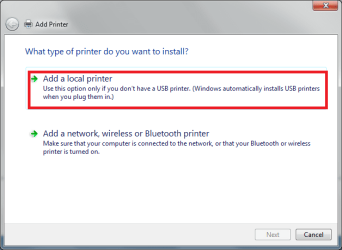
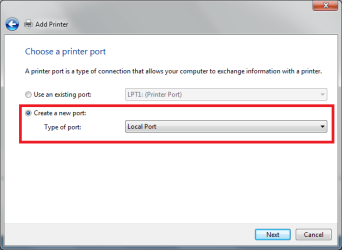
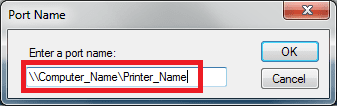
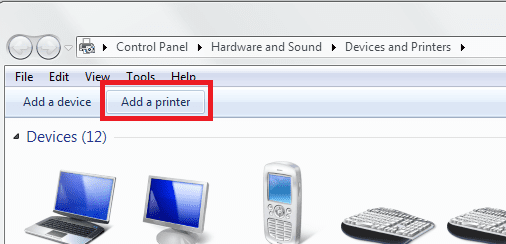
Second, installing shared printer. It's easiest to do like this:
Follow the instructions given on screen.
That's about it. Good luck!
Kari
Last edited by Kari; 23 Mar 2010 at 07:18 AM..
| My System Specs | | Computer type Laptop System Manufacturer/Model Number HP ENVY 17-1150eg OS Windows 7 x64 Ultimate CPU 1.6 GHz Intel Core i7-720QM Processor Memory 6 GB Graphics Card ATI Mobility Radeon HD 5850 Graphics Sound Card Beats sound system with integrated subwoofer Monitor(s) Displays 17" laptop display, 22" LCD and 32" Full HD TV through HDMI Screen Resolution 1600*900, 1680*1050 and 1920*1080 Keyboard Logitech diNovo Media Desktop Laser (bluetooth) Mouse Logitech MX1000 Laser (Bluetooth) Hard Drives Internal: 2 x 500 GB SATA Hard Disk Drive 7200 rpm
External: 2TB for backups, 3TB USB3 network drive for media Internet Speed 50/10 Mbps VDSL Antivirus MSE, Windows Defender Browser Maxthon 3.5.2. Other Info Windows 7 Ultimate Retail Full in English, additional Guest-user accounts in Finnish, German and Swedish (Working languages English & Swedish, Family language German, my own language, mother tongue, Finnish. I really need Ultimate to get to use Language Packs!) |
12 Mar 2010
|
| | Win7 Professional 64 153 posts |
I'm more or less stuck with WEP because I have an ancient Mac laptop running OS 9.2, and that and its Orinoco wireless card only support WEP. Some stuff I've found on the web suggests that WEP will work, although I don't know if that's for x64 too.
WHS suggested skipping Easy Transfer. On the one hand, I feel sophisticated enough to be able to figure out what I need and move it over. On the other though, why should I think at all when Windows can do it for me? Especially when I have zero experience to date with Windows 7. | My System Specs | | System Manufacturer/Model Number custom-built OS Win7 Professional 64 CPU Intel I3 550 (3.2 GHz) Motherboard GIGABYTE|GA-H55M-S2V H55 1156 R Memory 8 gig (2x4gig Kingston DDR 3) Graphics Card Intel HD graphics (from CPU) Sound Card Realtek ALC888B Monitor(s) Displays ViewSonic Screen Resolution 1280x1024 Hard Drives WDC WD800JD-22MSA1 (80 gig C drive for OS and programs)
WDC WD5000AAKS-00V1A0 (2x500 gig drives, software mirrored in a RAID 1 configuration, as a D drive, for documents and data) Internet Speed download > 15 mbps; upload approx 1 mbps |
12 Mar 2010
|
| | Vista, Windows7, Mint Mate, Zorin, Windows 8 17,871 posts Florida in winter, Black Forest/Germany |
Just make sure you back this data up before Easy Transfer can mess it up (as there have been reports of that happening). I always like to be in the driver seat and know what I am doing rather than have some "tool" take the initiative. | My System Specs | | System Manufacturer/Model Number HP, Dell, Gateway, Toshiba - 4 laptops and 2 desktops OS Vista, Windows7, Mint Mate, Zorin, Windows 8 CPU from 1.6GHz Duo to i7 Monitor(s) Displays 2x HP w2207 Keyboard with trackball - no mices Mouse Trackball mice Hard Drives 5x HDD, 7x SSD, 12x Externals Internet Speed DSL 6000 |
13 Mar 2010
|
| | Windows 7 Ultimate RTM (Technet) 137 posts Charlotte, NC |
I beg to differ with those of you that say WEP doesn't play well with Windows 7. I have used it on probably 20-30 machines in the last 90 days with NO problems whatsoever. It is the best way, IMHO, to transfer files and settings from XP or Vista to Windows 7. | My System Specs | | System Manufacturer/Model Number Custom OS Windows 7 Ultimate RTM (Technet) CPU 3.00 gigahertz Intel Core2 Duo E8400 Motherboard ASUSTeK Computer INC. P5K/EPU Rev 1.xx Memory 4GB Graphics Card ATI Radeon X1950 Pro Sound Card Built in HD Audio Monitor(s) Displays 22" Gateway LCD Screen Resolution 1920 x 1200 Keyboard Logitech G11 Mouse Microsoft Wireless Laser Mouse 5000 Hard Drives ST3160023A [Hard drive] (160.04 GB) -- drive 0, rev 8.01, ST3500630AS [Hard drive] (500.11 GB) -- drive 2, rev 3.AAK
ST3500630AS [Hard drive] (500.11 GB) -- drive 1, rev 3.AAK Internet Speed 13.44 Mbps |
13 Mar 2010
|
| | Windows 7 x64 Ultimate 12,755 posts A Finnish immigrant in Leipzig, Germany |

Quote: Originally Posted by MacGyvr I beg to differ with those of you that say WEP doesn't play well with Windows 7. I have used it on probably 20-30 machines in the last 90 days with NO problems whatsoever. It is the best way, IMHO, to transfer files and settings from XP or Vista to Windows 7. Do we have a small misunderstanding here? MacGyvr, I believe you are talking about WET (Windows Easy Transfer), which is also IMO a nice and easy way to transfer files. I've used it when upgrading various XP and Vista machines to Seven, never had any problems. WET works fine with XP, Vista and 7.
We were referring to WEP (Wired Equivalent Privacy), an algorithm used to secure wireless networks.
Changing only one letter makes a big difference!
Kari.
Last edited by Kari; 13 Mar 2010 at 08:46 AM..
| My System Specs | | Computer type Laptop System Manufacturer/Model Number HP ENVY 17-1150eg OS Windows 7 x64 Ultimate CPU 1.6 GHz Intel Core i7-720QM Processor Memory 6 GB Graphics Card ATI Mobility Radeon HD 5850 Graphics Sound Card Beats sound system with integrated subwoofer Monitor(s) Displays 17" laptop display, 22" LCD and 32" Full HD TV through HDMI Screen Resolution 1600*900, 1680*1050 and 1920*1080 Keyboard Logitech diNovo Media Desktop Laser (bluetooth) Mouse Logitech MX1000 Laser (Bluetooth) Hard Drives Internal: 2 x 500 GB SATA Hard Disk Drive 7200 rpm
External: 2TB for backups, 3TB USB3 network drive for media Internet Speed 50/10 Mbps VDSL Antivirus MSE, Windows Defender Browser Maxthon 3.5.2. Other Info Windows 7 Ultimate Retail Full in English, additional Guest-user accounts in Finnish, German and Swedish (Working languages English & Swedish, Family language German, my own language, mother tongue, Finnish. I really need Ultimate to get to use Language Packs!) |
13 Mar 2010
|
| | Win 7 Home X86 on 2 machines X64 on 3 machines WHS V1 on 1 machine 23 posts Hot Springs Village, AR |
As far as I can see, no one has answered the OPs FireFox concerns.
Download free MozBackup (Google it) to do this task. | My System Specs | | System Manufacturer/Model Number Dell XPS 7100 OS Win 7 Home X86 on 2 machines X64 on 3 machines WHS V1 on 1 machine CPU AMD Motherboard Dell Memory 6GB Monitor(s) Displays 2 1=DVI 1=VGA Hard Drives 320 GB for system. 1 TB drive for data. Internet Speed Cable 8Gb Other Info 4 laptops of different flavors
1 Desktop with Windows Home Server. 3 500 GB drives on the server.
4 pre orders of Home Prem. |
13 Mar 2010
|
| | Win7 Professional 64 153 posts |

Quote: Originally Posted by dmillergv As far as I can see, no one has answered the OPs FireFox concerns.
Download free MozBackup (Google it) to do this task. Thanks. I've migrated and rescued lots of Mozilla profiles before with crashed machines, new machine ports, etc. - I've just never gone from XP to 7. My "vibe" from a little reading though is it's pretty simple. Especially if I just use %APPDATA%\Mozilla\Firefox\Profiles\ to locate the profile folders. | My System Specs | | System Manufacturer/Model Number custom-built OS Win7 Professional 64 CPU Intel I3 550 (3.2 GHz) Motherboard GIGABYTE|GA-H55M-S2V H55 1156 R Memory 8 gig (2x4gig Kingston DDR 3) Graphics Card Intel HD graphics (from CPU) Sound Card Realtek ALC888B Monitor(s) Displays ViewSonic Screen Resolution 1280x1024 Hard Drives WDC WD800JD-22MSA1 (80 gig C drive for OS and programs)
WDC WD5000AAKS-00V1A0 (2x500 gig drives, software mirrored in a RAID 1 configuration, as a D drive, for documents and data) Internet Speed download > 15 mbps; upload approx 1 mbps |
13 Mar 2010
|
| | Windows 7 x64 Ultimate 12,755 posts A Finnish immigrant in Leipzig, Germany |

Quote: Originally Posted by 450125 
Quote: Originally Posted by dmillergv As far as I can see, no one has answered the OPs FireFox concerns.
Download free MozBackup (Google it) to do this task. Thanks. I've migrated and rescued lots of Mozilla profiles before with crashed machines, new machine ports, etc. - I've just never gone from XP to 7. My "vibe" from a little reading though is it's pretty simple. Especially if I just use %APPDATA%\Mozilla\Firefox\Profiles\ to locate the profile folders. Easy Transfer should do that, too. | My System Specs | | Computer type Laptop System Manufacturer/Model Number HP ENVY 17-1150eg OS Windows 7 x64 Ultimate CPU 1.6 GHz Intel Core i7-720QM Processor Memory 6 GB Graphics Card ATI Mobility Radeon HD 5850 Graphics Sound Card Beats sound system with integrated subwoofer Monitor(s) Displays 17" laptop display, 22" LCD and 32" Full HD TV through HDMI Screen Resolution 1600*900, 1680*1050 and 1920*1080 Keyboard Logitech diNovo Media Desktop Laser (bluetooth) Mouse Logitech MX1000 Laser (Bluetooth) Hard Drives Internal: 2 x 500 GB SATA Hard Disk Drive 7200 rpm
External: 2TB for backups, 3TB USB3 network drive for media Internet Speed 50/10 Mbps VDSL Antivirus MSE, Windows Defender Browser Maxthon 3.5.2. Other Info Windows 7 Ultimate Retail Full in English, additional Guest-user accounts in Finnish, German and Swedish (Working languages English & Swedish, Family language German, my own language, mother tongue, Finnish. I really need Ultimate to get to use Language Packs!) Most efficient/safest way to port files from XP to 7? problems? All times are GMT -5. The time now is 03:37 AM. | |