Renaming 'System Reserved' Partition?

imacken

New member
Power User
VIP
Local time
7:20 PM
Messages
288
Is it possible to safely rename the 'System Reserved' partition?
The only reason I ask is because I use a triple boot Chameleon setup, and it is annoying that I have to select 'System Reserved' to boot into Windows 7. (Trivial, I know, but irritating!)
Windows won't boot from the 'Windows' partition - just get the usual 'BOOTMGR is missing message'.
Is it possible to remove the 'System Reserved' partition, and boot from the Windows partition?
 

My Computer My Computer

At a glance

Windows 7 64-bitIntel i7 920 @ 4GHz6GbnVidia GTX 285
OS
Windows 7 64-bit
CPU
Intel i7 920 @ 4GHz
Motherboard
Asus P6T Deluxe V2
Memory
6Gb
Graphics Card(s)
nVidia GTX 285
Sound Card
X-Fi Extreme Audio PCIe
Screen Resolution
1900x1200
Load SYSTEM DISK and Repair.
 

My Computer My Computer

At a glance

Vista Ultimate 32 bit, Win 7 Pro 32 bit, Win ...Intel i5 CPU 750 @ 2.67 GHZ, OC 3.7 GHZ4 GigNvidia GeForce GTS450
Computer Manufacturer/Model Number
Home build.
OS
Vista Ultimate 32 bit, Win 7 Pro 32 bit, Win 7 Pro 64 bit
CPU
Intel i5 CPU 750 @ 2.67 GHZ, OC 3.7 GHZ
Motherboard
Asus P7P55D
Memory
4 Gig
Graphics Card(s)
Nvidia GeForce GTS450
Monitor(s) Displays
Acer 24"
Screen Resolution
1440 x 900
Hard Drives
1000 GIG
1000 GIG
PSU
650
Case
Antec Nine Hundred Two
Internet Speed
14 MB (APPROX)
Load SYSTEM DISK and Repair.
For doing what?

'System Reserved' is an internal name for the partition, I think you cannot rename it.
Maybe you can rename the text displayed by Chameleon...
 

My Computer My Computer

At a glance

Windows 7 Ultimate x64 SP1 clean installAMD Athlon 64 X2 6400+4 GB2 x NVidia Geforce 8600 GTS
Computer Manufacturer/Model Number
Custom Build
OS
Windows 7 Ultimate x64 SP1 clean install
CPU
AMD Athlon 64 X2 6400+
Motherboard
Asus M2N-E SLI
Memory
4 GB
Graphics Card(s)
2 x NVidia Geforce 8600 GTS
Sound Card
Trust 5.1 Surround USB
Monitor(s) Displays
Benq FP931 19"
Screen Resolution
1280x1024@32bit@75MHz
Hard Drives
1 x Western Digital 500GB SATA (OS installation), 2 x Seagate 320GB SATA, 1 x Seagate 250GB IDE (in external USB box), 1 x TrekStor 750GB USB
PSU
650W
Keyboard
Logitech Cordless Desktop EX 100
Mouse
Logitech Cordless Optical
Internet Speed
8192 kbps / 640 kbps
So, is it possible to remove this partition and make the Windows partition the bootable one?
 

My Computer My Computer

At a glance

Windows 7 64-bitIntel i7 920 @ 4GHz6GbnVidia GTX 285
OS
Windows 7 64-bit
CPU
Intel i7 920 @ 4GHz
Motherboard
Asus P6T Deluxe V2
Memory
6Gb
Graphics Card(s)
nVidia GTX 285
Sound Card
X-Fi Extreme Audio PCIe
Screen Resolution
1900x1200
I've never tried it. I could try it in a virtual machine. I'll say you if it is possible.
 

My Computer My Computer

At a glance

Windows 7 Ultimate x64 SP1 clean installAMD Athlon 64 X2 6400+4 GB2 x NVidia Geforce 8600 GTS
Computer Manufacturer/Model Number
Custom Build
OS
Windows 7 Ultimate x64 SP1 clean install
CPU
AMD Athlon 64 X2 6400+
Motherboard
Asus M2N-E SLI
Memory
4 GB
Graphics Card(s)
2 x NVidia Geforce 8600 GTS
Sound Card
Trust 5.1 Surround USB
Monitor(s) Displays
Benq FP931 19"
Screen Resolution
1280x1024@32bit@75MHz
Hard Drives
1 x Western Digital 500GB SATA (OS installation), 2 x Seagate 320GB SATA, 1 x Seagate 250GB IDE (in external USB box), 1 x TrekStor 750GB USB
PSU
650W
Keyboard
Logitech Cordless Desktop EX 100
Mouse
Logitech Cordless Optical
Internet Speed
8192 kbps / 640 kbps
Thanks.
 

My Computer My Computer

At a glance

Windows 7 64-bitIntel i7 920 @ 4GHz6GbnVidia GTX 285
OS
Windows 7 64-bit
CPU
Intel i7 920 @ 4GHz
Motherboard
Asus P6T Deluxe V2
Memory
6Gb
Graphics Card(s)
nVidia GTX 285
Sound Card
X-Fi Extreme Audio PCIe
Screen Resolution
1900x1200
Hello imacken


You may be able to mark the OS partition you want to boot as active (make it the system partition) and then run repair install though you may/will need to run the repair at least 3 times to complete the process. Have a look at the tutorial at the link below.


http://www.sevenforums.com/tutorials/681-startup-repair.html?ltr=S
 

My Computer My Computer

At a glance

W 7 64-bit UltimateIntel Q9550 Yorkfield8GB Dominator 8500C5DATI : XFX 5870
Computer Manufacturer/Model Number
* BFK Customs *
OS
W 7 64-bit Ultimate
CPU
Intel Q9550 Yorkfield
Motherboard
ASUS P5Q Pro
Memory
8GB Dominator 8500C5D
Graphics Card(s)
ATI : XFX 5870
Sound Card
Realtek HD Audio 7-1
Monitor(s) Displays
1x 47" LCD HDMI & 3x 26" LCD HDMI
Screen Resolution
1920x1080P & 1920x1200
Hard Drives
1x 80GB Intel X25-M G2 SSD : 1x 500GB & 1x 640GB WD Caviar Black(s)
PSU
Corsair 620HX
Case
Cooler Master RC-690
Cooling
Tuniq Tower 120, 2x 140mm and 3x 120mm case fans
Keyboard
Microsoft 500
Mouse
Razer Diamondback 3G
Internet Speed
14 Mb/s
Other Info
1x Koutech 3Gb/s SATA HDD Hot Swap Rack
Thanks. Is it possible to screw everything up by trying this out, or is it quite safe?
What about EasyBCD? Could that be used?
 

My Computer My Computer

At a glance

Windows 7 64-bitIntel i7 920 @ 4GHz6GbnVidia GTX 285
OS
Windows 7 64-bit
CPU
Intel i7 920 @ 4GHz
Motherboard
Asus P6T Deluxe V2
Memory
6Gb
Graphics Card(s)
nVidia GTX 285
Sound Card
X-Fi Extreme Audio PCIe
Screen Resolution
1900x1200
i would imagine that all you need to do is mark windows partition as active, delete the system partition then run system repair 3 times... but i havent tried it, ill give it a go on a VM a bit later on once my backup has finished
 

My Computer My Computer

At a glance

Windows 10 Pro x64Intel Core i5 7400 @ 3.00GHz8GB 2133Mhz DDR4 (OEM supplied)Gygabyte Windforce GTX 1050Ti (Factory Overcl...
Computer type
PC/Desktop
Computer Manufacturer/Model Number
Medion Erazer (note to self: insert model number) - with custom additions
OS
Windows 10 Pro x64
CPU
Intel Core i5 7400 @ 3.00GHz
Motherboard
OEM supllied with PC
Memory
8GB 2133Mhz DDR4 (OEM supplied)
Graphics Card(s)
Gygabyte Windforce GTX 1050Ti (Factory Overclocked)
Sound Card
Realtek
Monitor(s) Displays
Acer Al1980 + HKC
Screen Resolution
1360*768(HKC) / 1280*1024(Acer)
Hard Drives
1TB Toshiba
1TB WD Caviar Green
120GB Samsung Evo 840
PSU
OEM supplied (no power rating on case)
Case
OEM Supplied
Cooling
Stock
Keyboard
Logitech Wireless
Mouse
Logitect Wireless
Internet Speed
40Mb/s Down 10Mb/s Up
Antivirus
Defender
Browser
Firefox
Is it possible to safely rename the 'System Reserved' partition?
I'm not sure.

Is it possible to remove the 'System Reserved' partition, and boot from the Windows partition?
From what I've read on here, I'm going to say you're best bet is to leave it alone.
 

My Computer My Computer

At a glance

Windows 7 Ultimate x64 ®™Intel Core 2 Duo (2.2 GHz)2x 2GB Corsair (667 MHz)NVIDIA 8600M GS (256MB)
Computer Manufacturer/Model Number
Sony Vaio FZ21Z
OS
Windows 7 Ultimate x64 ®™
CPU
Intel Core 2 Duo (2.2 GHz)
Motherboard
Sony (Intel Chipset)
Memory
2x 2GB Corsair (667 MHz)
Graphics Card(s)
NVIDIA 8600M GS (256MB)
Sound Card
Sigmatel
Monitor(s) Displays
15.4" TFT X-Black
Screen Resolution
1280x800
Hard Drives
Western Digital 300GB Scorpio Black (7200rpm)
Mouse
Logitech Anywhere MX
Internet Speed
Sky 5MB
Thanks. Is it possible to screw everything up by trying this out, or is it quite safe?
What about EasyBCD? Could that be used?
Hello imacken;

The "System Reserved" partition, as a boot partition, is not a necessity. I have had it both ways. There is not much danger removing it, what you do by booting to the 7 DVD and running "Startup Repair" is let the DVD put all of the files that were in the seperate partition in the 7 partition, making it the "boot" partition. If you want to read up on the topic, please take a look at this: http://www.sevenforums.com/installation-setup/58680-solve-dual-boot-problem-windows-7-a.html

The only consideration there might be is that in removing a partition, you change the location of the other partitions on your hard drive. That may or may not be an issue.

Cheers!
Robert
 

My Computer My Computer

At a glance

...
OS
...
i would imagine that all you need to do is mark windows partition as active, delete the system partition then run system repair 3 times... but i havent tried it, ill give it a go on a VM a bit later on once my backup has finished

sorry i forgot my VM is only 32 bit, i have 64 bit windows, and my processor doesnt support the 64 bit Virtualization

obviously i dont want to dual boot and test it as that would mess up my own windows if it doesnt work

sorry again
 

My Computer My Computer

At a glance

Windows 10 Pro x64Intel Core i5 7400 @ 3.00GHz8GB 2133Mhz DDR4 (OEM supplied)Gygabyte Windforce GTX 1050Ti (Factory Overcl...
Computer type
PC/Desktop
Computer Manufacturer/Model Number
Medion Erazer (note to self: insert model number) - with custom additions
OS
Windows 10 Pro x64
CPU
Intel Core i5 7400 @ 3.00GHz
Motherboard
OEM supllied with PC
Memory
8GB 2133Mhz DDR4 (OEM supplied)
Graphics Card(s)
Gygabyte Windforce GTX 1050Ti (Factory Overclocked)
Sound Card
Realtek
Monitor(s) Displays
Acer Al1980 + HKC
Screen Resolution
1360*768(HKC) / 1280*1024(Acer)
Hard Drives
1TB Toshiba
1TB WD Caviar Green
120GB Samsung Evo 840
PSU
OEM supplied (no power rating on case)
Case
OEM Supplied
Cooling
Stock
Keyboard
Logitech Wireless
Mouse
Logitect Wireless
Internet Speed
40Mb/s Down 10Mb/s Up
Antivirus
Defender
Browser
Firefox
Thanks. Is it possible to screw everything up by trying this out, or is it quite safe?
What about EasyBCD? Could that be used?
Hello imacken;

The "System Reserved" partition, as a boot partition, is not a necessity. I have had it both ways. There is not much danger removing it, what you do by booting to the 7 DVD and running "Startup Repair" is let the DVD put all of the files that were in the seperate partition in the 7 partition, making it the "boot" partition. If you want to read up on the topic, please take a look at this: http://www.sevenforums.com/installation-setup/58680-solve-dual-boot-problem-windows-7-a.html

The only consideration there might be is that in removing a partition, you change the location of the other partitions on your hard drive. That may or may not be an issue.

Cheers!
Robert


Hello iseeuu.


Sorry mate, I keep forgetting what a wonderful resource your tutorial is, I'll try to remember it from now on; thanks!
 

My Computer My Computer

At a glance

W 7 64-bit UltimateIntel Q9550 Yorkfield8GB Dominator 8500C5DATI : XFX 5870
Computer Manufacturer/Model Number
* BFK Customs *
OS
W 7 64-bit Ultimate
CPU
Intel Q9550 Yorkfield
Motherboard
ASUS P5Q Pro
Memory
8GB Dominator 8500C5D
Graphics Card(s)
ATI : XFX 5870
Sound Card
Realtek HD Audio 7-1
Monitor(s) Displays
1x 47" LCD HDMI & 3x 26" LCD HDMI
Screen Resolution
1920x1080P & 1920x1200
Hard Drives
1x 80GB Intel X25-M G2 SSD : 1x 500GB & 1x 640GB WD Caviar Black(s)
PSU
Corsair 620HX
Case
Cooler Master RC-690
Cooling
Tuniq Tower 120, 2x 140mm and 3x 120mm case fans
Keyboard
Microsoft 500
Mouse
Razer Diamondback 3G
Internet Speed
14 Mb/s
Other Info
1x Koutech 3Gb/s SATA HDD Hot Swap Rack
Thanks. Is it possible to screw everything up by trying this out, or is it quite safe?
What about EasyBCD? Could that be used?
Hello imacken;

The "System Reserved" partition, as a boot partition, is not a necessity. I have had it both ways. There is not much danger removing it, what you do by booting to the 7 DVD and running "Startup Repair" is let the DVD put all of the files that were in the seperate partition in the 7 partition, making it the "boot" partition. If you want to read up on the topic, please take a look at this: http://www.sevenforums.com/installation-setup/58680-solve-dual-boot-problem-windows-7-a.html

The only consideration there might be is that in removing a partition, you change the location of the other partitions on your hard drive. That may or may not be an issue.

Cheers!
Robert


Hello iseeuu.


Sorry mate, I keep forgetting what a wonderful resource your tutorial is, I'll try to remember it from now on; thanks!
Thank you, BFK. That is very kind of you!

Cheers!
 

My Computer My Computer

At a glance

...
OS
...
Guys, I'm confused by this.
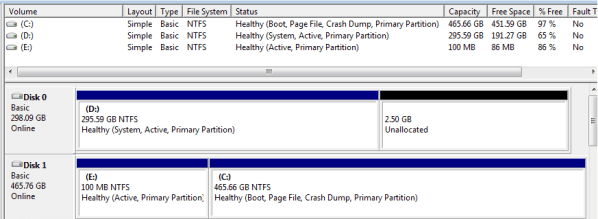
In the attachment you can see that the 'System Reserved' and 'Windows' partitions are active and primary. The 'Windows' one is Boot, so why can't I boot from it?
 

Attachments

  • disks.jpg
    disks.jpg
    47.3 KB · Views: 63

My Computer My Computer

At a glance

Windows 7 64-bitIntel i7 920 @ 4GHz6GbnVidia GTX 285
OS
Windows 7 64-bit
CPU
Intel i7 920 @ 4GHz
Motherboard
Asus P6T Deluxe V2
Memory
6Gb
Graphics Card(s)
nVidia GTX 285
Sound Card
X-Fi Extreme Audio PCIe
Screen Resolution
1900x1200
Guys, I'm confused by this.
In the attachment you can see that the 'System Reserved' and 'Windows' partitions are active and primary. The 'Windows' one is Boot, so why can't I boot from it?
imacken;

Thanks for the screen shot. However, you do not indicate how many hard drives you have plugged in here. Windows does NOT allow more than ONE ACTIVE PARTITION per hard drive. Your 100MB System Reserved partition was the boot partition and most likely still holds the boot code. Please post a more detailed screen shot of your drives?

Example:
phaze_01.png

Cheers!
 

My Computer My Computer

At a glance

...
OS
...
Thanks for that.
Hopefully the attached will be better!
 

Attachments

  • disks2.jpg
    disks2.jpg
    116.2 KB · Views: 50

My Computer My Computer

At a glance

Windows 7 64-bitIntel i7 920 @ 4GHz6GbnVidia GTX 285
OS
Windows 7 64-bit
CPU
Intel i7 920 @ 4GHz
Motherboard
Asus P6T Deluxe V2
Memory
6Gb
Graphics Card(s)
nVidia GTX 285
Sound Card
X-Fi Extreme Audio PCIe
Screen Resolution
1900x1200
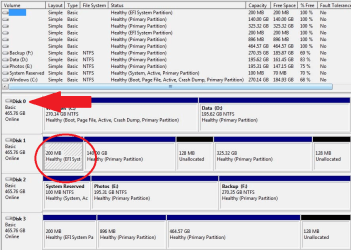
Yes, that makes a big difference. Please notice the red circled area here:

disks2.png

The 'hash' marks indicate to me that this is the "Active" partition your computer is booting to. Part of the problem is that you seem to have four identical hard drives, so how do you tell the difference when setting the desired hard drive as first in boot order? Evidently, Drive 1 is first whereas if you want to boot from the "Active" Windows partition, you will want Drive 0 to be first in boot order.

Then, if I may suggest, I would delete all the other 100MB and 200MB "EFI" and "System Reserved" partitions from your system and make sure the ONLY active partition left is the Windows partition.

Cheers!
Robert
 

My Computer My Computer

At a glance

...
OS
...
Thanks a lot Robert. If you look at my first post, you'll see that I have a triple boot system using Chameleon to boot Windows 7, Snow Leopard and Leopard on different drives.
The Chameleon partition is Disk 3 Part 2 and it is that drive 3 that I am using as the boot drive at the moment.
Of course, I can boot from the Windows drive by changing the boot drive in BIOS, but I want the triple boot to work on 'Windows' not 'System Reserved'.
The 200Mb partitions are OS X system things that are created but not actually used as far as I can see.
The problem is that using Chameleon I have to boot from the System Reserved partition as if I select Windows, I just get the 'BOOTMGR is missing' error.
 

My Computer My Computer

At a glance

Windows 7 64-bitIntel i7 920 @ 4GHz6GbnVidia GTX 285
OS
Windows 7 64-bit
CPU
Intel i7 920 @ 4GHz
Motherboard
Asus P6T Deluxe V2
Memory
6Gb
Graphics Card(s)
nVidia GTX 285
Sound Card
X-Fi Extreme Audio PCIe
Screen Resolution
1900x1200
Thanks a lot Robert. If you look at my first post, you'll see that I have a triple boot system using Chameleon to boot Windows 7, Snow Leopard and Leopard on different drives.
The Chameleon partition is Disk 3 Part 2 and it is that drive 3 that I am using as the boot drive at the moment.
Of course, I can boot from the Windows drive by changing the boot drive in BIOS, but I want the triple boot to work on 'Windows' not 'System Reserved'.
The 200Mb partitions are OS X system things that are created but not actually used as far as I can see.
The problem is that using Chameleon I have to boot from the System Reserved partition as if I select Windows, I just get the 'BOOTMGR is missing' error.
Sorry mate, my bad. Been awhile since I read your first post. Now that I can put your first post with the screen shot of your drives and your explanation, things are clearer.

I would suggest the way to get things the way you want them, would be to unplug the other three hard drives and configure your Windows partition to boot from the Windows partition. You may have done this already, but if not, you can run the "Startup Repair" from the 7 DVD until Windows boots correctly. Then plug you other hard drives back in and delete (or at least remove the "Active" flag from) the circled partition. As I know nothing about Chameleon, I can only guess then that you will need to repair the boot loader in order to reflect the change from the current "Active" partition to the "Active Windows" partition in order to boot to Windows 7 using the Chameleon boot menu.

Cheers!
 

My Computer My Computer

At a glance

...
OS
...
Back
Top