Windows 7 Forums Search
Welcome to Windows 7 Forums. Our forum is dedicated to helping you find solutions with any problems, errors or issues you are experiencing with Windows 7. The Windows 7 forum also covers news and updates and has an extensive Windows 7 tutorial section that covers a wide range of tips and tricks.


Windows 7 - Can't change date and time

03-17-2010   #11


Windows Se7en


ok, i'll try changing it in safe mode.

Attached Thumbnails
Can't change date and time-untitled.jpg  
My System SpecsSystem Spec
10-27-2010   #12


Windows Vista 64 bit


Won't Let Me Access Date and Time Adjustment

Hi,
I have a Windows Vista 64 bit. It's recently been restored to factory settings due to problems but now it's running fine... Until recently my time would always be off. I would adjust it and then the next day or two it wud either be 3 hours ahead or behind... Now when i try to access the date and time change, i get an error saying

C:/Windows/system32/rundll32.exe
"Windows cannot access the specified device, path or file. You may not have the appropriate permissions to access the item."
I haven't gotten it before and i tried going to the location and running it from there and nothign works.. Please help on how i can bypass this or get rid of this error. I tried running scans and virus checks and it says everything is fine and clear so there are no infections and im using AVG 2011 Free Internet Anti Virus
My System SpecsSystem Spec
10-27-2010   #13


Windows 7 Home Premium SP1, clean install, upgrade disc


This is a sign of corruption
This will not only tell you what the corruption is, but will fix it.
Run several times if corruption is found.

Report back either way.
There are other steps that we may be able to take
SFC /SCANNOW Command - System File Checker

Also download and run a full scan with malwarebytes. Update before the scan.

The bad time is usually due to the cmos battery. Which we will check as soon as we solve your problem
My System SpecsSystem Spec
.


10-27-2010   #14


Windows Vista 64 bit


Command Prompt

ok i did what u said and it ran the command prompt and it showed the exact same window that u posted it should show as in the picture.. problem is that i still can;t access or change my time.. it won;t let me it's showing me the same problem
My System SpecsSystem Spec
10-27-2010   #15


Windows 7 Home Premium SP1, clean install, upgrade disc


Try in safe mode. If it works we know that some program is stopping you from changing the time.
My System SpecsSystem Spec
04-18-2011   #16


Windows 7 Ultimate x64


I had this exact same problem. Anytime I tried to change the time it would say that I did not have permission. I was the only admin and user on that computer. Safe mode booting did not help. Ended up being a setting in the bios. Cheers!
My System SpecsSystem Spec
12-28-2011   #17


Windows 7 64 bit


As a workaround, you may want to consider changing the date on the command line.

1. Left click the Start button
2. Enter cmd in the Search box
3. Click on cmd in the Programs pop-up to open the command line
4. Enter "date" without the quotes
5. You will be prompted to enter the new date

I had the same issue and this worked for me.
My System SpecsSystem Spec
4 Weeks Ago   #18


Windows 7 Ultimate x64


I can't change the date and time from MS-DOS. I issued the command "date" and I tried to change the date but its showing a message- "A required privilege is not held by the client.". I am the computer administrator and yet I can't change the date!! I am able to change it by clicking on the date and time section in the lower right hand on my screen; but as I am a programmer, I frequently need to change the system time and date from my programs itself; but its not working in Windows7. Earlier I had WindowsXP and my programs were working fine on it.... But since the time I've upgraded to Windows7, I'm facing this problem.
Anyone having any knowledge about how to rectify this; please help me....
My System SpecsSystem Spec
3 Days Ago   #19


Windows 7 Ultimate x64


solution

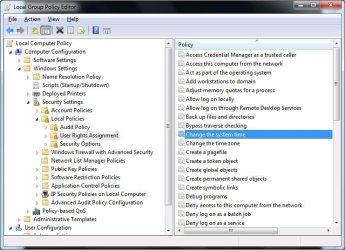
Go to "Control Panel\All Control Panel Items\Administrative Tools"
then open "Local Security Policy" , Local Policy\User Rights Assignment"
and make sure "change the system time" and "change the time zone" privileges are given to admin(or everyone).restart and it will be okay.
My System SpecsSystem Spec
20 Hours Ago   #20


32 win 7


I am having the same problem!!!!

Quote   Quote: Originally Posted by Barusang View Post
When i press the "Change date and time", an error occurs.

it says: " Unable to continue. You do not have permission to perform this task. Please contact your computer administrator for help."

im sure that i'm the admin of my pc. i can change the time settings before, but I can't now. The time is 1 hour advance.

Hope somebody can help. Thanks.

Hey! I see this post was addressed a few years back...but I am having this problem now... Is it due to a virus? My time has changed...it started out fine after a recient HD wipe...but once I went online.... I noticed that the time had changed and when I tried to change it... I was locked out... and got the message that I need the administrators permission to perform this task....I AM THE ADMINISTRATOR! Nobody uses this computer accept me!.. well..nobody that I know about... could be a hacker accessing my systems? Please help...
My System SpecsSystem Spec
Reply

 Can't change date and time problems?


Thread Tools


Similar Threads for: Can't change date and time
Thread Forum
Home Premium x64: Can't change new updates time and date Windows Updates & Activation
Random date/time change in Windows 7 Performance & Maintenance
Batch file , change filename with system date and time infor General Discussion
Change date and time stamp on file save... Performance & Maintenance
Date and Time - Change Tutorials


All times are GMT -5. The time now is 03:50 AM.


Windows 7 Forums is an independent web site and has not been authorized,
sponsored, or otherwise approved by Microsoft Corporation.
"Windows 7" and related materials are trademarks of Microsoft Corp.
© Designer Media Ltd
  

1 2 3 4 5 6 7 8 9 10 11 12 13 14 15 16 17 18 19 20 21 22 23 24 25 26 27 28 29 30