Windows 7 Forums


Windows 7: Cannot create new taskbar toolbar

20 Mar 2010   #1

Windows 7
 
 
Cannot create new taskbar toolbar

I've had Windows 7 for about 10 Days.One of the first things I did was create a quick launch section on the task bar. Had about 8 icons in this quick launch and everything worked fine for about 5 days.Then the quick launch area on the tool bar just vanished. The rest of the tool bar is still there and works just fine.I thought I would just create a new toolbar and start over, however when I click on the "tooolbars>new toolbar" up pops the Explorer " libraries>documents" page. This page also pops up if I try to pin anything to the task bar.EG I click and drag an icon to the task bar,click "pin to taskbar" and instead of the icon showing up a copy of "libraries" folder appears instead.
Would appreciate any suggestions.
Thanks hope someone can help

My System SpecsSystem Spec

21 Mar 2010   #2

Windows 7 Ultimate


When Windows Explorer pops up, it expects you do choose a folder to use for the new toolbar. I created a folder called "Shortcuts" in my User folder and added that as my new toolbar - then I just drop shortcuts into the Shortcuts folder and they show up at the toolbar.
My System SpecsSystem Spec
21 Mar 2010   #3
whs

Vista, Windows7, Mint Mate, Zorin, Windows 8
Florida in winter, Black Forest/Germany


My System SpecsSystem Spec
.


21 Mar 2010   #4

Windows 7


Thanks for the input.
It would seem that Microsoft in its infinite wisdom has decided the we can only have .exe files displayed on the task bar as icons. Any other link shortcuts must go in that inconvenient Explorer folder on the task bar.As for not being able to create a new task bar without it being linked to "Libraries" who thought that one up.Might be convenient for Microsoft but it sure aint for us users.As usual we have to go away from Microsoft products and look to outside software to give us what we want.I went for "RocketDock".
My System SpecsSystem Spec
21 Mar 2010   #5
whs

Vista, Windows7, Mint Mate, Zorin, Windows 8
Florida in winter, Black Forest/Germany


Quote   Quote: Originally Posted by gerryr1gerry View Post
Thanks for the input.
It would seem that Microsoft in its infinite wisdom has decided the we can only have .exe files displayed on the task bar as icons. Any other link shortcuts must go in that inconvenient Explorer folder on the task bar.As for not being able to create a new task bar without it being linked to "Libraries" who thought that one up.Might be convenient for Microsoft but it sure aint for us users.As usual we have to go away from Microsoft products and look to outside software to give us what we want.I went for "RocketDock".

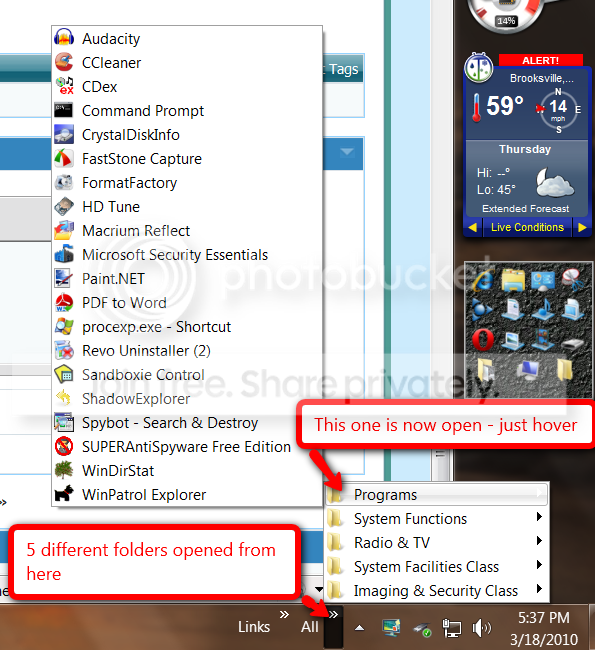
I use both, Rocket Dock and Taskbar where I parked a lot of programs and folders. In Rocket Dock there would not be enough space for all of this.

My System SpecsSystem Spec
Reply

 Cannot create new taskbar toolbar problems?


Thread Tools


Similar help and support threads for: Cannot create new taskbar toolbar
Thread Forum
How to create a windows xp toolbar and start menu Customization
How to Create a button on Toolbar in Windows 7? Customization
Taskbar Toolbar Help Customization
help regarding toolbar in taskbar.. General Discussion
Help needed with toolbar/taskbar General Discussion


All times are GMT -5. The time now is 04:39 AM.


Seven Forums Android App Seven Forums IOS App Follow us on Facebook

Windows 7 Forums is an independent web site and has not been authorized,
sponsored, or otherwise approved by Microsoft Corporation.
"Windows 7" and related materials are trademarks of Microsoft Corp.
© Designer Media Ltd
  

1 2 3 4 5 6 7 8 9 10 11 12 13 14 15 16 17 18 19 20 21 22 23 24 25 26 27 28 29 30 31 32