| Windows 7: Can't copy files from external hard drive |
24 Mar 2010
|
#11 | | |
I'm pretty sure it is a permission issue too, I just don't know how to fix it. I tried setting myself as the owner of all the directories the link referenced by Bill2. Looks like it may have improved the situation somewhat, but not totally fixed it.
It looks like maybe the destination appears to have a greater number of files after the copy because the source isn't showing me the correct number of files and size when I go to the folder Properties. Maybe it's not showing me data for folders and files it thinks I shouldn't have access to? Who knows.
I eventually got most of the files over by painstakingly going through each one and dealing with the problems as they came up. Not real impressed with this whole exercise. Until now I had been pretty impressed with Windows 7. Now I am depressed with it. | My System Specs |
| |
24 Mar 2010
|
#12 | | |

Quote: Originally Posted by dland2000 I'm pretty sure it is a permission issue too, I just don't know how to fix it. I tried setting myself as the owner of all the directories the link referenced by Bill2. Looks like it may have improved the situation somewhat, but not totally fixed it.
It looks like maybe the destination appears to have a greater number of files after the copy because the source isn't showing me the correct number of files and size when I go to the folder Properties. Maybe it's not showing me data for folders and files it thinks I shouldn't have access to? Who knows.
I eventually got most of the files over by painstakingly going through each one and dealing with the problems as they came up. Not real impressed with this whole exercise. Until now I had been pretty impressed with Windows 7. Now I am depressed with it. Did you read the article link posted from MajorGeeks.com yet? Did you try taking ownership of the entire folder and child permissions? | My System Specs | | System Manufacturer/Model Number HP Pavilion dv7 OS Windows 7 CPU Core i7 Memory 8 GB Graphics Card ATI FireGL Monitor(s) Displays Secondary is an HP L1940T Screen Resolution 1680x1050 Keyboard G11 Logitech Mouse G7 Logitech Hard Drives 160 GB SSD and 500 GB SATA Internet Speed Fiber Other Info My rig smegging rules! |
24 Mar 2010
|
#13 | | |

Quote: Originally Posted by motc7 Did you read the article link posted from MajorGeeks.com yet? Did you try taking ownership of the entire folder and child permissions? Yes, I added myself as the owner of the root folder and everything under it. It helped with some items but not all of them. | My System Specs | | |
24 Mar 2010
|
#14 | | |
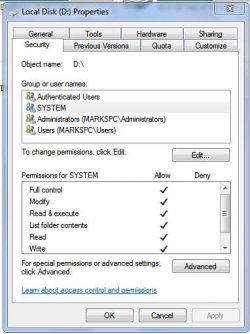
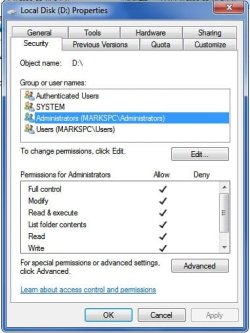
I had to set permissions on a drive where the files were copied over from an operating system that was pass worded.
Open mycomputer and right-click on drive. select properties and system tab.
You should set full access for system and yourself. | My System Specs | | System Manufacturer/Model Number Built by Mark OS Windows 7 x64 CPU Intel Core i7 930 Motherboard Gigabyte GA-X58A-UD3R Bios F5 Memory OCZ 6GBkit OCZ3G1600LV6GK 8-8-8-24-2T 1.65V Graphics Card (2) HIS ATI Radeon HD 5770 CROSSFIRE (H577QT1GD) Sound Card On board Realtek HD Monitor(s) Displays Samsung SyncMaster 2343 22" Wide Screen Screen Resolution 2048x1152 Keyboard Logitech Mouse Logitech MX310 PSU Corsiar 750 watts TX750W Case Antec NINE Hundred Two (air filters & adjustable fan speed) Cooling Cooler Master Hyper 212 Plus CPU cooler Hard Drives Two Western Digital 320 Gig Blue series WDC WD3200AAKS-00L9A0 Internet Speed 20 meg down/ 5 meg up Other Info Hewlett Packard Deskjet 932C printer
Epson 4990 Photo scanner |
03 Apr 2010
|
#15 | | |
i think this may help I too just switched (not by choice) from XP to Windows 7 and had a lot of stuff stored on external hard drive. At first I couldn't figure out how to transfer from external to internal hard drive but then I figured it out. Open two copies of Windows Explorer, minimize them to half size and put them side to side. In one window, open your C drive and create a destination folder. This is where you're going to store the files from your external hard drive. In the other window, open your external hard drive. With the two windows open, you can just drag the files from the external to the C drive and it will copy them over. Once the files are copied, you can delete them from you external drive. I hope this helps.
As far as the permissions stuff, I don't know anything about that. | My System Specs | | |
16 Feb 2011
|
#16 | | |
Solution 
Quote: Originally Posted by dland2000 So I recently moved from XP to 7. Before I did this I created a backup of some files on my XP box and copied it to an external hard drive. Now that I'm on Windows 7 I've learned that there is really no way to directly restore the backup. So I have restored it onto a Vista box and copied the rehydrated files back onto the external hard drive. Now I just want to copy the files from the external hard drive to the main hard drive on my Windows 7 box. However, when I do this I get the following warning for some (but not most) folders:
"You'll need to provide administrator permission to copy this folder"
My options are Continue, Skip, and Cancel. First off, I am an administrator on this box so I don't understand why it's asking my this. Secondly, if I choose Continue, it tells me that the folder I'm copying over already exists in the destination! What? The system is in the middle of copying it! Why is it asking me this? So I just tell it to proceed, but then it tells me the same thing about a few particular files and asks me if I want to overwrite them or ignore them. I usually say overwrite because they shouldn't be there yet. Anyway, by the time the whole thing is done, the destination folder is actually BIGGER and has more files than the same freaking folder on the drive I was copying from? How is that possible?
What is going on here? Why does a simple copy operation not work anymore?
REply: I found this in a website after much web maneuvering. hope its helpful 2 sum1. | My System Specs | | System Manufacturer/Model Number Hp OS Windows Vista Ultimate CPU 2.00Ghz Memory 2.00G Graphics Card Nvideo GeForce 9600 Sound Card IDT |
14 Mar 2013
|
#17 | | XP Pro SP3, soon to be 7 pro x64 |

Quote: Originally Posted by dland2000 So I recently moved from XP to 7. Before I did this I created a backup of some files on my XP box and copied it to an external hard drive. Now that I'm on Windows 7 I've learned that there is really no way to directly restore the backup. So I have restored it onto a Vista box and copied the rehydrated files back onto the external hard drive. Now I just want to copy the files from the external hard drive to the main hard drive on my Windows 7 box. However, when I do this I get the following warning for some (but not most) folders:
"You'll need to provide administrator permission to copy this folder"
My options are Continue, Skip, and Cancel. First off, I am an administrator on this box so I don't understand why it's asking my this. Secondly, if I choose Continue, it tells me that the folder I'm copying over already exists in the destination! What? The system is in the middle of copying it! Why is it asking me this? So I just tell it to proceed, but then it tells me the same thing about a few particular files and asks me if I want to overwrite them or ignore them. I usually say overwrite because they shouldn't be there yet. Anyway, by the time the whole thing is done, the destination folder is actually BIGGER and has more files than the same freaking folder on the drive I was copying from? How is that possible?
What is going on here? Why does a simple copy operation not work anymore?
the admin accounts are different SIDs. so you would have to take ownership of the files and folders.
best case would be to copy without perms/security info attached, meaning, you did not take ownership of the directory in the first place. Take Ownership of a File or Folder Troubleshoot "access denied" when opening files or folders | My System Specs | | System Manufacturer/Model Number Dell 4600, soon to be asrock x58 extreme6 OS XP Pro SP3, soon to be 7 pro x64 CPU Pentium 4 HT, soon to be i7-980x Motherboard Dell Memory 3GB Graphics Card PNY Geforce 6200 Sound Card onboard Monitor(s) Displays Dell 19" CRT Keyboard hp keyboard Mouse ge ball mouse, soon to be optical mouse PSU Antec TruPower New 550W Case Dell, soon to be Antec nine hundred two Cooling cpu fan, PSU fan, back fan, toon to be 5 fans Hard Drives 1TB, 2TB,
*C:1.30TB/2.00TB (64.91%)
E:325.75GB/995.71GB (32.71%)
TOTDATA1.62TB/3.00TB (54.21%)
backups and virus scans are a bear. Internet Speed 22Mbps/5Mbps Other Info processor is a single core, dual thread. so it looks like dual proc to the OS. Can't copy files from external hard drive problems? All times are GMT -5. The time now is 12:21 PM. | |