Windows 7 Forums Search
Welcome to Windows 7 Forums. Our forum is dedicated to helping you find solutions with any problems, errors or issues you are experiencing with Windows 7. The Windows 7 forum also covers news and updates and has an extensive Windows 7 tutorial section that covers a wide range of tips and tricks.


Windows 7 - search bar on start menu

 
03-24-2010   #1


win 7 ultimate 64x


search bar on start menu

ive recently notice that when i do a search on the search bar it wont direct me to what im searching for.
for example when i do a search for device manager it will show me that no matches were found same goes for system or note pad or calculator.
it used to work now it doesnt can any one help?

changes made
recently reinstalled win 7 and all my required drivers but this does not work

My System SpecsSystem Spec
03-24-2010   #2


Windows 7 Professional 64-bit


Hi Joe,

You can try going back to your start menu default settings:

Right click on the task bar > select properties > click on the start menu tab and then click on customize. At the bottom there should be a button that says default settings, click that and it'll set the start menu back to default.

Let us know what happens!

Cheers,
Cassandra
Microsoft Windows Outreach
My System SpecsSystem Spec
03-24-2010   #3


Windows 7 Ultimate (32-bit)


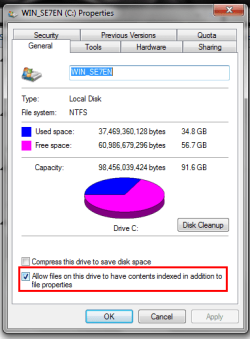
Is drive indexing turned off?
Attached Thumbnails
search bar on start menu-untitled.png  
My System SpecsSystem Spec
.


03-24-2010   #4


win 7 ultimate 64x


Quote   Quote: Originally Posted by CassieFWinTeam View Post
Hi Joe,

You can try going back to your start menu default settings:

Right click on the task bar > select properties > click on the start menu tab and then click on customize. At the bottom there should be a button that says default settings, click that and it'll set the start menu back to default.

Let us know what happens!

Cheers,
Cassandra
Microsoft Windows Outreach
cassie thank u for ur input that fixed it i remember i shut that off now totally forgot thanks all for ur input
My System SpecsSystem Spec
03-24-2010   #5


Windows 7 Ultimate (32-bit)


Quote   Quote: Originally Posted by joezrt1 View Post
Quote   Quote: Originally Posted by CassieFWinTeam View Post
Hi Joe,

You can try going back to your start menu default settings:

Right click on the task bar > select properties > click on the start menu tab and then click on customize. At the bottom there should be a button that says default settings, click that and it'll set the start menu back to default.

Let us know what happens!

Cheers,
Cassandra
Microsoft Windows Outreach
cassie thank u for ur input that fixed it i remember i shut that off now totally forgot thanks all for ur input
Okay. Which solution worked for you?
My System SpecsSystem Spec
03-24-2010   #6


win 7 ultimate 64x


resetting the start menu back to default i had made my adjustment like i had before but made more changes than i had thought so its fix now thank u
My System SpecsSystem Spec
Reply

 search bar on start menu problems?


Thread Tools


Similar Threads for: search bar on start menu
Thread Forum
How to remove search for computers and search for people start menu Performance & Maintenance
Start Menu - Add Libraries to Search in Start Menu Tutorials
Start Menu Search Gone - W7 General Discussion
Start Menu - Add Search Connectors to Start Menu Search Tutorials
Google Desktop Search Results from Start menu search Software


All times are GMT -5. The time now is 03:56 AM.


Windows 7 Forums is an independent web site and has not been authorized,
sponsored, or otherwise approved by Microsoft Corporation.
"Windows 7" and related materials are trademarks of Microsoft Corp.
© Designer Media Ltd
  

1 2 3 4 5 6 7 8 9 10 11 12 13 14 15 16 17 18 19 20 21 22 23 24 25 26 27 28 29 30