JavaScript is disabled. For a better experience, please enable JavaScript in your browser before proceeding.
You are using an out of date browser. It may not display this or other websites correctly.
You should upgrade or use an
alternative browser .
CHKDSK memory bug revisited
Gomen ne Jenna-chan
Guru
VIP
Hi guys. OK, so, after discovering that EVENT VIEWER had errors regarding my 500GB drive having bad clusters, I decided to make a "CHKDSK E: /F /R" (where E: is my 500GB drive).
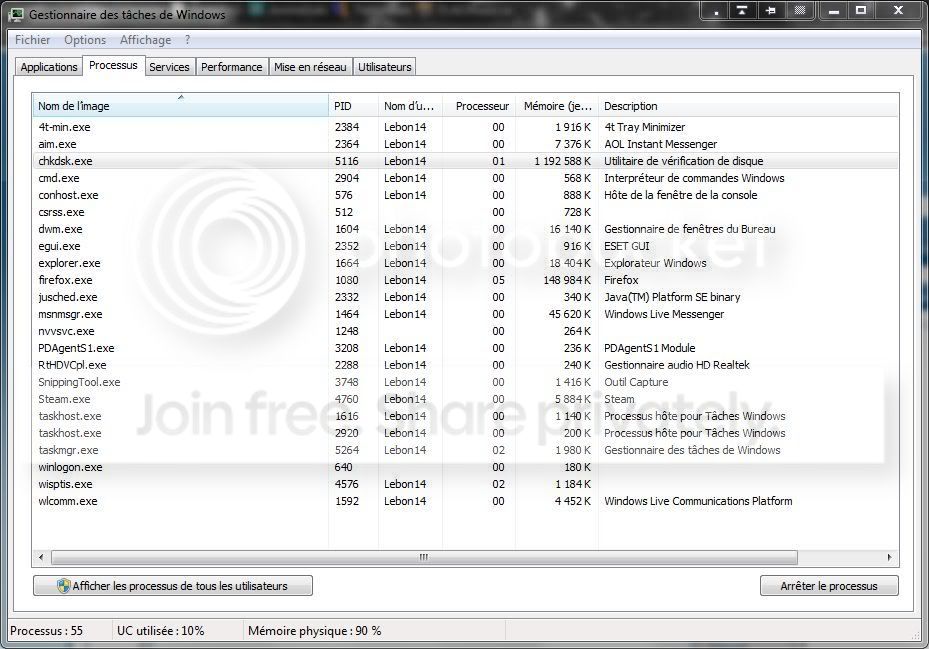
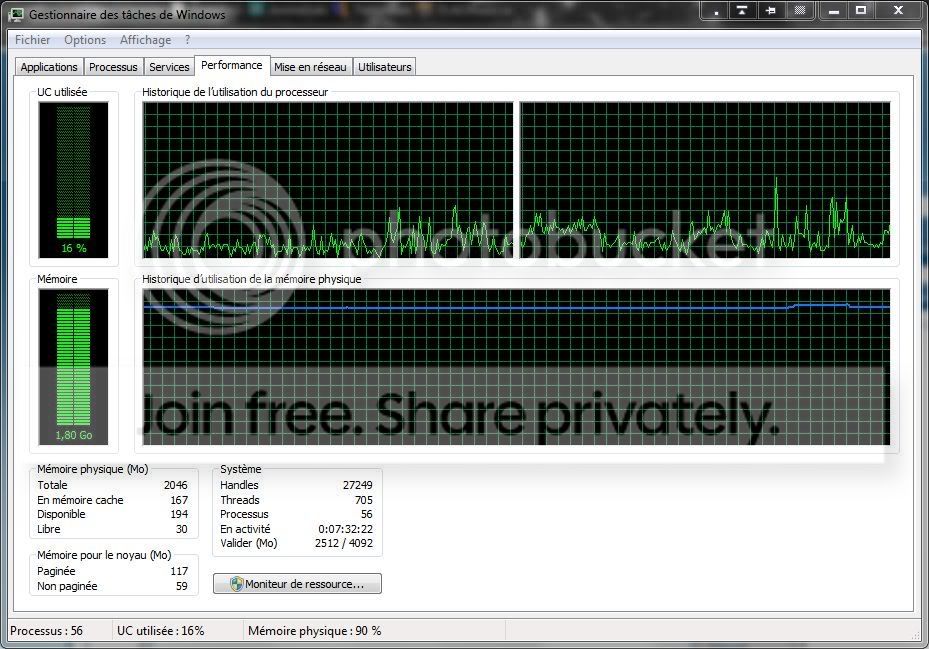
So, when doing small tasks with it running, I found that my computer went terribly slow... Memory is at 90% of usage (1.8GB on 2GB). CHKDSK in the processes says it's using 1 192 588 K of RAM
Two screenshots...
Discuss...
Windows 10 Professional 64-bit Ryzen 9 5900X G.Skill 3600Mhz CL16 16GB × 4 EVGA GeForce RTX 3070 Ti FTW3 Ultra Gaming PC/Desktop Custom build Windows 10 Professional 64-bit Ryzen 9 5900X Gigabyte X570 Aorus Master G.Skill 3600Mhz CL16 16GB × 4 EVGA GeForce RTX 3070 Ti FTW3 Ultra Gaming On-board Dell Alienware AW3418DW 3440x1440 1×Sabrent Rocket 4 Plus 2TB nvme SSD (System, internal) Seasonic Focus Plus 850W Platinum Corsair 680X Stock fans + 3× Corsair QL120, Corsair H100i Platinum Logitech K350 Logitech M510 120Mbits dl - 20Mbits up ESET NOD32 Antivirus Firefox (latest version) Headphones : Audio-Technica ATH-M50x
If you have bad sectors, clusters and so on usually menas that the HDD is on the way out.
Windows 7 Ultimate x64 Service Pack 1 (Build ... Intel Core 2 Quad Q6600 (G0 Kentsfield) LGA77... Corsair TW3X4G1333C9A 4GB PC-10600 (2x XMS3 2GB) ASUS nVIDIA GeForce 560 Windows 7 Ultimate x64 Service Pack 1 (Build 6.1.7601) Intel Core 2 Quad Q6600 (G0 Kentsfield) LGA775 (FC-LGA6) GIGABYTE GA-EP35C-DS3R (Rev. 2.1) Corsair TW3X4G1333C9A 4GB PC-10600 (2x XMS3 2GB) ASUS nVIDIA GeForce 560 RealTek ALC885/889A/890 ChiMei CMV CT-730D 17inch (LCD Monitor) 1280-1024 60Hertz (Ture Colour 32bit) 2x Barracuda 7200.10 SATA 3.0Gb/s 160-GB Hard Drive ST3160815AS (AHCI) ANTEC 750w Earthwatts Thermaltake Shark (VA7000SWA ATX) Full Tower Front 120mm fan (1400 RPM) /Rear 120mm (1400 RPM) blue LED Labtec Media Desktop Y-SAD65 Razer DeathAdder 3G Infrared Sensor (1800DPI) Telstra BigPond Elite Liberty ADSL2+ 24Mbps/256kbps ASUS PCE-N13 802.11n Wireless LAN card
Gomen ne Jenna-chan
Guru
VIP
Thread Starter
If you have bad sectors, clusters and so on usually menas that the HDD is on the way out.
I don't agree with what you said here...
Windows 10 Professional 64-bit Ryzen 9 5900X G.Skill 3600Mhz CL16 16GB × 4 EVGA GeForce RTX 3070 Ti FTW3 Ultra Gaming PC/Desktop Custom build Windows 10 Professional 64-bit Ryzen 9 5900X Gigabyte X570 Aorus Master G.Skill 3600Mhz CL16 16GB × 4 EVGA GeForce RTX 3070 Ti FTW3 Ultra Gaming On-board Dell Alienware AW3418DW 3440x1440 1×Sabrent Rocket 4 Plus 2TB nvme SSD (System, internal) Seasonic Focus Plus 850W Platinum Corsair 680X Stock fans + 3× Corsair QL120, Corsair H100i Platinum Logitech K350 Logitech M510 120Mbits dl - 20Mbits up ESET NOD32 Antivirus Firefox (latest version) Headphones : Audio-Technica ATH-M50x
----------------------
VIP
SF Team
They still haven't fixed that out of control climbing memory when running it, no. That's my discussion on it.
Windows 7 Ultimate x64 SP1 Core i7 920 (D0) @ 4Ghz, *26c idle *65c full ... 12GB DDR3 Corsair Dominator -CMD12GX3M6A1600C... Zotac Geforce GTX 770 PC/Desktop Airbot 2.0 Windows 7 Ultimate x64 SP1 Core i7 920 (D0) @ 4Ghz, *26c idle *65c full load on air Asus P6X58D Premium - Sata 6Gb/s - USB 3.0 12GB DDR3 Corsair Dominator -CMD12GX3M6A1600C8 at 1600MHz Zotac Geforce GTX 770 ASUS Xonar D2X 1 LG 24" Flatron W2453V-PF 1 Samsung 24" P2450H both 2ms RT 1920x1080@60hz 1 Samsung 250GB 840 Evo SSD Corsair HX1000W Cooler Master HAF 932 Case Fans *3 230mm, *1 140mm/CPU - *Tuniq Tower 120 Extreme Logitech Wireless MK700 Logitech Wireless MK700 DL 15 Mbps UL 0.98 Mbps None Firefox Nightly Processor-7.7 *RAM- 7.9 *Graphics-7.9 *Gaming Graphics- 7.9 *SSD- 7.8 W.E.I final score= 7.7
Gomen ne Jenna-chan
Guru
VIP
Thread Starter
Yeah, they haven't unfortunately
Windows 10 Professional 64-bit Ryzen 9 5900X G.Skill 3600Mhz CL16 16GB × 4 EVGA GeForce RTX 3070 Ti FTW3 Ultra Gaming PC/Desktop Custom build Windows 10 Professional 64-bit Ryzen 9 5900X Gigabyte X570 Aorus Master G.Skill 3600Mhz CL16 16GB × 4 EVGA GeForce RTX 3070 Ti FTW3 Ultra Gaming On-board Dell Alienware AW3418DW 3440x1440 1×Sabrent Rocket 4 Plus 2TB nvme SSD (System, internal) Seasonic Focus Plus 850W Platinum Corsair 680X Stock fans + 3× Corsair QL120, Corsair H100i Platinum Logitech K350 Logitech M510 120Mbits dl - 20Mbits up ESET NOD32 Antivirus Firefox (latest version) Headphones : Audio-Technica ATH-M50x
New member
Guru
Gold Member
VIP
They didn't "fix" it because its not a bug.
Windows 10 Pro (x64) Intel Core i7-3930K (3.2GHz - 4.5GHz) 4x Samsung 4GB PC3-12800 DDR3 (16GB 1600MHz) Nvidia Geforce GTX 690 PC/Desktop Alienware Aurora ALX R4 Windows 10 Pro (x64) Intel Core i7-3930K (3.2GHz - 4.5GHz) Alienware Aurora-R4 x79 4x Samsung 4GB PC3-12800 DDR3 (16GB 1600MHz) Nvidia Geforce GTX 690 SteelSeries Siberia Elite Dell UltraSharp U3011 2560x1600 Samsung 850 Pro 256 GB, Seagate 1TB Desktop Hybrid HDD, 2x Western Digital 4TB Green HDD 875W Some Dell PSU <.< Alienware Aurora ALX Custom Liquid Cooling (EK CPU & GPU blocks) dual EK 480RAD Logitech G710+ Mechanical Logitech G700s Verizon Fios (50 mbps average) Server: Intel NUC D54250WYK: i5-4250U, 16GB, 256 GB mSATA, Windows Server 2012 R2
Hello,
Windows 7 Professional x64
Windows 7 Professional x64