
You are using an out of date browser. It may not display this or other websites correctly.
You should upgrade or use an alternative browser.
You should upgrade or use an alternative browser.
How to remove win 7
- Thread starter fishslice
- Start date

Well, you just install it on it on the new machine and then put in your Product Key and activate, if you have issues, you can call the number provided by the activation window and call up Microsoft.
http://www.sevenforums.com/tutorials/18715-activate-windows-7-phone.html
http://www.sevenforums.com/tutorials/18715-activate-windows-7-phone.html
Last edited by a moderator:
My Computer
At a glance
Windows 7 Ultimate 64bitIntel i7 3770K16GB DDR3 1333 Corsair XMS3XFX HD6950 2GB EyeFinity
- Computer Manufacturer/Model Number
- HAL-9000
- OS
- Windows 7 Ultimate 64bit
- CPU
- Intel i7 3770K
- Motherboard
- Asus Sabertooth Z77
- Memory
- 16GB DDR3 1333 Corsair XMS3
- Graphics Card(s)
- XFX HD6950 2GB EyeFinity
- Sound Card
- Logitech G35 & Sennheiser PC135 & VIA HD
- Monitor(s) Displays
- 23" HP 2310e, 23" Samsung B2230, 21.5" Viewsonic
- Screen Resolution
- 5760x1080
- Hard Drives
- 16TB of Storage
128GB & 256GB Crucial M4 SSD's, 2X 1TB WD Black, 3x 2TB WD, 3x 2TB Samsung F4, 1.5TB Seagate, WD 500GB,
- PSU
- Antec True Power New 650watt
- Case
- Cooler Master HAF-932
- Cooling
- Corsair H60 Hydro Cooler, 3x 230mm Fans, 2x120mm Fan
- Keyboard
- Logitech G15 and G13
- Mouse
- Logitech G700 Gaming Mouse
- Internet Speed
- 50/10 Mbit
- Other Info
- Speakers : Alesis M1 Active Mk2 Studio Monitors , APC RS 1200 UPS, HP 4500DN Color Laser, HP P1006 mono Laser, Kodak 8500 Dye-Sub, Epson 1280 inkjet, Epson Worforce 610 MFC

Zepher is spot on. I have done this.. You may have to talk to a live person. I did and all is fine. I even passed WAT's scrutiny.
My Computer
At a glance
Windows 7 Ultimate 32 bitIntel(R) Pentium(R) 4 CPU 3.00GHz2.50 GB RAMNVIDIA GeForce 7600 GS
- Computer Manufacturer/Model Number
- Home built
- OS
- Windows 7 Ultimate 32 bit
- CPU
- Intel(R) Pentium(R) 4 CPU 3.00GHz
- Motherboard
- ASUS P4P800-VM Motherboard Chipset: Intel 865G + ICH5
- Memory
- 2.50 GB RAM
- Graphics Card(s)
- NVIDIA GeForce 7600 GS
- Sound Card
- SoundMax Integrated Digital Audio (Chip)
- Monitor(s) Displays
- ViewSonic VX 1962 wm
- Screen Resolution
- 1680 X 1050
- Hard Drives
- Seagate Barracuda 7200.10 80 GB
ST380215A ATA Device 18.6 GB
Western Digital "My Book" external hard drive 750 GB
- Cooling
- Fan based
- Keyboard
- Microsoft Comfort Curve Keyboard 2000 v10 USB
- Mouse
- Logitec optic USB
- Internet Speed
- 3.01 Mb/s download 0.64 Mb/s upload

This is all assuming you have a retail license, and not OEM. If you installed an OEM license on one system, technically, you aren't supposed to move it to another computer. Take that as you will.
My Computer
At a glance
Windows 7 Ultimate x64 SP1Intel Core i7-260012 GB Patriot Extreme DDR3-1333Nvidia GTX 470
- OS
- Windows 7 Ultimate x64 SP1
- CPU
- Intel Core i7-2600
- Motherboard
- Gigabyte GA-P67A-UD3P-B3
- Memory
- 12 GB Patriot Extreme DDR3-1333
- Graphics Card(s)
- Nvidia GTX 470
- Monitor(s) Displays
- Dell UltraSharp 2209WA
- Hard Drives
- OCZ Agility3 240 GB, WD5001AALS, WD7501AALS
- PSU
- OCZ ModStream 700W
- Case
- CoolerMaster HAF 912 Advanced
- Cooling
- CoolerMaster Hyper 212 Plus

Hello Fishslice, and welcome to Seven Forums.
Unless you installed a retail copy on your laptop, then it most likely is a OEM copy of Windows 7. OEM product key numbers are permanently tied to the computer that they are first activated on. You will not be able to use the product key number on another computer if it is not a retail copy of Windows 7.
Unless you installed a retail copy on your laptop, then it most likely is a OEM copy of Windows 7. OEM product key numbers are permanently tied to the computer that they are first activated on. You will not be able to use the product key number on another computer if it is not a retail copy of Windows 7.
My Computer
At a glance
64-bit Windows 11 Pro for WorkstationsIntel i7-8700K OC'd to 5 GHz64 GB (4x16GB) G.SKILL TridentZ RGB DDR4 3600...ASUS ROG-STRIX-GTX1080TI-O11G-GAMING
- Computer type
- PC/Desktop
- Computer Manufacturer/Model Number
- Self built custom
- OS
- 64-bit Windows 11 Pro for Workstations
- CPU
- Intel i7-8700K OC'd to 5 GHz
- Motherboard
- ASUS ROG Maximus XI Formula Z390
- Memory
- 64 GB (4x16GB) G.SKILL TridentZ RGB DDR4 3600 MHz
- Graphics Card(s)
- ASUS ROG-STRIX-GTX1080TI-O11G-GAMING
- Sound Card
- Integrated
- Monitor(s) Displays
- 2 x Samsung Odyssey G7 27"
- Screen Resolution
- 2560x1440
- Hard Drives
- 1TB Samsung 990 PRO M.2,
4TB Samsung 990 PRO PRO M.2,
TerraMaster F8 SSD Plus NAS
- PSU
- Seasonic Prime Titanium 850W
- Case
- Thermaltake Core P3
- Cooling
- Corsair Hydro H115i
- Keyboard
- Logitech wireless K800
- Mouse
- Logitech MX Master 4
- Internet Speed
- 2 Gb/s Download and 100 Mb/s Upload
- Antivirus
- Malwarebyte Anti-Malware Premium
- Browser
- Google Chrome
- Other Info
- Logitech Z625 speaker system,
Logitech BRIO 4K Pro webcam,
HP Color LaserJet Pro MFP M477fdn,
APC SMART-UPS RT 1000 XL - SURT1000XLI,
Galaxy S23 Plus phone

Hello Fishslice, welcome to the Seven Forums.
I have had no problems transferring a retail license and activation to a new computer or hardware setup when first uninstalling, 'un-activating' Windows product key. Notice that transferring an OEM license is against the EULA.
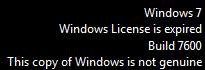
Open an elevated command prompt*, type slmgr /upk and hit enter. Close the command prompt. You'll should now see a warning on desktop and an License is expired watermark:
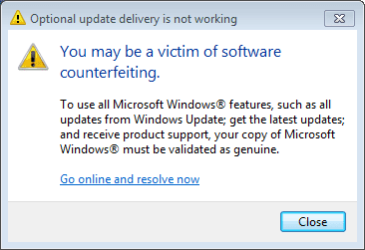
Reboot the computer. After reboot you can see your licence is deactivated:

Click Ask me later or Cancel, shut down the computer and you are free to use your retail key on a new computer.
Kari
* = right click Command Prompt icon or shortcut, choose Run as administrator.
I have had no problems transferring a retail license and activation to a new computer or hardware setup when first uninstalling, 'un-activating' Windows product key. Notice that transferring an OEM license is against the EULA.
Open an elevated command prompt*, type slmgr /upk and hit enter. Close the command prompt. You'll should now see a warning on desktop and an License is expired watermark:
Reboot the computer. After reboot you can see your licence is deactivated:
Click Ask me later or Cancel, shut down the computer and you are free to use your retail key on a new computer.
Warning
Do not try this if you are not sure you want to cancel the activation.
Kari
* = right click Command Prompt icon or shortcut, choose Run as administrator.
My Computer
At a glance
Windows 10 Pro x64 EN-GB1.6 GHz Intel Core i7-720QM Processor6 GBATI Mobility Radeon HD 5850 Graphics
- Computer type
- Laptop
- Computer Manufacturer/Model Number
- HP ENVY 17-1150eg
- OS
- Windows 10 Pro x64 EN-GB
- CPU
- 1.6 GHz Intel Core i7-720QM Processor
- Memory
- 6 GB
- Graphics Card(s)
- ATI Mobility Radeon HD 5850 Graphics
- Sound Card
- Beats sound system with integrated subwoofer
- Monitor(s) Displays
- 17" laptop display, 22" LED and 32" Full HD TV through HDMI
- Screen Resolution
- 1600*900 (1), 1920*1080 (2&3)
- Hard Drives
- Internal: 2 x 500 GB SATA Hard Disk Drive 7200 rpm
External: 2TB for backups, 3TB USB3 network drive for media
- Cooling
- As Envy runs a bit warm, I have it on a Cooler Master pad
- Keyboard
- Logitech diNovo Media Desktop Laser (bluetooth)
- Mouse
- Logitech Performance Mouse MX
- Internet Speed
- 50/10 Mbps VDSL
- Antivirus
- Windows Defender 4.3.9431.0
- Browser
- Maxthon 3.5.2., IE11

- Local time
- 6:40 PM
- Messages
- 3,194
what part of the laptop died? If you can salvage the Harddrive, you could put it in a different Laptop. I don't know what will happen though as others have said due to OEM issues.
Or you can get a 2.5" to 3.5" HD bracket and put the Laptop HD in a desktop tower.
Or you can get a 2.5" to 3.5" HD bracket and put the Laptop HD in a desktop tower.
My Computer
At a glance
Win7 Home Premium 64xIntel Core 2 Duo P7450 / 2.13 GHz (2.29 with ...4 GB PC-6400 Hyundai (2X2) at 800MhzNVIDIA GeForce GTX 260M 1GB DDR3 VRAM
- Computer type
- Laptop
- Computer Manufacturer/Model Number
- ASUS G60-RBBX05
- OS
- Win7 Home Premium 64x
- CPU
- Intel Core 2 Duo P7450 / 2.13 GHz (2.29 with Extreme Turbo)
- Memory
- 4 GB PC-6400 Hyundai (2X2) at 800Mhz
- Graphics Card(s)
- NVIDIA GeForce GTX 260M 1GB DDR3 VRAM
- Monitor(s) Displays
- 16" LED Backlit
- Screen Resolution
- 1366 x 768 on laptop 1600x1050 max res on 22" external mon
- Hard Drives
- OCZ Agility 3 60GB SSD / 320 GB - Serial ATA-150 - 7200 rpm
- PSU
- 6-cell Lithium ion { lasts 1.5 hours }
- Case
- ASUS G60 Laptop
- Keyboard
- Chicklet type back-lit (white light) keyboard
- Mouse
- Logitech G9 Laser Mouse 3200dpi and 1000 reports per minute
- Internet Speed
- Comcast 8.60mb/s up - 3.11mb/s down
- Antivirus
- MSE
- Browser
- Firefox
- Other Info
- General mid-budget gaming Comp. Low batterylife - High FrameRates - currently overheating problems :(
2nd Rig: Case: Rosewill BLACKHAWK Gaming ATX Mid Tower Computer Case
Mobo: GIGABYTE GA-990FXA-UD3
CPU: AMD FX-6200 Zambezi 3.8GHz (4.1GHz Turbo)
Heatsink: COOLER MASTER V8 CPU Cooler
RAM: Patriot Viper 3 8GB (2 x 4GB) 240-Pin DDR3 SDRAM 1866 (PC3 15000)
GPU: SAPPHIRE Radeon HD 6850 1GB 2

- Local time
- 5:40 PM
- Messages
- 233
I agree with Brink here. If your laptop came with Widows 7 already installed, you have an OEM version that is tied to that computer. Retail versions are licensed to be used on one computer only, meaning you can only have it one computer at a time. As Zepher said, if you are using a retail version and want to put it on a different computer, you will need to call Microsoft to activate, but you shouldn't have problems with the move.
Cheers,
Cassandra
Microsoft Windows Outreach
Cheers,
Cassandra
Microsoft Windows Outreach
My Computer
At a glance
Windows 7 Professional 64-bitPentium(R) Dual-Core CPU E5300 @260GHz
- Computer Manufacturer/Model Number
- HP/p6207c
- OS
- Windows 7 Professional 64-bit
- CPU
- Pentium(R) Dual-Core CPU E5300 @260GHz
- Sound Card
- RealTek High Def Audio
- Monitor(s) Displays
- HP 2159m
- Screen Resolution
- 1920 x 1080 x 60
- Mouse
- HP M/N: M-U0009-HP1
- Internet Speed
- Broadband

vatz
New member
- Local time
- 5:40 PM
- Messages
- 27
what would happen say if a hard drive died and you needed to reinstall on a new hard drive with a OEM copy. could you use the key on the new hard drive even tho there one use keys?
My Computer
At a glance
Windows 7 Ultimate 64bitintel core i5 2500k sandybridge8GB Corsair Vengeance DDR3MSI 560 GTX-ti OC
- Computer Manufacturer/Model Number
- Home Build
- OS
- Windows 7 Ultimate 64bit
- CPU
- intel core i5 2500k sandybridge
- Motherboard
- MSI p67a GD53 (B3)
- Memory
- 8GB Corsair Vengeance DDR3
- Graphics Card(s)
- MSI 560 GTX-ti OC
- Monitor(s) Displays
- Samsung Sync Master P2050
- Screen Resolution
- 1600-900
- Hard Drives
- 2 x 500GB Samsung HD502HJ
- PSU
- Coolmaster 900w UCP
- Keyboard
- Logitech G15 Gaming Keyboard
- Mouse
- Logitech G9 Gaming Mouse

- Local time
- 3:40 PM
- Messages
- 50,634
MS sometimes makes exceptions for Builder OEM reinstalls with hardware changes. They are using a hardware signature to determine this where any hardware or combination of hardware can be replaced and not invalidate the OEM license except the mobo, but there are reports that mobo changes are being allowed in some cases.
There are never exceptions made for factory-installed OEM Windows being reinstalled on the same machine, but again the hardware signature rules and the only deal-breaker is a mobo change. This is why maker's will replace the mobo with same exact model - to keep from invalidating the OEM licenses.
Other combinations of hardware changes on OEM will often not require more than a robocall to MS to refresh the hardware signature (that is what the number exchange is about). The only areas where you might expect problems are (almost always) mobo, LAN, or multiples of other hardwares changed.
There are never exceptions made for factory-installed OEM Windows being reinstalled on the same machine, but again the hardware signature rules and the only deal-breaker is a mobo change. This is why maker's will replace the mobo with same exact model - to keep from invalidating the OEM licenses.
Other combinations of hardware changes on OEM will often not require more than a robocall to MS to refresh the hardware signature (that is what the number exchange is about). The only areas where you might expect problems are (almost always) mobo, LAN, or multiples of other hardwares changed.
Similar threads
- Replies
- 2
- Views
- 4K


- Replies
- 5
- Views
- 2K

- Replies
- 1
- Views
- 3K
